



Whether you're a content creator, a startup, or an educator, chances are your audience doesn't only speak English and isn't waiting for subtitles. In today's attention economy, dubbing and translating video material has become a growth hack rather than a luxury.
And, thanks to AI-powered video translating tools[1] , you don't need a Hollywood studio or voice actors to accomplish this.
In this guide, we’ll walk you through 3 practical ways to translate and dub your videos, with a special focus on tools that don’t break the bank or your creative flow. Whether you want to use AI (like VMEG AI[2] ), DIY it with subtitles and voiceovers, or go the freelance route, we’ve got you covered.
Why Translating Your Videos Isn’t Optional Anymore
According to Statista[3] , video content is expected to account for over 82% of all internet traffic in 2025. That’s not surprising. But here’s what might be:
Localized video content gets up to 5X more engagement in non-English-speaking regions (Wyzowl Video Marketing Report 2024[4] )
Simply put, if your video isn’t in your audience’s native language, you’re leaving reach and revenue on the table.
And no, subtitles aren’t always enough.
A 2023 study by G2 found that dubbing improves viewer retention by 33% in mobile-first markets, such as India, Brazil, and Indonesia.
Traditional vs AI-Based Localization:
Feature
Studio Dubbing
AI-Powered Tools
Cost
$500–$5,000/min
$0–$10/min
Turnaround Time
Days to Weeks
Minutes to Hours
Languages Supported
Limited
100–170+
Lip Sync
Manual
Automated (in some tools)
Scalability
Low
High
AI isn’t here to replace creative nuance—it’s here to remove bottlenecks, especially for fast-moving teams and solo creators.
3 Practical Ways to Translate & Dub Videos in 2025
We’ll cover 3 methods, ranging from AI-powered platforms to DIY hacks and agency-level services.
Method 1: Use VMEG AI for Fast, Scalable Dubbing
If you’re looking for a one-stop platform to translate, dub, and localize videos at scale, without sacrificing quality or sanity, VMEG AI is the smartest starting point.
VMEG AI is a next-generation browser-based video localization tool that helps creators, educators, and companies transform their videos into 170+ languages using artificial intelligence.
Unlike traditional tools that require you to piece together transcription, translation, voiceover, and editing across multiple apps, VMEG AI handles everything in one streamlined workflow—from auto-transcription to lip-synced dubbing.
Key Features of VMEG AI
- Voice Cloning - Clone your own voice in multiple languages or choose from 7,000+ AI-generated voice profiles. From childlike tones to professional narration, there’s a voice for every use case.
- Lip-Sync Dubbing- Create realistic character or presenter visuals with synced facial movements—even for avatars or talking-head videos.
- Multi-Speaker Support- Perfect for interviews, podcasts, or webinars. VMEG automatically detects who is speaking and assigns appropriate voice models.
- Web-Based Interface- No software downloads. Everything—from upload to export—happens right in your browser.
How to Dub a Video with VMEG AI (Step-by-Step)
Step 1. Visit the VMEG AI Video Translator official website.
Step 2. Upload your video (MP4, MOV, WEBM, M4V, or MKV formats supported).
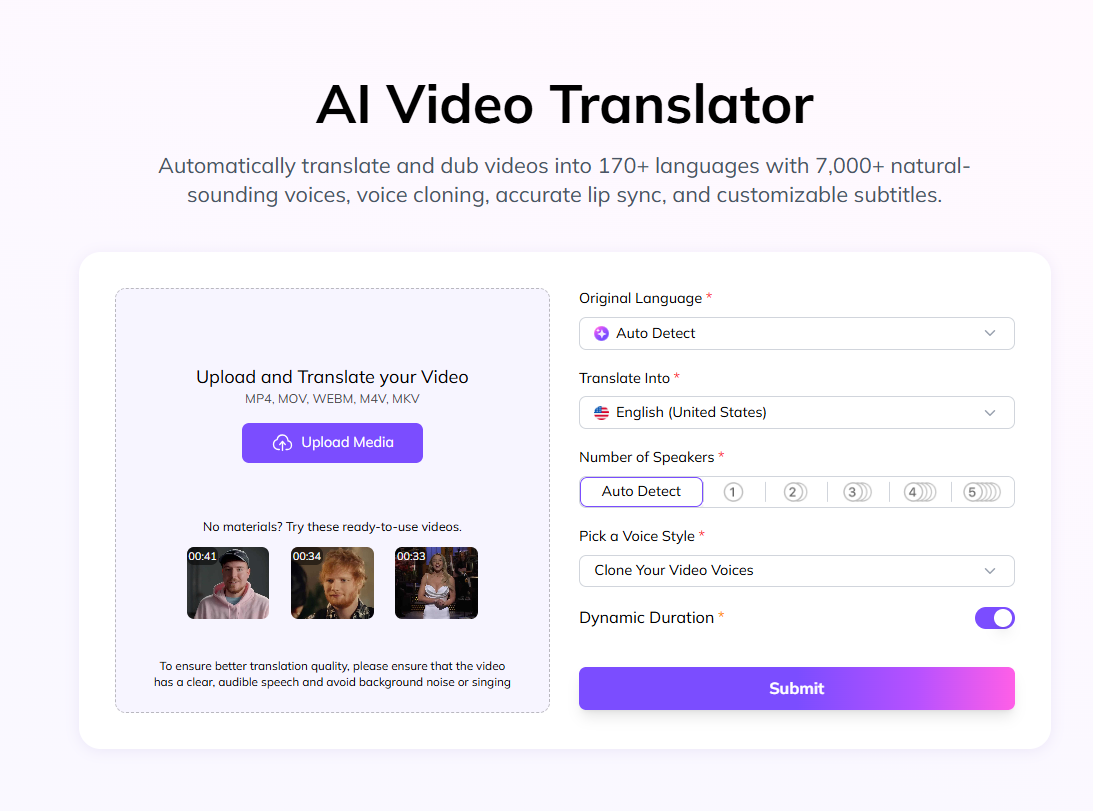
Step 3. Choose your target language and select a voice—either from VMEG’s voice bank or by cloning your own. VMEG supports over 170 languages, including dialects like Brazilian Portuguese or Canadian French.
Step 4. Submit your project. VMEG AI will automatically detect speakers, translate the script, and generate dubbed audio.
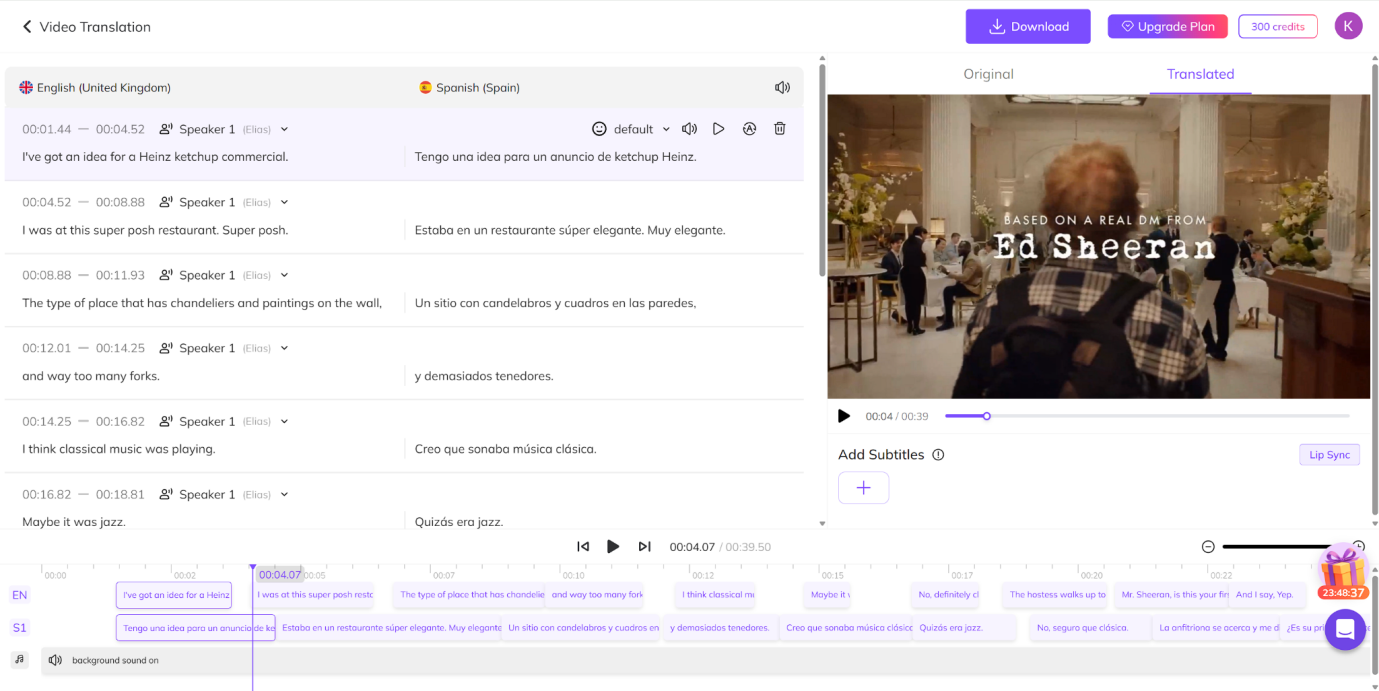
Step 5. Preview and export. Before exporting, you can preview dubbed output, make edits to translations or voice selection, and even adjust timing per scene. Once satisfied, export the final dubbed video in your preferred resolution.
Method 2: Subtitle + Voiceover DIY Combo (Budget-Friendly)
If you're on a tight budget but still want decent quality, this method offers the most control, with a little elbow grease.
How It Works:
- Translate your script with tools like DeepL or Google Translate
- Record voiceovers using your mic (Audacity, Descript, or OBS)
- Sync it to your video timeline (Premiere Pro, CapCut, or iMovie)
Pros:
- Maximum creative control
- Zero cost if you already have tools
- Can record in your voice or with native fluency
Cons:
- Time-consuming
- No lip sync or speaker recognition
- Not scalable for multiple languages
Method 3: Hire Freelancers or Agencies (Human-First Approach)
For companies with a budget and a need for perfect emotional delivery, human dubbing still reigns supreme.
Platforms like Voices.com, BunnyStudio, and Fiverr allow you to commission native speakers with voice acting experience.
How It Works:
- Submit your script
- Choose language, tone, and voice style
- Receive professionally recorded audio
- Combine it with video in your editing tool
Pros:
- Emotion-rich voiceovers
- High-quality output
- Great for branding, corporate, or high-stakes content
Cons:
- Expensive and time-intensive
- Limited revisions depending on the vendor
- Requires coordination across multiple people
Frequently Asked Questions (FAQs)
Is AI dubbing reliable for professional use?
It depends on the context. AI dubbing has made major progress in accuracy and voice quality, especially for educational content, tutorials, and product explainers. However, for projects that require emotional nuance—like films or ads—traditional voice actors may still offer better results.
How accurate is the translation?
AI translation is generally accurate for straightforward, non-technical language. However, idioms, slang, and culturally specific references may require manual editing. Most platforms allow you to review and adjust translations before finalizing the dub.
What happens if the video has more than one speaker?
Some tools can detect multiple speakers automatically. This feature, called speaker diarization, helps assign different voice models to different speakers.
Final Thoughts
Whether you're making a product demo, a tutorial, or a short film, translating and dubbing your videos no longer requires a big team or budget. With AI-powered tools, you can scale globally, stay authentic, and do it all from your laptop.
Start small. Try dubbing a 60-second clip. Preview how your message sounds in Spanish, Hindi, or Japanese. You might be surprised at how far your content can go when it speaks your audience’s language.


