



In a decade where it seems like our whole lives happen on our phones, a good scanning app deserves a place there, too. Here’s why, as well as the top 5 scanning apps to choose from.
You never know when you’ll need a scanning app, but you’ll definitely need one someday. Even if you don’t deal with documents or digital and physical photos daily, there’s almost always a reason for a quick scan: your ID, passport, a whiteboard after a meeting, or a restaurant receipt during a business trip.
If you work with documents regularly, having a scanner at your fingertips can be essential. For freelancers and students, for instance, it can be quite challenging these days to find a traditional scanner in their neck of the woods (some may have never used one before at all). However, being competitive and productive often means being able to scan and e-sign a supplier’s contract immediately or scan and upload assignments to Google Classroom without delay. Without a dedicated app, that can become challenging.
Finally, buying a traditional scanner can cost a fortune. As for scanning apps, they often provide the basic tools for free. If you need premium features, you can usually get them via subscription—just the way you would with any other paid platform like Netflix, YouTube Premium, or Spotify.
Best Scanning Apps for 2026
iScanner
With over 125 million downloads, iScanner is one of the most widely used full document management apps. It’s a multifunctional, AI-powered tool capable of handling practically any document-related task. That becomes clear when you open the app for the first time. The interface offers numerous options, from basic scanning to advanced editing and AI features.
First, it performs well at its core function—scanning. You can scan at 300 dpi, which, for instance, is considered the standard for applications by some universities. The app can also automatically crop your scans, which is quite convenient when working with multipage documents. There are also different scanning modes for various items, including QR codes, ID cards (both sides), passports, and more.
Second, iScanner can improve the quality of your scans. It doesn’t matter if your document was scanned in poor lighting, at an awkward angle, or even if fingers accidentally appear in the frame. The app can straighten scans, correct curves and skews, repair folded or stapled edges, and remove unnecessary backgrounds.
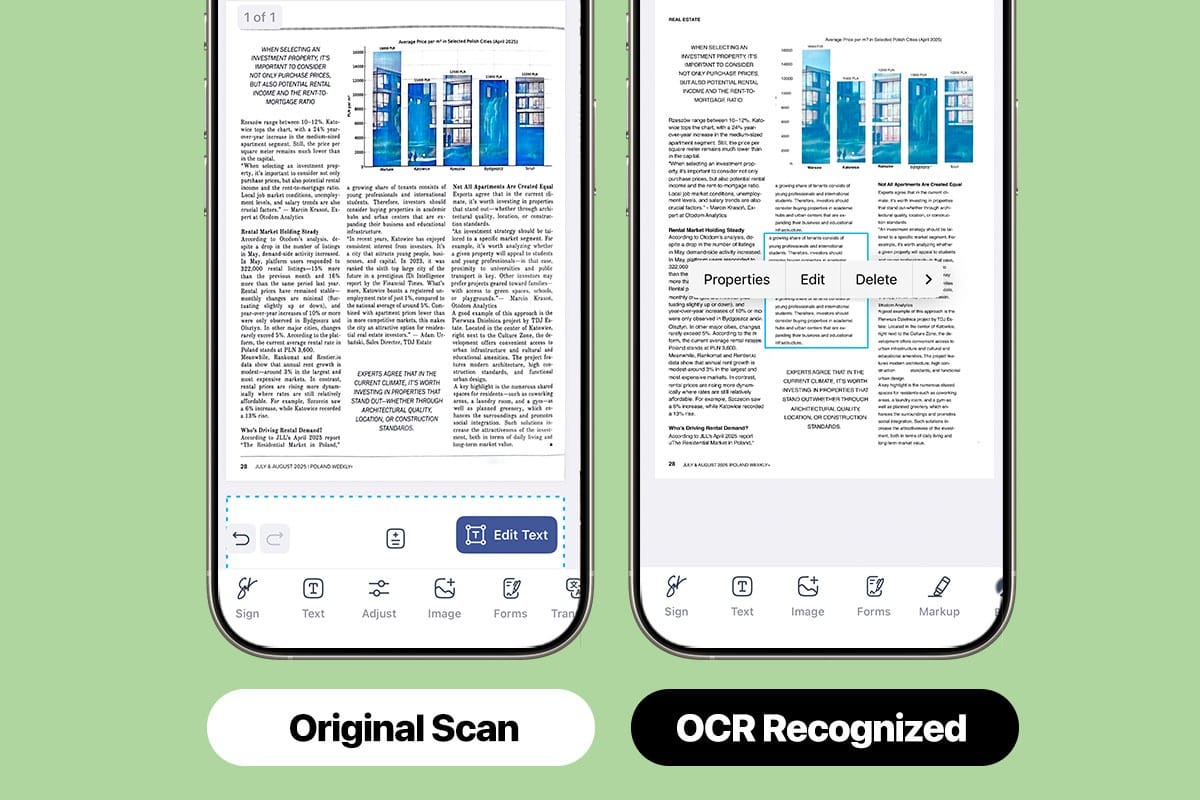
Third, its text recognition (OCR) feature can recognize text in at least 20 languages, including handwritten notes. This allows users to edit and adjust files in many ways, such as adding or removing text or images, blurring or hiding sensitive information, highlighting text, and filling forms.
Fourth, iScanner has several different AI tools for various purposes—and sometimes they help in ways you didn’t even expect. It can generate file names based on content, translate documents in more than 100 languages, rewrite text, sign documents, and even count objects in an image or measure the area of a space.
Last but not least, users can decide whether to store their files locally or in the cloud. If the cloud is chosen, documents will be stored on AWS (Amazon Web Services). Among other privacy perks, users can create PIN-protected files, decoy folders, and customizable expiration dates for shared links.
iScanner is available on iOS, Android, and the web, with plenty of tools for use on all platforms. These include converters to popular formats, PDF merging, splitting, compression, cropping, multipage (bulk) scanning, and more.
Best for: freelancers, small business owners, educators, students, and office workers.
Adobe Scan
Adobe Scan is also one of the most widely used and highly rated scanning apps. It delivers clean scans at high resolution, can automatically detect document borders, and accurately captures text with its OCR function, making it searchable and editable. As for editing, adjustments closely match the source font, and that’s definitely an advantage for users working with professional documents.
Arguably, one of Adobe Scan’s biggest advantages is its integration with Adobe’s ecosystem. The app connects to the Adobe Document Cloud, allowing scans to sync automatically across devices and move into Acrobat and other Adobe tools. For those who are already familiar with this integration, it can really simplify document management. However, if you’re a newcomer, it may take some time to experience all the benefits. Setting up an Adobe account is required, and fully leveraging the workflow often means using additional Adobe apps.
Adobe Scan is available for iOS and Android devices, as well as on the web.
Best for: office workers, medium to large businesses, and anyone who already uses the Adobe ecosystem.
PhotoScan
PhotoScan is a mobile app developed by Google to quickly digitize physical photos.
The process is a bit different from how you’d usually scan documents. Instead of taking a single shot, the app asks users to capture several images of the same photograph from different angles. After that, PhotoScan will stitch them together to produce a tidy, high-quality scan with minimal glare and reduced reflections. As a result, you get a more evenly lit and detailed scan than you would by simply taking a photo with your phone.
PhotoScan doesn’t offer OCR, PDF export, annotation, or editing tools. However, if you need to preserve printed photographs, such as family albums, childhood pictures, or significant artifacts like a movie ticket from your first date, it’s worth a try.
All scans can be saved to your device and backed up to Google Photos for storage and organization.
PhotoScan is available for iOS and Android devices.
Best for: anyone who scans printed photographs, whether professionally or casually.
SwiftScan
SwiftScan is another document scanning app. It offers fast, high-quality scans as PDFs or JPGs at 200 dpi and higher. It also supports automatic edge detection and multi-page (bulk) scanning. The app can also scan QR codes, making it useful for URLs, contacts, and phone numbers.
If you need advanced features, SwiftScan VIP includes cloud integration with Dropbox, Google Drive, and Box. Apart from that, the VIP subscription offers OCR for extracting searchable and editable text. Users can automatically upload scans to the cloud, edit documents by moving or deleting pages, and apply smart file naming.
You can download SwiftScan from both the App Store and Google Play.
Best for: students, travelers, and freelancers.
vFlat
vFlat is a mobile scanning app that has all the basic features you’d expect from a modern scanner: OCR, automatic border detection, cropping, quality enhancement (straightening, glare removal, and deblurring), and e-signature.
The app offers three scanning modes: 1-page, 2-page, and auto-detect. In 1-page mode, border detection and automatic cropping are disabled, so users should adjust manually. In auto-detection mode, the app identifies page borders on its own and applies light enhancements after capture, making the result look like a proper scan rather than a simple photo.
One of vFlat’s standout features is its 2-page mode. This allows users to scan book spreads or multiple documents placed side by side in a single shot, speeding up the process and making it particularly useful for digitizing books.
vFlat is available for iOS and Android devices.
Best for: students, researchers, and anyone who regularly scans books.
Making the Right Choice
These days, having a scanning app has become a practical necessity. They can save you time and money in a wide range of situations, whether you’re digitizing lecture notes and assignments, signing contracts on the go, or filing tax records.
Each app on our list deserves to be downloaded, but they each offer different strengths. PhotoScan, for instance, is best at preserving printed memories. Adobe Scan is a match for those already familiar with its products and ecosystem. SwiftScan and vFlat offer reliable document scanning with some extras, especially for students and those digitizing books.
But if you’re looking for an all-in-one option, iScanner is well worth trying. Its high-resolution scanning, numerous editing tools, text recognition, multipage support, AI-powered assistant, and strong privacy features make it one of the most versatile scanners available.


