

![Download Amazon Music to MP3: Unlock Offline Listening Forever [2026 Guide] Post image](https://images.unsplash.com/photo-1730818027473-176ab8a3bb4c?crop=entropy&cs=tinysrgb&fit=max&fm=webp&ixid=M3wxMTc3M3wwfDF8c2VhcmNofDF8fGFtYXpvbiUyMG11c2ljfGVufDB8fHx8MTc3NDg2MDAwNnww&ixlib=rb-4.1.0&q=80&w=2800)

While Amazon Music offers access to a huge music library, there is an annoying issue: Even after becoming an Unlimited user, you can't fully control and listen to your songs due to platform restrictions. Here, I will show you how to download Amazon Music to MP3 via some professional software, making your Amazon music remain accessible forever on any device.
Can You Download MP3s from Amazon Music?
The answer is positive if you are a Prime member and have purchased songs from Amazon Music Digital. Instead, you can't directly save Amazon Music to MP3 files. The official only supports offline features for subscribers - the cost of an Amazon Music subscription is not a small expenditure.
Besides, you have no choice to download single tracks or albums, but only for the whole playlist from All-Access Playlists. And the saved tracks actually are cache files protected by DRM. It's impossible to export, play, or use those contents outside of the app. Therefore, you may have to use a third-party tool to complete the task without any limits.
Method 1. TopVox All Music Converter [Overall]
TopVox All Music Converter is designed for an all-in-one music solution on Windows/Mac. You can serve it as a professional Amazon Music downloader. It bypasses DRM protections and converts all kinds of Amazon music to popular formats like MP3. Even if you're a free user, you can listen to music offline with ease. This desktop software gives priority to speed. You can preserve original-quality music at a faster speed than most music downloaders. More importantly, everyone can get started with the built-in web player without installing Amazon Music on their computer anymore.
Pros
- Convert Amazon Music into MP3, WAV, FLAC, etc.
- Keep the original audio quality with ID3 tags.
- Download songs, albums, playlists, and podcasts in one go.
- Batch downloading speed is 35× faster.
- 99% success rate for music conversion.
- Intuitive and clean interface without ads or malware.
Cons
- A limited free trial of 14 days.
How to download Amazon Music to MP3 via TopVox:
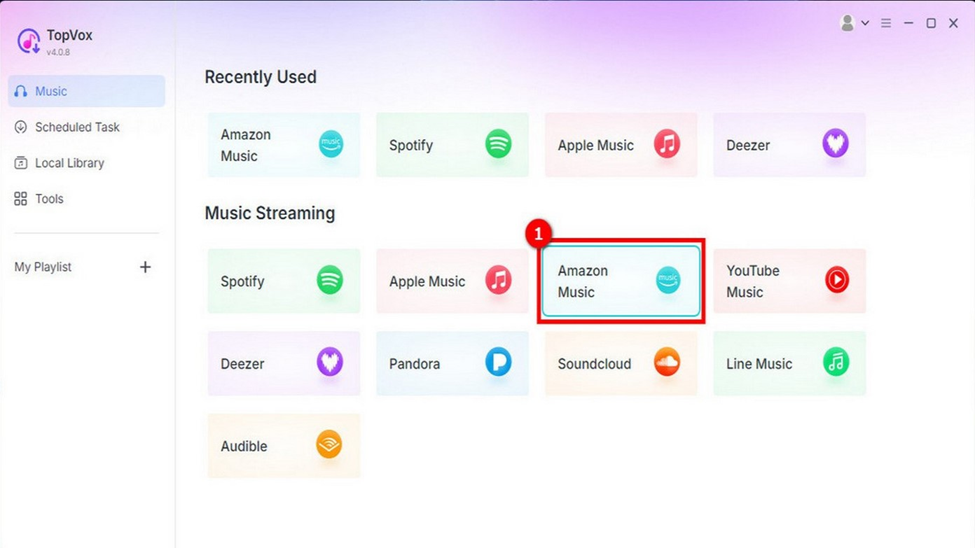
Step 1. Click the Amazon Music on its main interface and log in to your Amazon account.
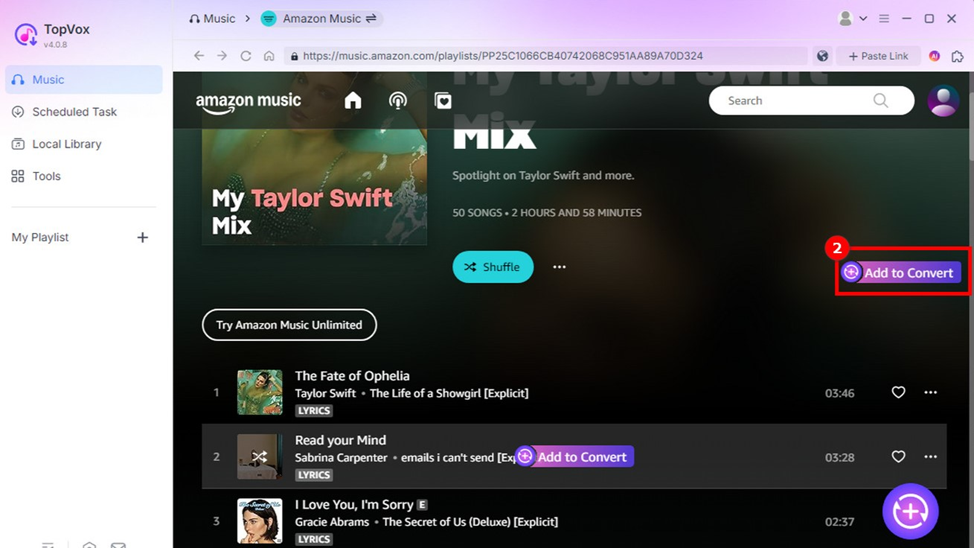
Step 2. Search for what you want to download from Amazon Music. Click the Add to Convert button or the Add button with a plus icon to load songs. You can convert an individual song as well.
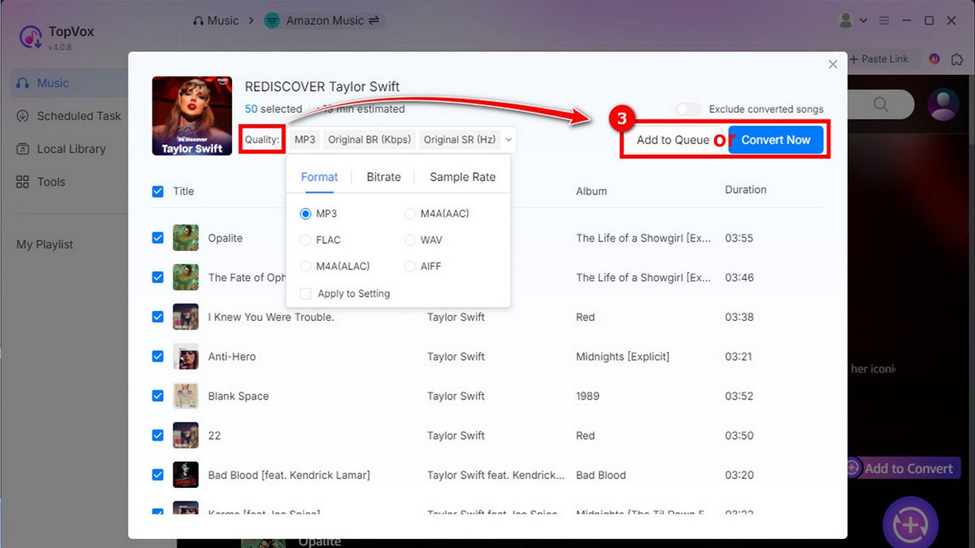
Step 3. Customize your output settings as you like. If you are not finished searching, you can click Add to Queue for later conversion. Instead, click Convert Now.
Step 4. Change the storage location to find files. Then click Convert All to save Amazon Music to MP3.
TopVox All Music Converter is a reliable solution for downloading music from Amazon Music forever, giving you the flexibility to save songs regardless of the plan you're using. In our tests, downloading a playlist with 77 songs to 320kbps MP3 takes just 15 minutes.
Method 2. Audials [Recording]
Audials, a record streaming software, helps you save songs from all music streaming services directly on your PC. You can play the Amazon Music you want to download, and then the tool will automatically record the tracks to MP3 files at a fast speed up to 5X. It will keep all audio metadata, making your music library remain organized.
Pros
- Record high-quality music files up to 96 kHz/24-bit.
- Play music offline without the Amazon Music app.
- Download Amazon music to MP3, FLAC, M4A, etc.
Cons
- Only works on Windows.
How to download Amazon music to MP3 with Audials?
Step 1. Go to the Music Streaming and click on Amazon Music.
Step 2. After selecting target music, adjust your recording settings, like audio quality and output format.
Step 3. Click the Download or Record button to start saving your Amazon music to MP3.
Method 3. NoteBurner Amazon Music Converter
Whether you're a free or Premium Spotify user, you can download Amazon music to MP3 with NoteBurner Amazon Music Converter. This application supports various audio formats, such as MP3, AAC, WAV, FLAC, etc., for offline playback on various devices. You can convert HD Amazon music at a 10X faster speed without quality loss.
Pros
- Download Amazon music into several common formats.
- Offer up to 5X/10X conversion speed on PC.
- User-friendly and intuitive interface.
- Preserve high-quality (up to Ultra HD) audio files.
Cons
- Only convert the first minute of each song with a free trial.
- Unlocking full features requires a subscription.
- Mac versions are sometimes limited to 1X speed.
How to download Amazon music to MP3 via NoteBurner?
Step 1. Run NoteBurner Amazon Music Recorder and choose the Amazon Music App.
Step 2. Copy and paste the music URL into the program. When your selected songs are loaded, click the Add button.
Step 3. Choose MP3 format and adjust other parameters, such as Bit Rate, Sample Rate, Conversion Speed, Output Path, and more.
Step 4. Click Convert to download Amazon music to MP3.
Conclusion
Choose the most suitable tool for your needs! For those who have bought music works from the official store, the Amazon Music app provides more convenience. For free users, third-party music converters like TopVox give you the true freedom of your playlists, empowering you to download Amazon Music to MP3 for building a permanent music collection.


