Final Cut Pro and Adobe Premiere Pro often top the list when it comes to professional video editing tools. They’ve both been used to cut award-winning films, hit YouTube channels, and corporate promos—but they approach editing very differently. Whether you're just starting out or switching tools mid-career, the choice between them can shape how you work day-to-day. So instead of debating which one is “better,” let’s look at how they stack up across real-world categories—and which fits your style best.
1. Platform Compatibility
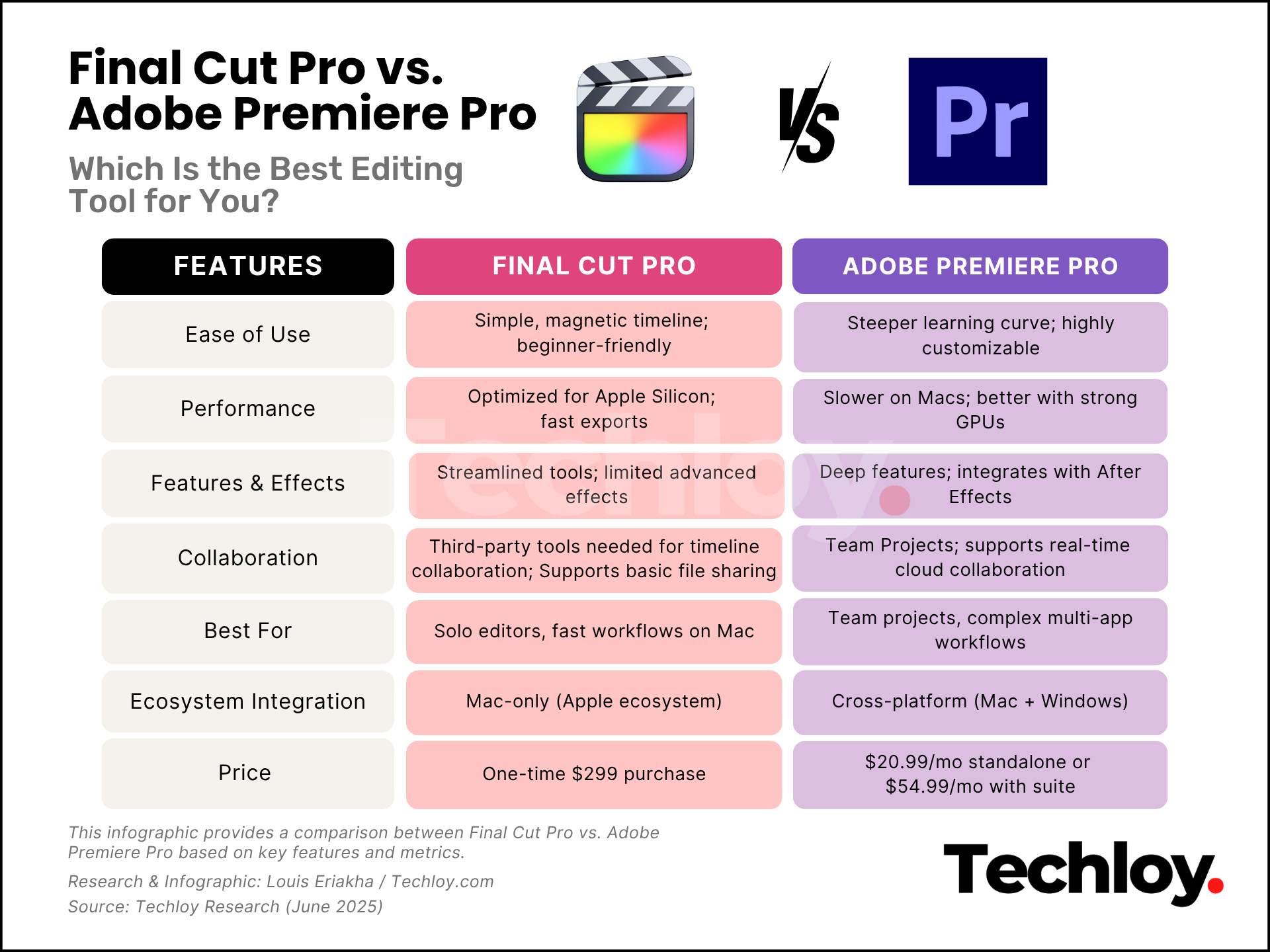
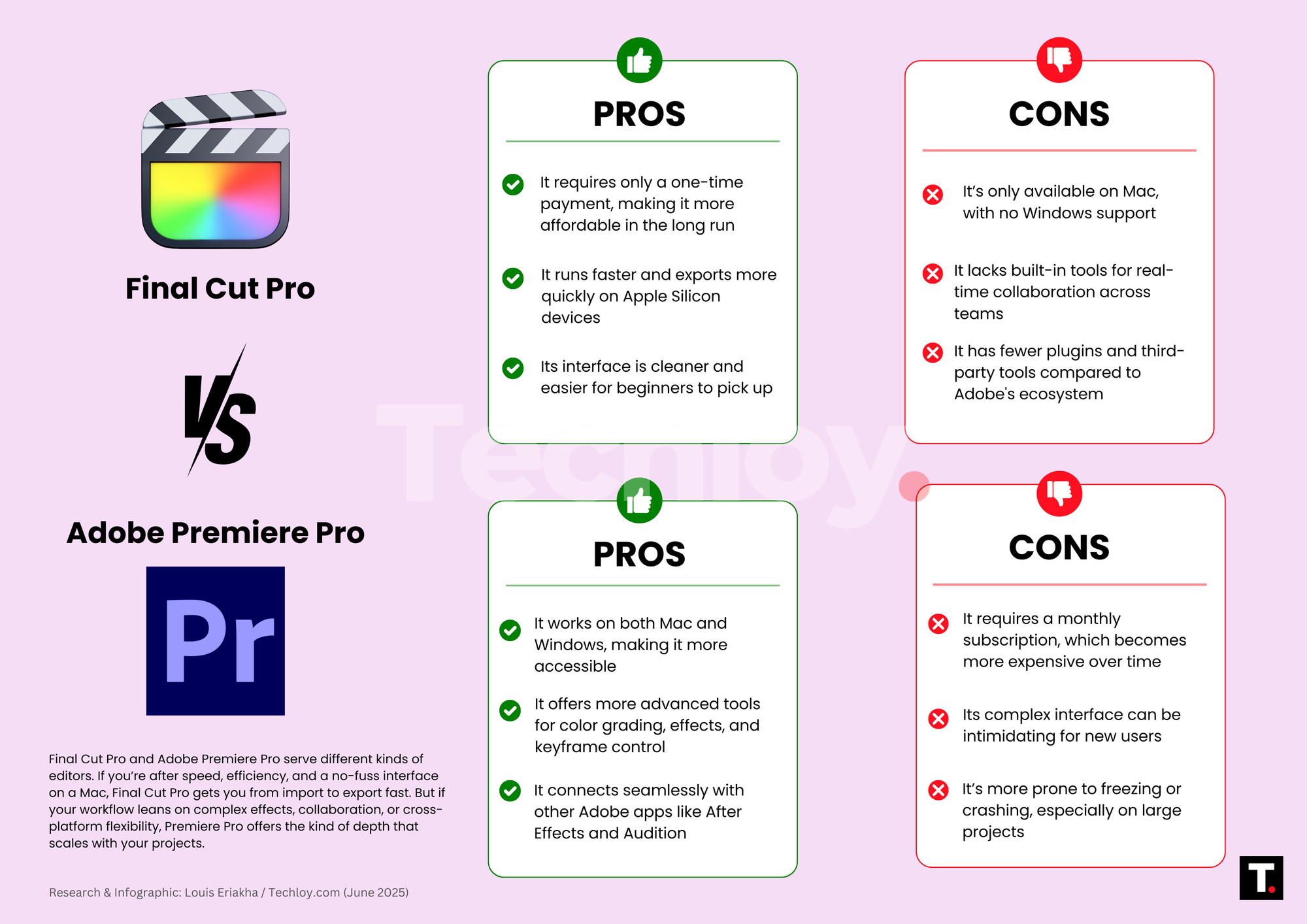
Let’s start with the basics—where you can actually use them. Premiere Pro runs on both Windows and macOS, which makes it accessible to virtually anyone. It’s a reliable cross-platform option if your team uses different systems or if you want flexibility down the line. Final Cut Pro, however, is Mac-only, and that’s by design. It’s optimized specifically for macOS and even more so for Apple Silicon chips. If you’re all-in on Apple, that’s a plus. If not, it’s a hard stop.
Which wins? Premiere Pro, for being platform-agnostic and more flexible in team settings.
2. Performance & Speed
Thanks to its native optimization for macOS, Final Cut Pro runs incredibly smoothly on Apple hardware. It launches fast, scrubs through 4K footage with ease, and exports videos noticeably quicker, especially on M1 and M2 machines. Premiere Pro has made major improvements in recent years (hello, GPU acceleration), but it still isn’t quite as snappy on Mac, and Windows users might experience inconsistent performance depending on their system’s specs. Which wins? Final Cut Pro, if you're using Apple hardware. Its speed can shave hours off your workflow.
3. User Interface & Learning Curve
Final Cut Pro has a more simplified, streamlined interface. The magnetic timeline is intuitive for beginners, though it might feel limiting to those used to traditional NLEs. Premiere Pro sticks to a more conventional setup. It’s less beginner-friendly, but that comes with flexibility. Editors can customize the workspace, switch between tabs for color, audio, and effects, and go deep into detailed settings. Which wins? Final Cut Pro, for ease of use. But if you're willing to climb the learning curve, Premiere Pro offers more control.
4. Features & Effects
Here’s where Premiere Pro really shows its depth. It offers robust color grading tools, advanced keyframing, and seamless integration with After Effects, Photoshop, and Audition. For editors doing more than just cutting footage, think VFX, motion graphics, or audio mixing—this ecosystem is a major win. Final Cut Pro covers the essentials: Multicam editing, advanced stabilisation, Smart Conform, and magnetic timeline organisation. It’s fast and capable, but it’s not as modular or customizable when it comes to complex effects. Which wins? Premiere Pro, hands down, if you're building a more advanced or layered production.
5. Collaboration & Workflow
Premiere Pro integrates with Adobe’s Team Projects, letting multiple editors collaborate on the same sequence remotely. It’s built for cloud workflows, with version history, synced assets, and Creative Cloud Libraries all in play. Final Cut Pro has no native collaboration features. You can share libraries and use tools like Postlab, but real-time teamwork is more of a workaround than a built-in solution. Which wins? Premiere Pro, especially for teams working across locations or on tight deadlines. Of course, all these features come at a cost, literally.
6. Pricing Model
Final Cut Pro is a one-time purchase: $299 for full access, with no recurring fees. That’s appealing for solo creators and smaller teams who want to own their tools outright.
Premiere Pro is subscription-only—it costs $22.99/month for the app alone when billed annually. For access to a wider range of creative tools, the Creative Cloud Standard suite is available at $54.99/month (annual plan, billed monthly), which includes Premiere Pro and many other desktop applications. For the most comprehensive package with additional generative AI credits and premium features, the Creative Cloud Pro suite is $69.99/month (annual plan, billed monthly). While these costs add up over time, they provide access to a whole ecosystem of tools beyond just video editing.
Which wins? Final Cut Pro, if you want long-term value without a monthly bill. Premiere Pro might be worth it if you rely on multiple Adobe apps.
Final Thoughts
There’s no one-size-fits-all answer here. Final Cut Pro is fast, clean, and perfect for Mac users who value speed, simplicity, and ownership. It’s ideal for solo creators, editors on the go, or anyone who wants to get in and get the job done—fast. Premiere Pro, on the other hand, is built for flexibility, collaboration, and deep integration with other creative tools. If you’re managing complex projects, working with a team, or juggling multiple media types, it might be a better fit. Ultimately, the choice relies on your workflow, hardware capabilities, and the level of control you desire over the editing process.
 Louis Eriakha