If your Gmail inbox is constantly drowning in Amazon receipts and shipping confirmations, Google’s about to throw you a lifeline. The company is rolling out a new Purchases tab on both mobile and web that corrals all your shopping-related emails into one place.
Instead of scrolling endlessly to figure out whether your package is still stuck in a warehouse or already out for delivery, you’ll get order confirmations, shipping updates, and delivery estimates grouped neatly together. It’s basically Gmail admitting what most of us already know: our inboxes double as a shopping diary.
This isn’t Google’s first attempt at tackling inbox chaos. Back in 2022, Gmail quietly added package-tracking cards that let you peek at delivery updates without clicking through emails. Sometimes you’ll even see a “your package arrives tomorrow” notice floating at the top of your inbox.
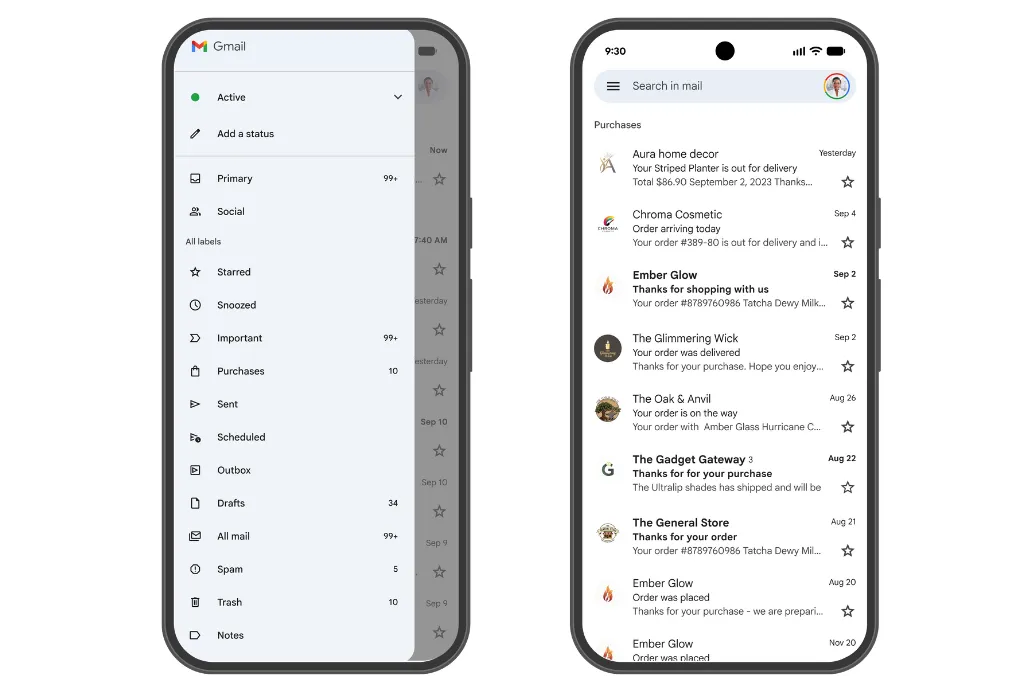
Now, the new Purchases tab takes all of that one step further by turning those scattered nuggets of info into a central hub for your online orders. And given Gmail’s scale, this tweak isn’t small. With more than 2.5 billion active users worldwide, even a sliver of people adopting this feature means a massive shift in how online shopping gets tracked.
Other inboxes like Outlook and Yahoo Mail let you filter receipts or sort messages into categories like “Travel” or “Shopping,” but Gmail’s move feels more ambitious. Instead of just dumping receipts into a folder, it’s layering in live tracking data, something that even Amazon, with its famously detailed delivery updates and map views, keeps locked inside its own app.
So yes, you could call this an Amazon play. While the Purchases tab won’t be limited to Amazon orders, it’s hard to ignore just how much of our inbox clutter comes from Jeff Bezos’ empire. Google is positioning Gmail as the place to track all your stuff, no matter the retailer.
 Ogbonda Chivumnovu
This shopping glow-up doesn’t stop with Purchases. Gmail’s Promotions tab is also getting a tune-up. Soon, you’ll be able to sort offers by “most relevant,” meaning deals from brands you actually shop with will rise to the top instead of random spammy discounts. But if you prefer the chaos, you can still switch back to “most recent.”
On top of that, a new Manage Subscriptions tool will make it easier to see who’s clogging your inbox and unsubscribe with a single tap, basically a Marie Kondo for newsletters.
Google says these updates will start rolling out to personal Gmail accounts on mobile in the coming weeks. For serial shoppers, especially Amazon regulars, this could be the inbox upgrade you’ve been waiting for.
And for Google, I think it’s another way of nudging Gmail beyond “just email” and into something closer to a digital life hub—one where your receipts, delivery updates, and shopping habits are neatly tucked away in a single tab.
 Emmanuel Oyedeji