



Remember when Google launched Gemini 3 a few weeks back and teased a more powerful reasoning mode called Deep Think? Well, the wait is over.
As of today, Google AI Ultra subscribers can now access Deep Think mode directly in the Gemini app, marking the end of the safety testing phase that began when Gemini 3 first dropped.
What's actually different about Deep Think?
Gemini 3 Pro is made for speed and routine activities, whereas Gemini 3 Deep Think uses advanced parallel thinking to look at several hypotheses at once. Think of it as the difference between getting a quick answer and getting a thoroughly researched one.
The trade-off? Time. When you submit a query with Deep Think enabled, Gemini will notify you when your response is ready—usually in a few minutes. But for complex math problems, scientific questions, or multi-step logic puzzles, that wait time could be worth it.
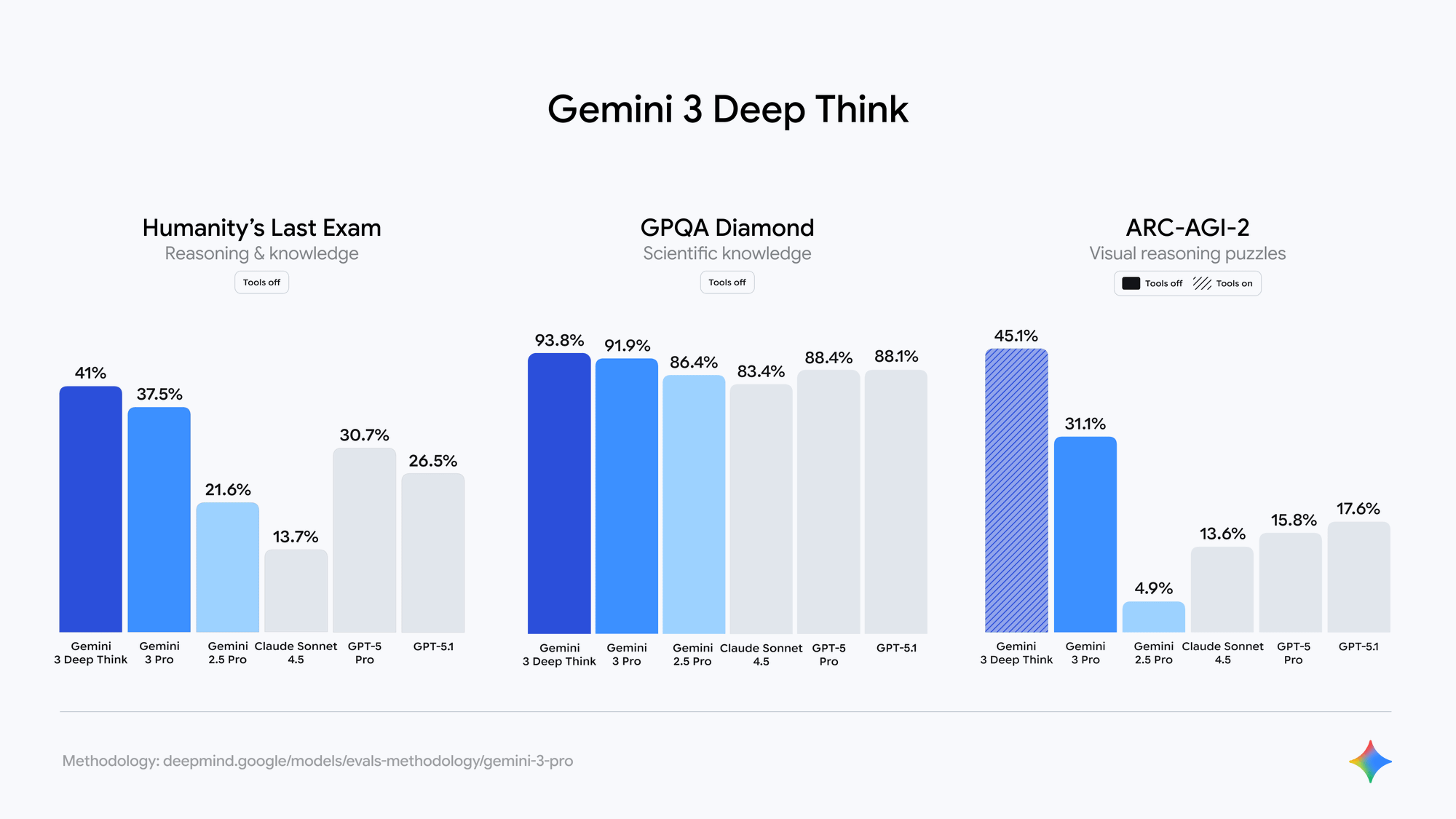
According to Google's official benchmarks, Deep Think achieves 41% on Humanity's Last Exam without using tools, compared to Gemini 3 Pro's 37.5%. It also hits 93.8% on GPQA Diamond, a benchmark designed for PhD-level scientific reasoning.
When Deep Think makes sense
Not every question needs this level of computational effort. Asking about the weather or drafting an email? Stick with Pro. But if you’re working on something that requires genuine reasoning—like designing an algorithm, solving mathematical proofs, or planning a complex strategy—Deep Think could deliver noticeably better results.
Google says it’s particularly effective for “refined, nuanced code” generation and producing better visualizations, which could make it useful for developers and researchers who need precision over speed.
How to use Gemini 3 Deep Think mode(Credit: @GeminiApp on X)
The bigger context
The launch comes as AI labs race to build models that can actually think, not just predict. OpenAI has been pushing its o1 reasoning models, while Anthropic continues refining Claude’s advanced capabilities. Now Google is making its move with a reasoning mode that’s accessible in the same app people use for everyday queries.
Whether Deep Think becomes a tool people reach for regularly or remains a premium feature for specialized tasks will depend on how well it performs in real-world scenarios. But for Ultra subscribers who’ve been waiting since the Gemini 3 announcement, at least the waiting is over.
For more on what makes Gemini 3 different from previous models, check out our full breakdown of the Gemini 3 launch.
How to activate Deep Think
If you’re already paying for Google AI Ultra (that’s $250 per month), here’s how to use it:
- Open the Gemini app
- Select “Deep Think” from the prompt bar at the bottom
- Switch to “Thinking” in the model dropdown menu
- Type your query and submit
- Wait for the notification when your response is ready
The interface is straightforward, but the real question is when you’d actually want to use this over the faster Pro model.


