



Nowadays, the way people watch television and movies has changed due to streaming services like Netflix, Amazon Prime, Hulu, and Disney+. Thousands of titles are now instantly accessible across devices. However, vast DVD repositories remain in circulation, containing mission-critical homemade content, rare out-of-print titles, and archival cinema.
Many users are searching for workable solutions to convert DVDs to digital formats (such as MP4) so they can continue accessing their collections as optical drives are gradually removed from modern laptops and media devices.
By digitizing DVDs, people can watch content on contemporary devices like smartphones, tablets, and smart TVs, preserve their media libraries, and reduce the need for physical storage.
Why Physical Media Is Becoming Less Common
The transition from VHS to DVD in the early 2000s marked a shift to digital optical storage. However, the current dominance of Cloud-based delivery has marginalized physical discs due to:
- Rapid access to vast content collections
- Hardware Abstraction: Modern architectures in laptops and PC computer no longer integrate bulky optical disc drives
- Eliminating the need for physical storage
Hardware trends are changing at the same time. DVD drives are no longer standard on many contemporary laptops, including those made by Apple and other manufacturers.
As a result of this combination of hardware advancements and digital convenience, the use of physical media has steadily declined.
Why Many People Still Keep Their DVDs
Despite the ubiquity of streaming, local DVD assets provide several advantages:
1. Some films aren't accessible on streaming services
Streaming libraries are volatile; licensing expirations can result in the immediate removal of titles. Physical discs ownership ensures 100% uptime for specific content.
2. Home videos and personal recordings
Personal recordings (family archives, school projects) exist solely on physical media and require migration to modern file systems.
3. Value to collectors
Collectors often keep special editions that include bonus features, director commentary, or extended cuts.
As one comment on Reddit puts it:
"As long as they are releasing quality movies with quality remasters and restorations, then I will keep buying."
4. Media ownership
Unlike "Access-only" subscription models, physical media represents permanent asset ownership.
For these reasons, many people choose to digitize their DVD collections rather than discard them.
What It Means to Convert DVDs to Digital
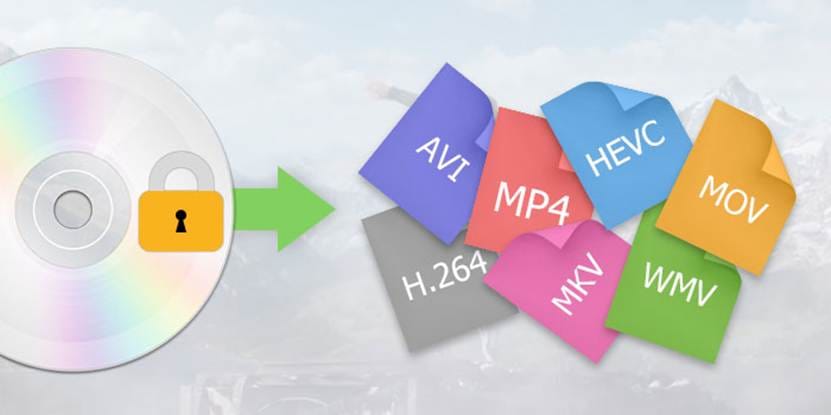
Converting a DVD to a digital asset involves extracting the MPEG-2 video stream and AC-3/DTS audio from the disc's VOB (Video Object) files and transcoding them into a modern codec/container (e.g., H.264/H.265 in an MP4 or MKV wrapper). After DVD-to-digital conversion, the file can be stored on:
- a computer
- an external hard drive
- a home media server (such as Plex or NAS devices like Synology or QNAP)
- cloud storage (for example Google Drive, Dropbox, OneDrive, or iCloud)
Using this method, users can view their content without needing a DVD drive.
Additionally, digital files are easier to share, search, and organize across devices.
For example, a DVD movie that has been converted to MP4 can be played on smartphones, tablets, laptops, and smart TVs without requiring additional hardware.
Tools That Help Digitize DVD Collections
Digitizing a physical media collection requires specialized encoding software designed to transition DVD data into contemporary digital formats. The optimal software selection typically hinges on the user’s specific requirements regarding processing speed and output fidelity.
- WinX DVD Ripper: Frequently recommended for managing extensive libraries, this utility excels at processing both commercial and personal media. Its primary advantages include efficient MP4 encoding and robust GPU acceleration.
- HandBrake: A versatile, open-source transcoder. As a free, multi-platform solution, it remains a primary choice for converting diverse video formats into standardized, modern codecs.
- MakeMKV: Preferred by enthusiasts who prioritize data integrity. This tool performs a lossless extraction; however, users should be aware that the resulting files are substantial in size and may require further optimization for mobile compatibility.
Please note that legal regulations regarding "format-shifting" are jurisdiction-dependent. Users are advised to limit these activities to legally owned media for personal archival purposes only.
Best Practices for Digital Media Library Management
Effective organization post-conversion is critical for ensuring long-term accessibility. Implementing a structured management system is essential for maintaining the functionality and scalability of your digital library.
1. Optimizing Technical Standards
For seamless cross-platform compatibility, media should be encoded using H.264 (AVC) or H.265 (HEVC) within MP4 containers. This configuration facilitates hardware-accelerated decoding across most modern devices.
2. Standardized Naming Conventions
Utilizing programmatic naming structures allows media management software—such as Plex, Kodi, or Jellyfin—to accurately aggregate metadata and artwork. We recommend a format such as: MovieTitle (Year).mp4 or ShowName_S01E01.mp4.
3. Data Redundancy and Backups
To mitigate the risk of data loss, we suggest maintaining three distinct copies of your library across two different media types, including one off-site cloud-based backup.
4. Categorization and Navigation
Large-scale libraries are most efficient when indexed by genre, chronology, or series. Utilizing "Collections" within your media server is an effective way to group related titles and sequels.
5. Upscaling and Post-Processing
Because native DVD resolution (480i) may appear degraded on 4K displays, AI-driven upscaling can be employed to enhance legacy content to 1080p or higher. Platforms like WinXDVD offer AI tools to enhance legacy resolution to 1080p or 4K.
Advanced users often use tools like Avidemux or ffmpeg to deinterlace video or remove "noise" from older family recordings to improve visual clarity on digital screens.
Benefits of Digitizing Your DVD Collection
Beyond convenience, converting DVDs to digital format has a number of benefits.
Easier device compatibility
Digital files can be played on smartphones, tablets, laptops, and smart TVs without needing a connected external DVD drive.
Space saving storage
Large physical collections can be stored digitally on a single storage device, making it a more budget-friendly option compared with storing DVDs in individual sleeves.
Long-term preservation
Media content is shielded from physical harm like scratches and disc deterioration by digital copies.
Better organization
Users of digital libraries can swiftly classify and search their content.
Many people are gradually converting their physical collections into digital archives due to these benefits.
Bridging the Physical and Digital
As the industry shifts toward a "platform-first" model, the personal media library stands as a final bastion of true ownership. By digitizing these physical assets, you aren't just saving space on a shelf; you are future-proofing a curated history of media against the whims of licensing agreements and server shutdowns.
Ultimately, the transition from physical discs to a resilient digital archive ensures that your most valued content—whether a forgotten indie masterpiece or a priceless family recording—remains exactly where it belongs: in your control.


