We’ve all been there, you’re watching an interesting video, your finger slips, the feed refreshes, and poof, it’s gone. Or maybe you want to find a funny clip you saw earlier but forgot to save. Don't worry; you haven't lost them for good. TikTok tracks everything you view in a hidden log.
Here is how to open your Watch History and find that missing video in seconds.
Step 1:
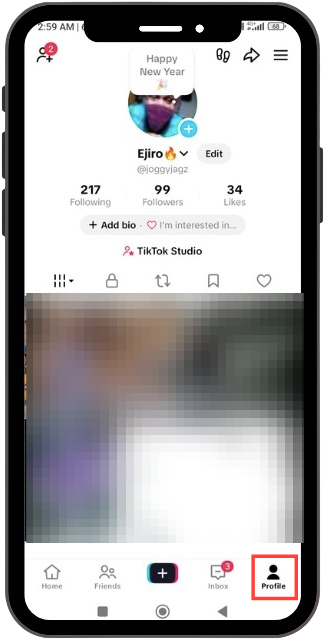
Go to Profile: Open the TikTok app and tap on the Profile icon in the bottom right corner of the screen to go to your profile page.
Step 2:
Open the Menu: Tap the three horizontal lines (hamburger menu icon) located in the top right corner of your screen (as seen in your second screenshot).

Step 3:
Select Activity centre: A menu will pop up at the bottom. Look for the option labelled Activity Centre (it has a clock icon next to it) and tap on it.
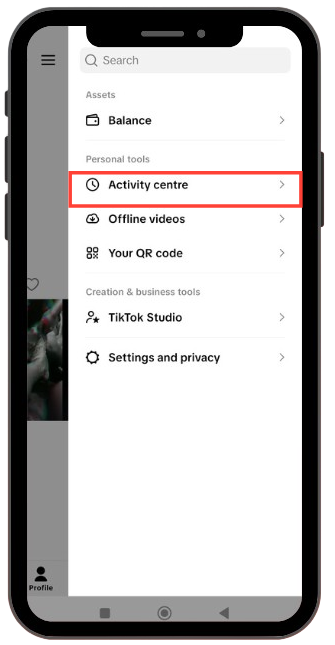
Note: In some versions of TikTok, if you don't see "Activity Centre" immediately, you may need to tap "Settings and Privacy" first, and then find "Activity Centre" inside that menu.
Step 4:
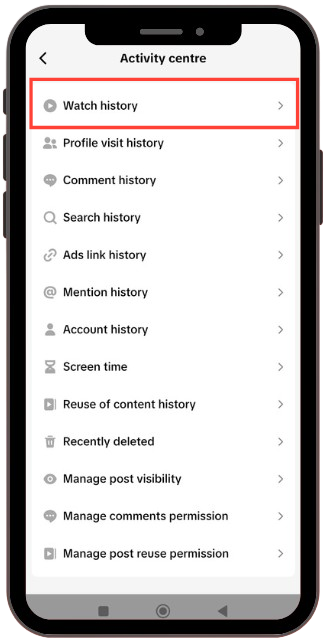
Tap on Watch History: You will now see a list of your activity. Tap on the very first option at the top is Watch History.
Step 5:
View or Filter Your History: You can now see all the videos you have watched recently.
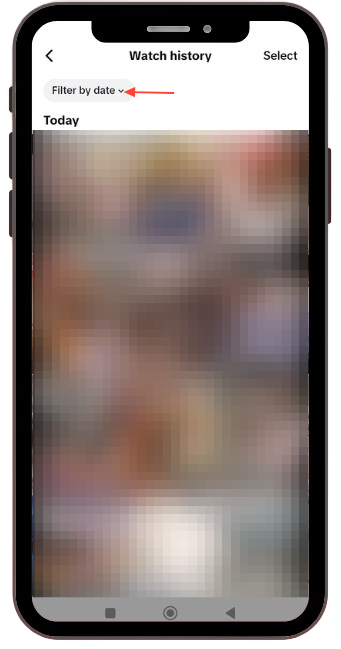
- To Filter: If you are looking for a video from a specific time, tap the "Filter by Date" button at the top left. You can select "Today," "Yesterday," "Last week," or a specific date range.
- To Delete: If you want to clear specific videos, tap Select in the top-right corner, choose the videos you want to remove, and then delete them.
 Louis Eriakha