



Apple Music is one of the most popular streaming platforms for music lovers around the world. With over 100 million tracks, curated playlists, lossless audio, and seamless syncing across devices, it provides an excellent listening experience. However, many users still face one common limitation: Apple Music does not allow you to download playlists to MP3.
If you are looking for a practical, safe, and efficient solution to download Apple Music playlist to MP3, this guide will walk you through everything you need to know. The best tool for this job is ViWizard Apple Music Converter, a professional and reliable software designed to help you convert Apple Music tracks into MP3, WAV, FLAC, AIFF, M4A, and more without quality loss.
Why You Cannot Download Apple Music Playlists as MP3 Directly?
Before diving into the solution, it’s important to understand why Apple Music restricts MP3 downloads.
1. DRM Protection
Apple Music uses FairPlay DRM to protect its streaming content. This prevents users from freely copying or distributing songs and playlists.
2. Limited Offline Downloads
Even if you download tracks for offline use, these files remain encrypted and playable only within the Apple Music ecosystem.
3. No Exporting to Devices
You cannot move Apple Music downloads to MP3 players, USB drives, SD cards, or non-Apple devices without conversion.
Because of these limitations, users often search for third-party tools to convert Apple Music playlists to MP3. That’s where ViWizard Apple Music Converter comes in.
The Challenge: Apple Music's DRM Protection
The primary obstacle between you and your MP3 files is a technology called DRM. Apple uses this to protect the rights of artists and publishers, which is understandable. However, it also severely limits what you, as a legitimate user, can do with the music you're streaming.
Standard methods like screen recording or internal audio capture are low-quality, cumbersome, and impractical for entire playlists. This is why you need a specialized DRM-removal tool designed to work seamlessly with Apple Music. This is precisely where ViWizard excels.
Meet ViWizard Apple Music Converter – The Best Apple Music Converter to MP3 for You
ViWizard Apple Music Converter is a professional desktop software specifically engineered to solve this exact problem. It allows you to legally download and convert any song, album, or playlist from Apple Music or iTunes into common, DRM-free audio formats like MP3, M4A, FLAC, WAV, and more.
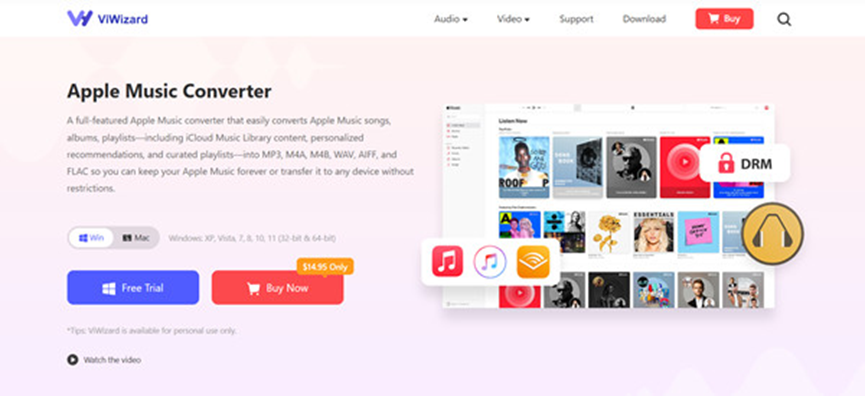
Here’s a breakdown of what makes ViWizard the top choice for users looking to "download Apple Music playlist to mp3":
- DRM Removal in Batch: ViWizard seamlessly strips the DRM protection from Apple Music files, allowing for batch conversion of entire playlists or albums at once, saving you immense time and effort.
- Lossless Audio Quality: Unlike recording methods that degrade quality, ViWizard converts your music while preserving the original high-fidelity sound quality. You can enjoy the same rich audio experience in your MP3 files.
- Incredible 30x Conversion Speed: Efficiency is key. ViWizard's optimized processing engine can convert your songs at up to 30 times the normal speed, meaning you can download a 100-song playlist in a fraction of the time.
- Permanent MP3 Ownership: Once converted, the MP3 files are 100% yours. You can copy, transfer, edit, and play them on any device, forever.
- Keep All ID3 Tags and Metadata: ViWizard automatically retains all original metadata, including song title, artist, album, genre, cover art, and track number. Your music library will remain perfectly organized.
- User-Friendly Interface: You don't need to be a tech expert. ViWizard features an intuitive, clean interface that makes the conversion process a simple, three-step task.
Step-by-Step: How to Download Apple Music Playlist to MP3 with ViWizard
The process is remarkably straightforward. Let's walk through how you can convert your favorite Apple Music playlist to MP3 files in just a few minutes.
Step 1: Download and Install ViWizard
Visit the official ViWizard website and download the Apple Music Converter for your operating system (Windows or Mac). Follow the simple installation instructions to set up the software on your computer.
Step 2: Add Apple Music Playlist to ViWizard
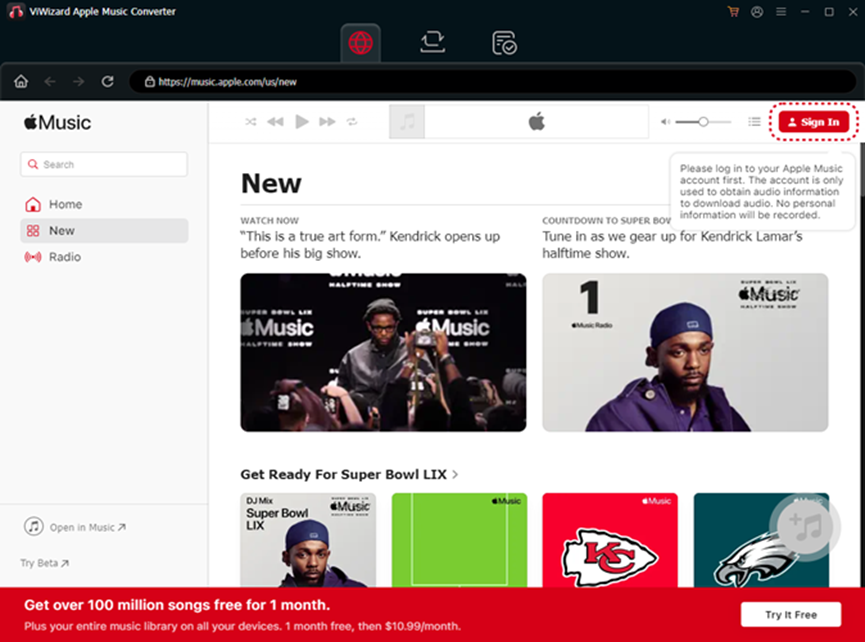
After installing the ViWizard downloader, open it and the Apple Music web player will be integrated. In the upper right corner, sign in to your account to access your music library. Then, locate the desired tracks, open them, and click the + button to import them into ViWizard.
Step 3: Configure Output Settings (Choose MP3)
This is a crucial step. Before converting, click on the menu to adjust your output settings:
- Output Format: Select MP3 from the list of available formats (you can also choose AIFF, FLAC, WAV, etc.).
- Quality: Adjust the bit rate, sample rate, and channel to your preference. For most users, the default high-quality MP3 settings are perfect.
- Output Folder: Choose a destination on your computer where the converted MP3 files will be saved.
Step 4: Initiate the Conversion
Once your settings are configured, click the "Convert" button. ViWizard will now start downloading and converting your selected Apple Music playlist to MP3. Thanks to the 30x speed, you can watch the progress bar move rapidly.
Step 5: Locate and Enjoy Your MP3 Playlist
After the conversion is complete, click the "Converted" button to find your new MP3 files. They will be neatly organized with all metadata intact. You can now transfer them to your phone, USB drive, or any other device and enjoy your music without limitations.
Conclusion: Take Control of Your Music Today
The desire to "download Apple Music playlist to mp3" is a logical step for anyone who truly values their music collection. It’s about breaking down digital barriers to achieve genuine ownership and unparalleled listening freedom.
ViWizard Apple Music Converter is the most robust, efficient, and user-friendly solution available to achieve this goal. It transforms your rented music library into a personal, permanent collection that you can enjoy anywhere, anytime, on any device.


