



The Logitech MX Master 3S and RAPOO MT760L are both ergonomic wireless mice designed for productivity and multi-device workflows. While they target similar users—people who spend long hours working on a computer—they occupy different positions in the market.
The MX Master 3S is widely considered a premium productivity mouse, known for its refined build quality, MagSpeed scroll wheel, and advanced software ecosystem. The MT760L focuses more on practical productivity features and value, offering a similar ergonomic design at a lower price. To better understand the differences, let’s compare their design, features, software, and overall value.
RAPOO MT760L vs Logitech MX Master 3S — Key Specifications
Before diving deeper into performance and usability, it helps to look at the core specifications of both mice. The table below highlights the most important differences in areas such as price, weight, connectivity, and scrolling technology.
Both mice are designed for productivity, but they prioritize different strengths. The MX Master 3S focuses on premium features and software integration, while the MT760L emphasizes value, lighter weight, and responsive performance.
Design and Ergonomics
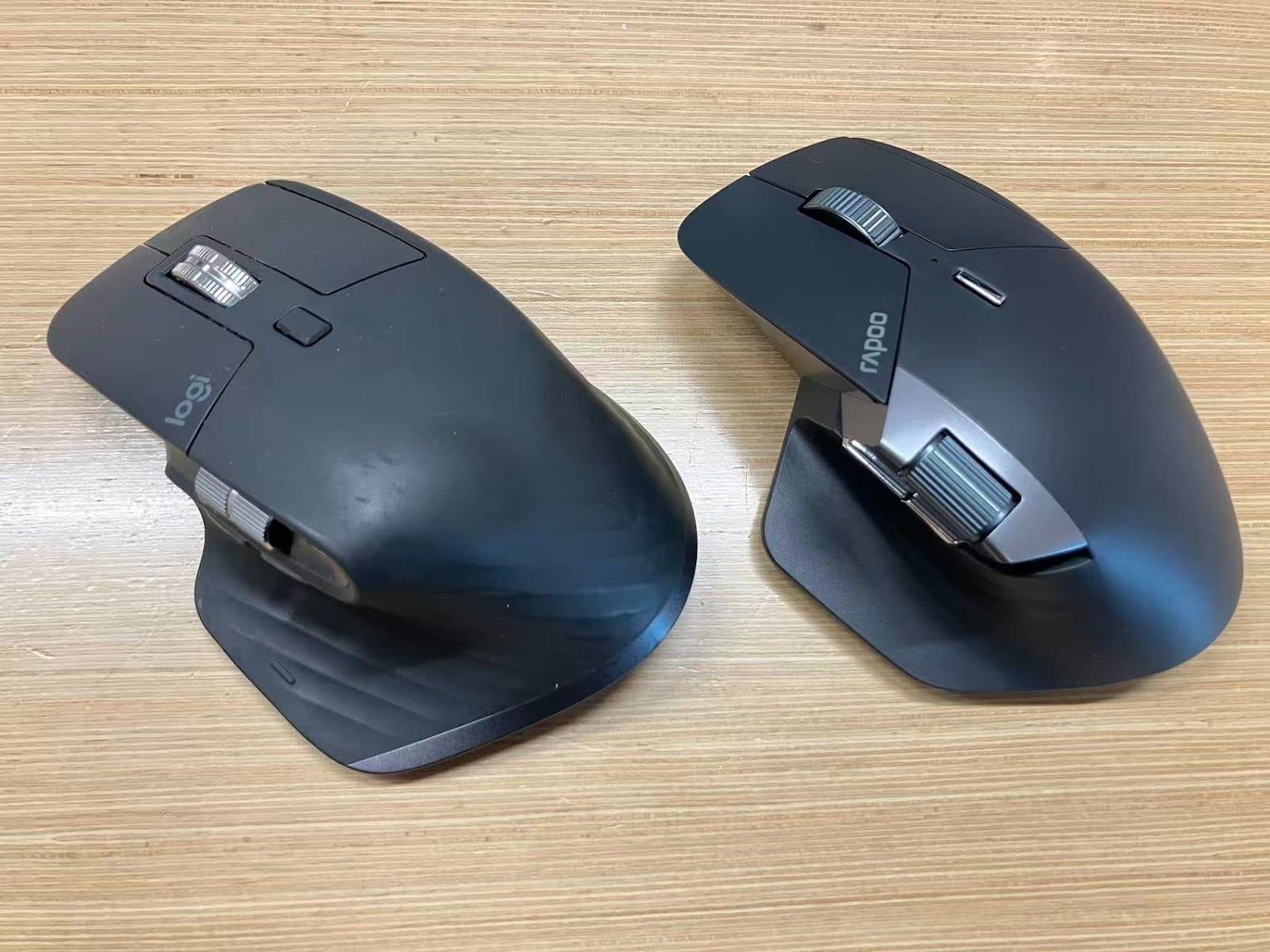
Both mice feature a right-hand ergonomic design with a sculpted body and thumb rest that supports the palm during long work sessions.

The MX Master 3S is heavier at around 141 g, giving it a more solid and premium feel. The MT760L is noticeably lighter at about 101 g, which can reduce hand fatigue during extended use.
The surface coating is another difference. The MX Master 3S uses a soft-touch rubber coating that feels smooth and premium but may develop a patina over time with heavy use. The MT760L uses a durable plastic finish that feels slightly less premium initially but is more resistant to long-term wear.
In short:
- MX Master 3S → heavier with premium soft-touch coating
- MT760L → lighter with durable surface finish
Scroll Wheel Technology
One of the standout features of the Logitech MX Master 3S is its MagSpeed electromagnetic scroll wheel, which can switch between precise line-by-line scrolling and ultra-fast infinite scrolling for quickly navigating long documents, spreadsheets, or web pages. In comparison, the RAPOO MT760L uses a traditional tactile scroll wheel that provides consistent and precise scrolling but does not offer the same infinite scroll capability. For users who frequently work with large documents or long timelines, the MX Master 3S’s advanced scroll wheel can offer a noticeable productivity advantage.
Software and Customization
When it comes to customization, the Logitech MX Master 3S uses the Logitech Options+ software ecosystem. This platform offers advanced features such as application-specific profiles, gesture controls, and complex macro customization, allowing users to tailor mouse behavior to different apps and workflows.
The RAPOO MT760L is supported by RAPOO A HUB, which allows users to configure button functions, DPI settings, and other performance options. Many RAPOO mice also support web-based configuration, meaning users can adjust settings directly in a browser without installing additional software. This can be convenient for users who prefer lightweight setups or frequently switch between computers.
Another advantage of RAPOO’s approach is onboard memory support. Once settings are configured, they are stored directly on the mouse, so the device keeps the configuration even when connected to another computer—without requiring software to run in the background.
Both brands also support cross-computer workflow features:
- Logitech MX Master 3S → Logitech Flow
- RAPOO MT760L → M+ Cross-Computer
These features allow users to move the cursor between multiple computers and copy-paste text or files across devices. To enable this functionality, the devices generally need to be connected via USB receivers and be on the same local network or Wi-Fi environment.
Price and Value Comparison
Price is one of the most noticeable differences between the Logitech MX Master 3S and the RAPOO MT760L. As of March 10, 2026, the official prices listed on their websites show a clear gap between the two models.
The MX Master 3S is positioned as a premium productivity mouse, with pricing that reflects its flagship features such as the MagSpeed electromagnetic scroll wheel, refined materials, and the mature Logitech Options+ software ecosystem.
The MT760L takes a different approach, focusing on practical productivity features at a more accessible price point. It still provides an ergonomic design, multi-device connectivity, and responsive performance suitable for most office workflows.
How to Choose Between RAPOO MT760L and Logitech MX Master 3S
Both the RAPOO MT760L and Logitech MX Master 3S are designed for productivity, but they suit different types of users. The right choice depends on your workflow, budget, and software preferences.
Choose RAPOO MT760L if you:
- Want a more affordable ergonomic productivity mouse
- Prefer a lighter mouse for long working sessionsOccasionally play games and benefit from a higher polling ratePrefer configure-once devices with onboard memory
- Work in environments where installing third-party software is restricted (such as enterprise or security-sensitive systems)
Because the MT760L stores settings directly on the mouse, it can maintain your configuration without requiring software running on the computer, making it practical for secure or multi-device environments.
Choose Logitech MX Master 3S if you:
- Want a premium productivity mouse
- Frequently work with large documents, spreadsheets, or timelines and benefit from the MagSpeed infinite scroll wheel
- Need advanced software features, including app-specific profiles and complex macros
- Prefer premium materials and a heavier, more solid feel
In short, the MX Master 3S is ideal for users who want the most advanced productivity features, while the RAPOO MT760L is a strong value option for users who want ergonomic comfort and practical functionality at a lower price.


