



Have you ever looked at an old black-and-white video and wondered what it would feel like if those moments were captured in full, vivid color? How different would those memories appear if technology could restore the world exactly as it was?
What if you could instantly transform vintage footage, historical clips, or family recordings with the power of AI—without any editing skills? Today, video colorization has become more accessible than ever, and HitPaw VikPea is leading the way.
Part 1. Why Colorizing Old Videos Matters More Than Ever
We live in a digital era where everything is high-definition, vibrant, and visually immersive. Yet, some of the most important memories and historical moments remain locked inside black-and-white footage. Colorizing these videos is not just a trend — it’s a powerful way to reconnect with the past, revive nostalgia, and re-experience moments with new emotional depth.
1. Color Creates Emotional Impact
When we see a black-and-white video, we often feel distance — as if the moment belongs to another world. Adding color bridges that emotional gap. It lets viewers feel the warmth of a scene, sense the environment more fully, and perceive people not as distant figures but as real individuals with real lives.
2. It Preserves and Modernizes History
Many documentaries and archival projects are now colorizing vintage footage to help younger generations better understand past events. Color adds a layer of relatability, turning historical clips into engaging, modern-looking content that resonates with today’s audiences.
3. It Enhances Personal Memories
Many families have VHS tapes, film reels, or digitized clips of grandparents, childhood moments, or old celebrations. Colorizing these videos gives them new life — allowing people to reconnect with relatives they may barely remember and preserve these memories for future generations.
4. Social Media Loves Colorized Content
Platforms like TikTok, Instagram, and YouTube have created massive demand for “before-and-after” transformations. Colorized footage often goes viral because it fascinates viewers, blending nostalgia with modern technology.
In short, colorization is not just a technical upgrade — it’s a storytelling evolution. But how does it actually work?
Part 2. How Video Colorization Works: Traditional vs. AI Methods
Before AI became accessible, video colorization was one of the most complex tasks in filmmaking. Teams of artists would manually paint each frame — sometimes thousands per minute — combining artistic judgment with technical precision.
Let’s explore how far the process has come.
1. Traditional Frame-by-Frame Colorization
Colorizing video manually involves painting colors onto every frame using editing software like Photoshop or After Effects. This requires:
- A deep understanding of color theory
- Patience to work frame by frame
- Artistic judgment to choose realistic tones
- Smooth transitions between frames
While the results can be stunning, manual colorization can take days, weeks, or even months depending on video length.
2. Semi-Automated Colorization Tools
Before AI, some software tried to speed things up by letting users mark color regions, which the program would then track across frames. While faster than full manual work, it still demanded:
- Skill
- Time
- Corrections when tracking failed
- Strong hardware
It was a step forward, but still far from convenient for ordinary users.
3. AI-Powered Colorization
AI changed everything. Modern systems analyze each frame and automatically assign realistic colors using trained models based on real-world data. Instead of drawing, the user simply:
- Uploads the video
- Applies AI Colorization
- Downloads a fully colorized version
With AI:
- No painting is required
- No artistic training is needed
- No tracking issues occur
- The process is dramatically faster
This is where HitPaw VikPea becomes a game-changing tool.
Part 3. Meet HitPaw VikPea: The Smartest Way to Colorize Videos with AI
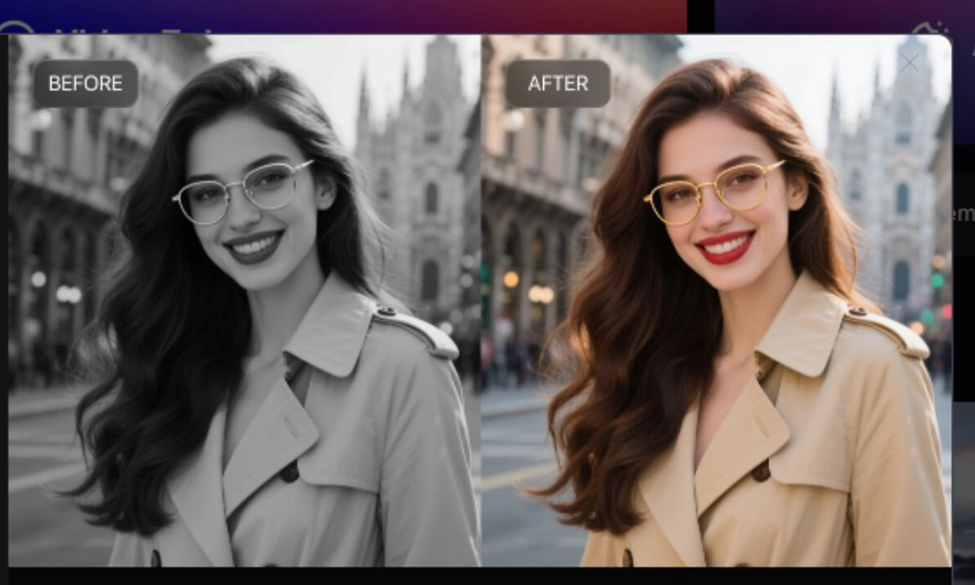
HitPaw VikPea is designed for creators, editors, historians, families, and anyone who wants to revive old footage with vivid, realistic color — without needing editing skills.
It combines advanced AI with a beginner-friendly workflow, making video colorization accessible to everyone.
1. One-Click AI Video Colorization
No learning curve. No manual adjustments. VikPea’s video colorization model automatically detects objects, people, backgrounds, lighting, and textures — then applies natural, consistent colors across frames.
Upload your black-and-white footage, click “Colorize,” and the AI handles everything. Within seconds, your video is reborn in full color.
2. Accurate, Realistic Colors
VikPea’s advanced algorithm understands natural color tones. Skin colors look authentic, shadows remain balanced, and environmental elements appear vibrant without feeling artificial.
3. Additional AI Enhancement Tools
Beyond colorization, VikPea offers features like:
- Video stabilization
- Noise reduction
- Upscaling
- Sharpness enhancement
- Old video restoration
- Frame interpolation
So you’re not only adding color — you're upgrading the entire video quality.
4. Fast, intuitive, and beginner-friendly
Even if you have never edited video in your life, VikPea’s interface guides you through the process effortlessly. It’s built for speed, accuracy, and simplicity.
Part 4. How to Colorize a Video Using HitPaw VikPea (Step-by-Step Guide)
Now that you understand the benefits, let’s walk through the exact process of colorizing your footage.
Step 1. Download and Launch VikPea: Visit the official website and install the latest version of HitPaw VikPea. Open the app and select the “AI Colorist” option at the top right corner.
Step 2. Import Files: Click to browse and select your videos. You can also drag them directly into the program.
Step 3. Choose Processing Mode
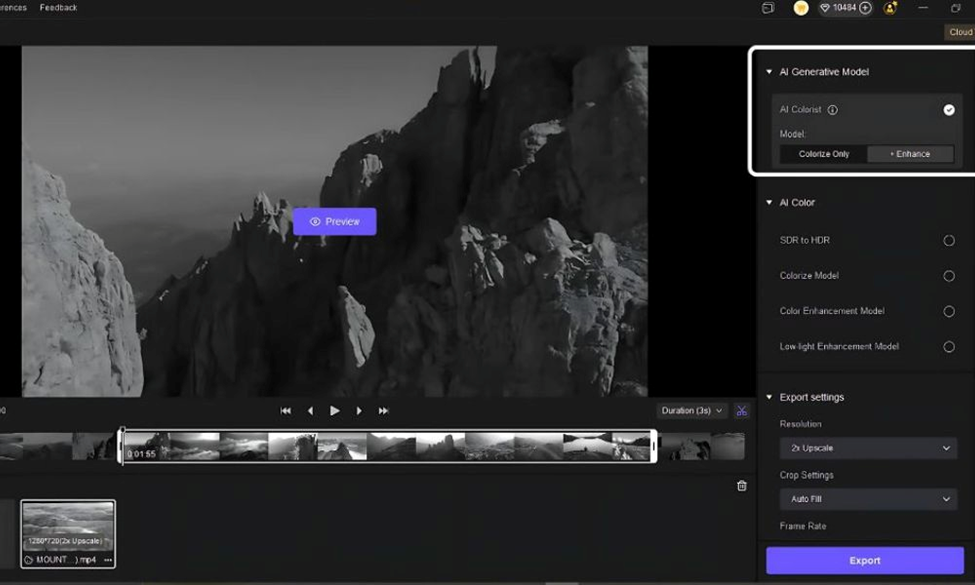
There are two main modes. Colorize Only adds realistic color but keeping original resolution. Colorize + Enhance adds color, reduces noise and sharpens details. This mode gives you desired high-quality results.
Step 4. Preview Results: Before full export, click Preview to see how the restored version looks. This will export a short preview of about 3 seconds.
Step 5. Export Final Video: Once satisfied with the preview, click Export.
Conclusion
Colorizing videos used to be a time-consuming task reserved for professionals — but AI has changed everything. With HitPaw VikPea, anyone can turn old monochrome footage into vibrant, cinematic content in just a few clicks.
Whether you’re preserving family memories, modernizing historical films, or creating eye-catching social media content, VikPea gives your videos a new life filled with color and emotion.


