



You need your Android app to hit a London edge server, and QA must see every request. Turn on a consumer VPN and your proxy falls silent—that’s the network stack at work. VPNs secure whole-device routes; debugging proxies reveal and let you edit individual HTTP calls. This guide shows you when to use each layer and how to chain them. We’ll rate two VPNs, two proxies, and one hybrid so you can debug safely, test geography, and ship with confidence.
What a proxy gives developers
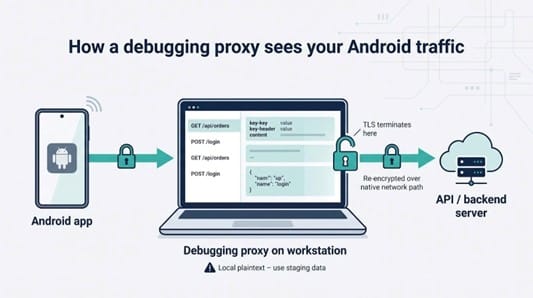
A debugging proxy terminates TLS on your workstation before any bytes leave Wi-Fi or LTE. That single hand-off exposes request headers, JSON bodies, and WebSocket frames so you can set breakpoints, rewrite fields, or replay a flow in seconds.
Setup is straightforward: point Android’s System Proxy to your host, then add the tool’s certificate under a debug-overrides rule in Network Security Config. Android trusts that certificate only when the build is debuggable, so release users stay protected.
What a VPN gives developers

A VPN creates an encrypted, whole-device tunnel, so every packet (HTTP, MQTT, UDP, QUIC) leaves your test phone through a single, trusted exit node. Switch the exit node from Sydney to São Paulo and region-locked APIs reveal their alternate logic without changing code.
The trade-off: once packets enter the tunnel, a debugging proxy on the same device cannot see them. Android also allows only one active VpnService at a time, so two local-VPN apps cannot run together.
The top five tools
1. TorGuard: best managed hybrid for VPN, SOCKS5, and V2Ray test routes
TorGuard is the only finalist that bundles a full VPN client with standalone SOCKS5 and V2Ray endpoints. The VPN encrypts all traffic, while the proxy applies only to the apps you configure, so you trade blanket security for speed. TorGuard’s proxy vs vpn breakdown reinforces the difference, noting that a SOCKS5 proxy masks one application at a time whereas a VPN secures every connection on the device.
More than 70 city exits let you test regional feature flags in minutes. Use WireGuard for speed or fall back to OpenVPN when a firewall blocks UDP. On an emulator, run TorGuard on the host and point Android’s System Proxy to 10.0.2.2:<mitmproxy-port> to keep inspection before the tunnel.
TorGuard doesn’t expose payloads, so pair it with mitmproxy or HTTP Toolkit for that.
2. mitmproxy: best for scripted, repeatable payload surgery
mitmproxy is an open-source interceptor that turns every request into Python-addressable data. Run it headless in CI or with the mitmweb UI to stub flaky third-party APIs, spot rogue headers, or replay exact flows against a new backend.
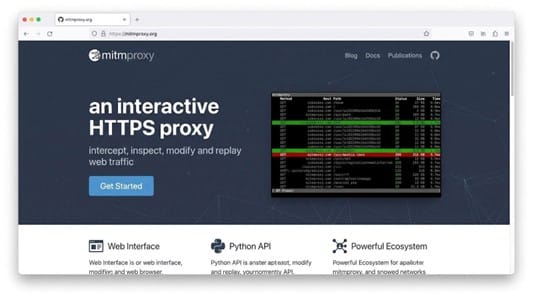
mitmproxy UI screenshot showing Android HTTPS debugging flows
Point Android’s System Proxy to your laptop and trust the CA with debug-overrides, or use the built-in WireGuard listener to intercept UDP and QUIC for HTTP/3. Python assertions can fail a build when production hosts appear or tokens leak into query strings.
Decrypting TLS adds about 5–15 ms per request, so disable the proxy for final performance runs. Cost: free under an MIT-compatible license.
3. Tailscale: best for private staging and distributed device labs
Tailscale creates a WireGuard-based mesh: install it on the phone, laptop, and staging server and every node gets a stable private IP you control. A coffee-shop phone can reach private staging without port forwards, and a laptop running mitmproxy can act as an exit node to capture traffic before it hits the staging API.
Tailscale transports bytes but does not decrypt HTTPS, so keep a proxy inside the tailnet for payload inspection.
4. HTTP Toolkit: best for fast, rootless Android interception
HTTP Toolkit pairs a desktop proxy with an Android helper that claims the device’s VpnService slot and funnels selected apps to your laptop, with no Wi-Fi proxy fields or manual certificate installs required. Scan a QR code and traffic appears within seconds, even on stock devices.
Because the helper occupies Android’s single VPN interface, run any commercial VPN on the host or router instead. Apps with certificate pinning still require a debug build that trusts HTTP Toolkit’s CA.
5. WireGuard: best self-hosted high-speed tunnel
WireGuard ships with about 4,000 lines of core code, and independent benchmarks show only 0.1 to 0.4 ms of added latency, far below OpenVPN under the same conditions. Generate keys, paste a short config, scan the QR code in the Android client, and you get a stable virtual IP you can route anywhere.
Like any VPN, WireGuard encrypts packets but cannot inspect them; pair it with mitmproxy or HTTP Toolkit when you need payload visibility.
Inspect traffic and change geographic egress together
Run mitmproxy on your laptop and point the Android System Proxy to laptop_ip:8080. Then start a VPN on the laptop and pick your target region. The app sees the foreign IP; you still see clear payloads.
Keep the proxy closest to the app and the VPN one hop downstream. Reverse the order and the VPN captures the traffic before the proxy can decrypt it.
Frequently asked questions
Is a proxy or a VPN better for debugging Android HTTPS traffic?
Use a proxy when you need to read or rewrite requests. Use a VPN when you need a different exit IP or encrypted device-wide routing.
Does SOCKS5 encrypt Android traffic?
No. SOCKS5 hides your IP but leaves encryption to HTTPS or another tunnel.
Conclusion
Selecting the right combination of proxies and VPNs lets Android teams observe every byte, test any geography, and protect sensitive data—without drowning in network stack quirks. Use this guide to choose the appropriate layer, chain tools safely, and avoid common capture pitfalls so you can ship reliable, secure builds with confidence.


