



Applicant Tracking Systems (ATS) filter out roughly 75% of résumés before a recruiter sees them, Jobscan reports. AI résumé builders can close that gap, yet the 2026 market is packed with copy-cat tools, hidden fees, and flashy templates that jam ATS parsers.
This guide cuts through the clutter.
1. True ATS Compatibility: Keep It Simple
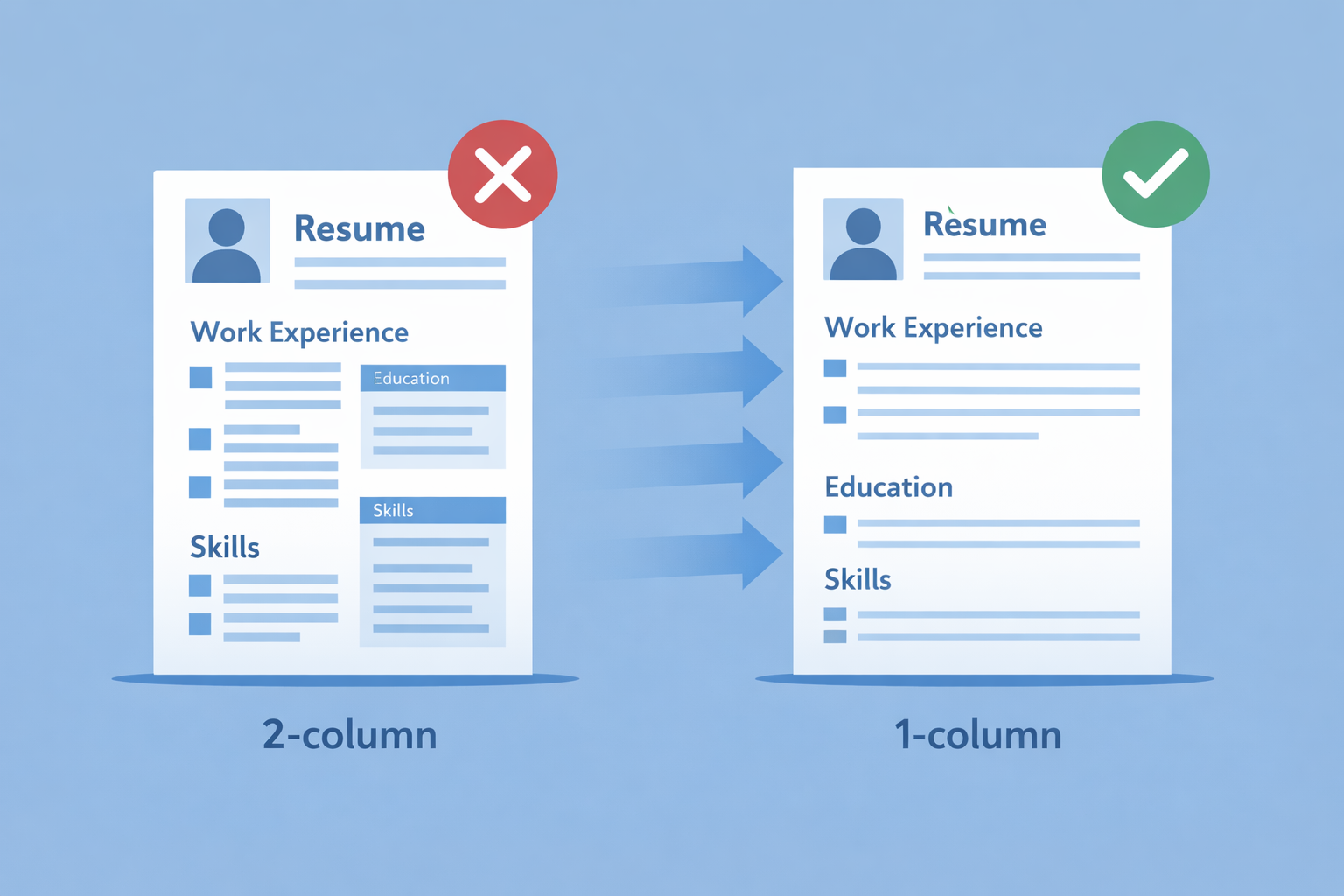
Applicant Tracking Systems read left to right, top to bottom. Anything that interrupts that flow can delete your best accomplishments. A University of Texas HR Analytics study found that multi-column layouts are 91% more likely to fail Workday parsing than identical single-column files. In Jobscan tests, moving a designer résumé from two columns to one raised the match score from 41% to 86%, no wording changed.
Choose a builder that:
- defaults to a single-column template with standard headings (“Work Experience,” “Education,” “Skills”)
- runs an on-page ATS scan and flags problems before download
- exports real text, not images, so recruiters can still search inside the PDF
Run a quick Jobscan or ResumeWorded test.
Then check whether the builder has done its own ATS testing. Enhancv, for example, publishes an ATS guide based on tests with major ATS vendors and a small myth-busting study; it reports that standard fonts and well-structured layouts usually parse correctly, while information embedded in graphics is more likely to disappear.
2. Transparent Pricing: Spot The Fine Print Before You Pay
Many résumé builders advertise a low “$1–$3 trial.” The catch is that, after only a few days, the plan switches to a full subscription.
A fair platform will:
- display the real monthly or annual rate beside any trial button
- let you download at least one watermark-free file without a credit card
- email a reminder before a trial converts to paid status
On a transparent site, you can often see this at a glance.
Novoresume’s AI Resume Templates, for example, lays out a free basic tier and one-time premium plans that explicitly state there is no recurring billing or automatic subscription, and its FAQ confirms there are no hidden costs and that you see the full price before entering any payment details.
Use that as a benchmark when you compare builders: renewal rules, total charges, and what you can download for free should all be spelled out just as clearly in one place.
If you instead spot countdown timers, hidden checkout steps, or forced card entry just to preview your PDF, close the tab; unexpected fees can drain more than your job-search budget.
3. Privacy And Data Security: Keep Your Résumé Out Of The Wrong Hands
A résumé lists phone numbers, locations, and even salary clues that can feed identity thieves or ad networks. According to HRME’s 2023 industry coverage, 53.87% of U.S. job seekers rank privacy risks as their top fear when AI tools handle their data.
Spend two minutes on these checks:
- Scan the privacy policy: Confirm that your data is encrypted in transit and at rest, stored in GDPR- and CCPA-compliant regions, and never sold.
- Search for complaints: The BBB logged dozens of 2025 grievances against CareerBuilder after users received spam calls without consent.
- Verify the promise: FlowCV states in bold, “We never sell your personal data. You can delete it anytime.”
- Check access controls: You should be able to download locally and delete your account in one click; no support ticket required.
If a platform hides these details or floods the page with tracking cookies, leave. Your career story belongs in a recruiter’s inbox, not a marketing database.
4. AI Capabilities: Writing Help Plus Job Matching
“AI-powered” can refer to two distinct engines:
- Writing assistant. Tools such as Resume Genius and Kickresume rewrite your bullets for clarity, active voice, and stronger verbs.
- Job-matching analyzer. Platforms like Jobscan or Rezi compare your résumé to a posting, flag missing keywords, and assign a match rate. Jobscan advises aiming for 75% or higher to lift interview odds.
A strong AI résumé builder combines both functions. Look for a workflow where you:
- Paste the job description → spot keyword gaps → accept suggested rewrites → watch the match rate climb in real time.
These feedback loops turn a static document into a résumé that mirrors employer language while sounding like you. If the software only writes or only scores, you will spend extra time and may miss interviews.
5. Export Formats And File Flexibility
File type can determine if an ATS reads or rejects your résumé. In a 2025 study of 50,000 submissions across 15 ATS platforms, DOCX files parsed correctly 88% of the time, text-based PDFs 7%, and image-based PDFs just 3%.
Keep at least three versions on hand:
- DOCX – safest for systems such as Taleo or iCIMS that still prefer Word
- PDF (text-based) – preserves layout when you email hiring managers directly
- Plain TXT – a fallback for legacy portals that strip formatting
Before you spend hours designing, open the export menu. If you don’t see DOCX, PDF, TXT, and even a “copy to Google Docs” option, choose another builder. Multiple formats let you edit on any device, meet upload rules, and send the right file fast when a recruiter calls.
6. Customization And Localization Options
A résumé builder should let you shape content the way recruiters read it, with no coding needed. At minimum, you need to:
- Drag and drop sections. Move Projects above Experience or add Certifications without rebuilding the file.
- Swap fonts and colors in one click while keeping a single-column structure for ATS safety.
- Toggle extras by region. A 2024 Michael Page survey found that 98% of Italian recruiters expect a headshot, while 0% of UK recruiters do. A good tool lets you add or hide a photo, change date formats (DD/MM/YYYY vs MM/DD/YYYY), and spell-check in languages such as French, Arabic, or Swahili.
- Support RTL languages and local currencies. If you target roles in Saudi Arabia or Israel, right-to-left alignment and non-Latin fonts must stay intact.


