Every small business depends on digital files. Invoices, client records, and project plans all live on a screen. Data loss can strike without warning. One missing file can stop daily work in seconds.
Small teams often store files on a single laptop or a shared server. There is rarely a large IT team standing by to help. This makes data loss feel much riskier for a small business than for a large company.
Digital files hold the details that keep a business running smoothly. Losing them can delay payments and damage years of client trust.
Accidental data loss can pause an entire workflow without warning. Sales cannot send quotes. Finance cannot close invoices. This guide shares simple steps to recover files and avoid future damage.
Common Causes of Business Data Loss
Knowing common causes of business data loss helps you stop it before it starts. Most causes are avoidable once a team understands risk.
Small businesses often assume major data problems only happen to large companies. In reality, smaller teams face the same risks with fewer safety nets in place.
Human Error
Sometimes employees delete files by mistake when cleaning up folders. It can wipe away hours of effort in a single accident during a hectic workday.
Hardware Failure
Even if hard drives are used with care, they will wear out over time. Storage devices can be damaged in a few seconds, causing data loss.
System Crashes
Software updates sometimes fail partway through installation. This can corrupt files or crash the whole system without much warning.
Malware Attacks
Business files may be locked or deleted by viruses and ransomware. Small businesses are common targets since they have less security than larger businesses.
Why Fast Recovery Matters
Fast data recovery protects a small business from much bigger losses. Every hour without key files adds more pressure on the whole team.
Owners who respond quickly often limit the damage to a single afternoon. Those who wait can face problems that last for weeks.
Lost Productivity
Staff cannot complete tasks properly without their files. Work piles up while teams wait for a fix, slowing down the entire business.
Delayed Projects
Missing files can push back project deadlines for clients. Repeated delays can also cost a business future contracts and trust.
Missing Customer or Financial Records
Losing customer data can break trust almost instantly. Missing financial records can also cause billing errors and compliance trouble.
Importance of Acting Quickly After Data Loss
First steps taken after data loss matter most. Quick action raises the chance of full recovery. Waiting too long can make files harder to restore.
Ways to Recover Lost Files on Windows
There are several practical ways to handle Windows data recovery once files disappear.
Restore From Backups
Check your backup drive or backup software first. A recent backup can restore lost files within minutes with very little effort.
Check Cloud Storage Versions
Many cloud platforms quietly save older versions of every file. You can often roll a document back with a few clicks.
Use Professional Windows Data Recovery Software
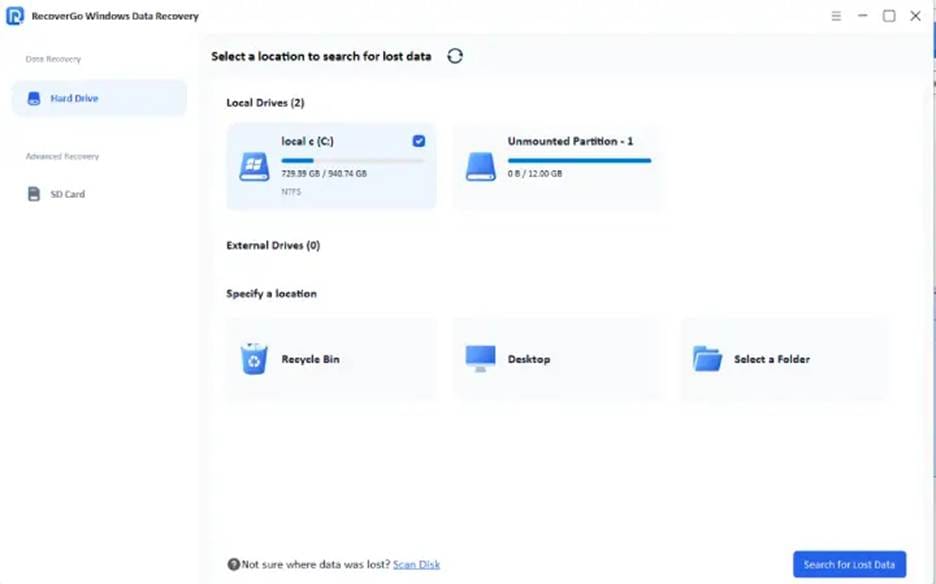
If backups are missing, recovery software is the next best step. iToolab RecoverGo is one example of a Windows data recovery tool built for situations like this. It scans drives for deleted documents, photos, and other common file types.
Choosing the best data recovery software for Windows gives small businesses a dependable backup plan when other methods fail.
Building a Simple Data Protection Strategy
A simple data protection strategy can prevent the most common data loss problems before they start.
Small steps taken now can save high costs and stress later. A basic plan takes very little time to set up.
Regular Backups
Set up automatic backups for every important file. Consider building these simple habits into your routine:
- Schedule daily or weekly automatic backups
- Store copies on an external drive and in the cloud
- Test backups regularly to confirm they work
Employee Awareness
Train your team to spot risky behavior online. Focus training on these key areas:
- Recognizing suspicious emails and links
- Saving files in approved business locations
- Reporting mistakes early instead of hiding them
Recovery Tools as a Backup Plan
Good habits do not always prevent problems. Have trusted recovery software as a backup for your team.
Conclusion
Data loss is an unfortunate reality for many small businesses. Whether caused by human error or hardware failure, the ability to respond quickly can make a significant difference in recovery outcomes.
A combination of regular backups, employee awareness, and reliable recovery tools can help organizations reduce downtime and protect valuable information. Solutions such as RecoverGo for Windows can serve as an additional safeguard when important files are accidentally deleted or become inaccessible.
Small businesses that prepare in advance are often better positioned to recover quickly and keep operations running smoothly.