RAID-5 is quite a popular choice for a redundant storage setup among individuals and small businesses. It requires a minimum of 3 member drives (HDD/SSD) to set up. RAID-5 uses block-level data striping with a single distributed parity. Parity is a calculated value stored in a block called "parity block".
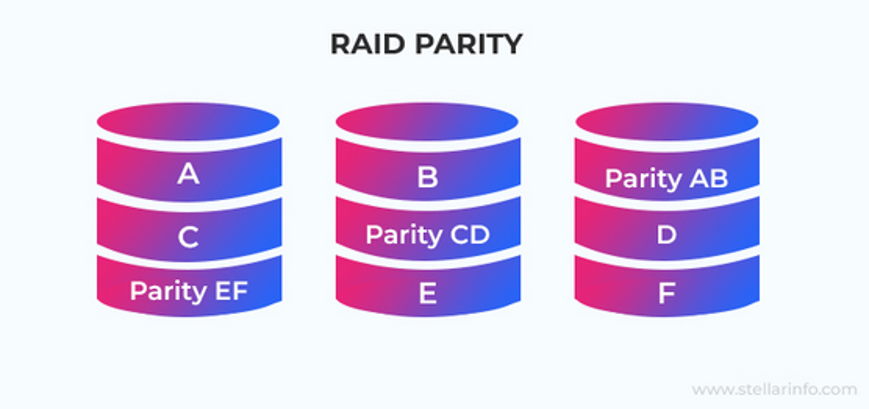
Due to this, RAID-5 has a fault tolerance of a single member disk failure. This means that if one of the member drives fails, the array continues to work, though under increased stress. In such a scenario, it is possible to retrieve the data with negligible loss. However, if another drive fails (which is highly likely due to increased R/W operation stress on the remaining member drives), it will result in a complete RAID-5 array failure - resulting in permanent data loss.
In this article, we'll explore some ways to recover data lost from a RAID-5 array. We will also discuss the reasons behind this.
Why Data Loss Happens in RAID-5?
Listed below are some reasons behind RAID 5 failure and subsequent data loss:
- Human errors (accidental deletion, partition formatting, etc.)
- Drive failure (bad sectors, mechanical issues, bit flips, and more)
- RAID software failure
- Controller failure
- Malfunctioning RAID controller, improper or loose connections, etc.
- Power outage
- DDoS attack
- Malware attack
Methods to Recover Data from RAID-5 Array
Follow the methods mentioned below to recover data from RAID-5.
Method 1: Recover RAID-5 Data from Backup
Whether you have accidentally deleted critical files or formatted a volume/partition, a backup can help you to restore lost or deleted files quickly. If you've been taking regular backups of at least important files stored in your RAID-5 array, on an external storage drive or cloud storage, you can use it to easily restore data even in case of multiple drive failures. All you have to do is rebuild the array from scratch and use the backup to populate it with your data.
Method 2: Hot-Swap the Degraded/Failed Disk
In case a single drive has failed, RAID-5 will work, but, not optimally. Simply hot-swap the failed member disk with a new disk. Once the RAID controller detects the new drive, it will use the parity blocks stored in other drives to recalculate the missing data and rebuild the degraded array.
However, you need to consider the following:
- The new disk should be of the same storage capacity, from the same brand, and of the same model/make as the failed drive. Any mismatch could cause compatibility problems.
- Any interruptions, like power surges or outages, etc., could corrupt the RAID configuration.
Method 3: Recover Data using a Specialized RAID Recovery Software
To safely recover deleted or lost files from your RAID array, you can use a specialized RAID data recovery software. These applications come equipped with advanced algorithms or data recovery engines that perform an in-depth byte-level scan on the member drives of the RAID-5 array to retrieve deleted or lost files.
Many RAID data recovery software also offer a feature to reconstruct the RAID array for data recovery, even when you don’t know or remember the RAID parameters, like start/end sectors, parity type, parity rotation, strip size, etc.
Manual recovery of data from a crashed/inaccessible RAID-5 can be risky. Hence, such a tool is deployed to recover data with 100% accuracy and precision.
Some advanced RAID recovery software available in the market also support data recovery from Nested RAID levels. These include RAID configurations, like RAID 10, RAID 50, RAID 60, and more. Moreover, they can also recover data from other types of storage media: HDDs, SSDs, SD cards, flash drives, optical media (CD/DVD), etc., or retrieve files and folders from crashed or unbootable Windows PCs. As an added functionality, these may also have a built-in drive monitor module that lets users monitor the health of connected storage media.
In general, these are a one-stop suite that can:
- Recover RAID data lost due to accidental deletion, volume formatting, and other reasons.
- Recover different types of files – documents, images, videos, presentations, mailbox data files (MBOX, OST, PST, etc.), and more.
- Restore individual files and folders from the scanned member drives of a RAID server.
Now let’s look at the general process to recover data from RAID-5 array:
- First, carefully disconnect all the member drives from the drive enclosure.
- Connect them to a Windows PC via SATA cables/RAID controller in the same sequence as in the enclosure.
- Download and install a RAID data recovery software of your choice. Use it to recover your data from the RAID-5 array.
After recovering files and folders, rebuild a new RAID-5 array from scratch and transfer the recovered data into it.
Tips to Prevent Data Loss from a RAID-5 Array
Here are some handy tips to prevent data loss from your RAID array:
- Carefully monitor the health of the drives.
- Follow the 3-2-1 backup technique – 3 data copies (2 on different storage media and 1 on the cloud).
- Keep the array in a well-ventilated, dust-free, and dry environment.
- Use a UPS with your RAID-5 array to avoid an abrupt shutdown.
- Always keep a specialized RAID data recovery software installed on a computer
Conclusion
RAID-5 configuration offers several benefits – data resilience, higher read/write speeds and more. However, like any other data storage device, it is susceptible to data loss for several reasons, such as drive corruption, controller failure, malware attacks, etc. In this post, we discussed some methods that you can use to recover data lost from a RAID-5 array due to drive failure, array crash, accidental deletion, or more.