



Epic Games has brought the Kernel Hearts crossover to Fortnite, adding Fernet to the game's growing lineup of crossover outfits.
There are two ways to get the Fernet outfit. You can purchase or pre-order Kernel Hearts through the Epic Games Store and receive the outfit as part of the purchase, or wait for Fernet to arrive separately in the Fortnite Item Shop.
Here's how both options work.
Can You Get the Fernet Skin for Free?
Yes, but it's more accurate to call it a gift-with-purchase rather than a free giveaway.
KERNEL HEARTS FERNET SKIN RELEASE DATE IN FORTNITE ITEM SHOP!https://t.co/k7Vk1QpjxS pic.twitter.com/5oHdZ4zQzp
— Fortnite Leaks 🕜 (@FortniteFNLK) August 17, 2026
Players who purchase or pre-order Kernel Hearts through the Epic Games Store receive the Fernet Outfit as part of the purchase. You don't need to spend additional V-Bucks on the outfit.
The important part is making sure you're using the same Epic Games account connected to your Fortnite profile. Otherwise, the outfit may not appear in your Locker.
How to Get the Fernet Skin With Kernel Hearts
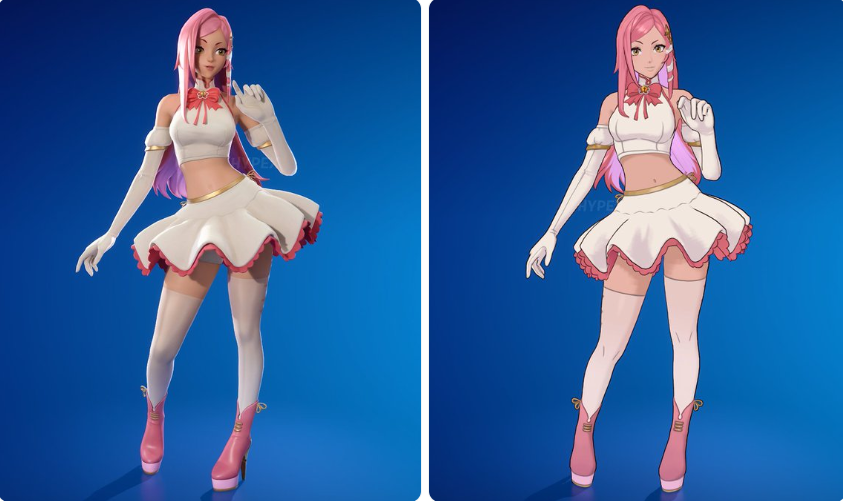
If you want to get Fernet through the Epic Games Store, here's what to do.
Step 1: Open the Epic Games Store
Open the Epic Games Store app on your PC or visit the store through your web browser.
Step 2: Find Kernel Hearts
Use the search bar to find Kernel Hearts and open its official store listing.
Step 3: Purchase or Pre-Order the Game
Purchase or pre-order Kernel Hearts for $19.99 using your Epic Games account. The Fernet Outfit is included with the purchase, so there is no separate V-Bucks charge for the skin.
Step 4: Check Your Fortnite Locker
After completing the purchase, the Fernet Outfit will be added to your Fortnite account. Open Fortnite and check your Locker to find the outfit. Make sure the Epic Games account you used to purchase Kernel Hearts is the same account you use for Fortnite.
Who Is Fernet?
Subscribe for free to continue reading this article
Subscribe SubscribeAlready have an account? Log in


