


In Los Angeles this week, Adobe took the stage for its annual Max 2025 conference, and as expected, the spotlight was firmly on AI. Over the three-day event, running from October 28th to 30th, the company is unveiling a wave of updates and experimental tools designed to make creative work faster, smarter, and more connected across its ecosystem.
So far, we’ve seen plenty of that vision in action. From Firefly’s upgraded generative models to a new social media “creative director” called Project Moonlight, Adobe made it clear that AI isn’t just another feature anymore; it’s becoming the foundation of how its tools evolve.
Here’s a look at some of the biggest announcements from Adobe Max 2025 so far.
Adobe announces "Project Moonlight"
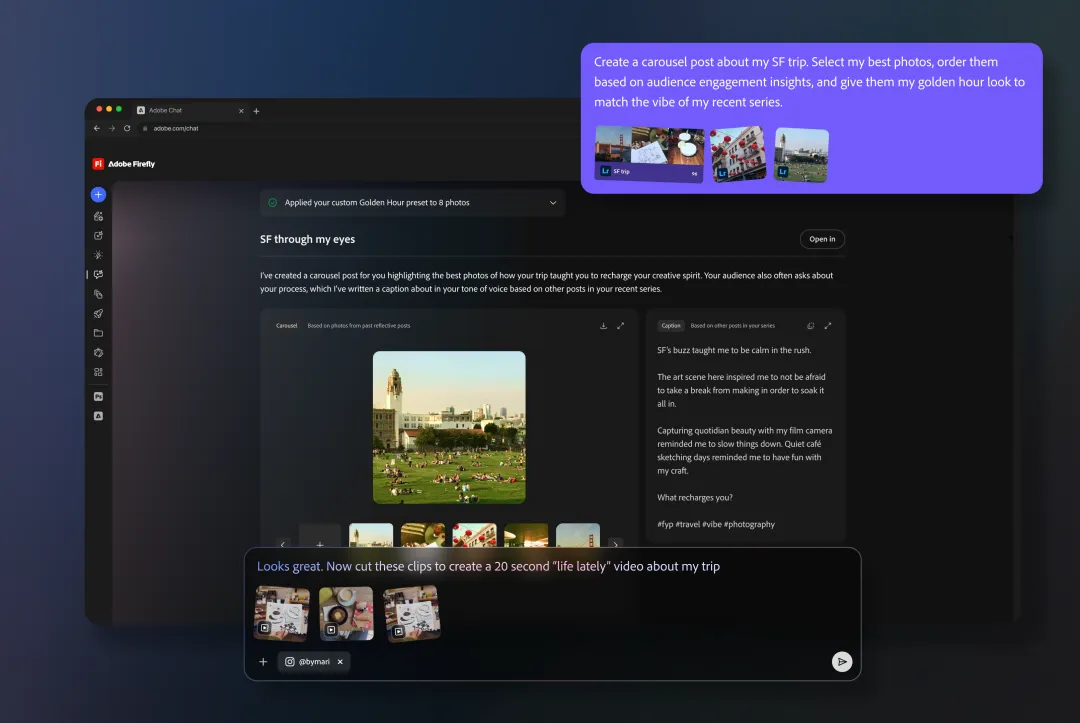
The first thing that caught our eye at the event was what Adobe calls Project Moonlight. You can think of it as an AI chatbot that doesn’t just talk to you but actually creates and refines ideas with you as you work through them.
Its refinements come from being connected across all your Adobe apps and linked social accounts. That means it can understand your creative style, use each Adobe tool toward a central goal, and even analyse social media data and metrics to generate optimised content for your platforms. For example, if you tell it you’re planning a product launch campaign, Moonlight could edit product shots in Photoshop, cut a short promo in Premiere Pro, tweak lighting in Lightroom, and then suggest caption ideas and posting times for Instagram and TikTok, all in one go.
In Adobe’s words, it’s your “personal orchestration assistant capable of coordinating across multiple Adobe apps and beyond.” In my words, it’s basically an AI-powered social media manager assistant.
To get it, though, Adobe says you'll have to sign up for the waitlist, where it'll be rolling out a private beta version in the coming months. - Louis
Adobe Express gets a new AI assistant
Adobe Express wasn’t left out of the AI updates either. The company has added a new AI assistant to the platform, extending its focus on making quick edits and simple design tasks even easier.
You can think of Adobe Express as a simplified version of Adobe’s creative tools rolled into one platform. Learning to use apps like Photoshop or Premiere Pro can be rewarding for professionals, but if you just need quick edits for school, business, or social media, Express is the easier option.
Instead of navigating menus and layers, you can type what you want in plain language, like “remove the background” or “make this photo look tropical.” It can also handle broader requests such as “make this pop,” surfacing relevant tools like colour pickers or brightness sliders so you can refine the result. The assistant works on individual elements, such as fonts, images, or backgrounds, or across a whole design without undoing your progress.
Video Credit: Adobe Express/YouTube.com
To be able to use this (or not, it's up to you), there'll be a new mode toggle that lets you switch between the familiar Express interface and the chat-style workspace where you can brainstorm or make changes through conversation. Adobe says the assistant also uses Adobe Firefly’s generative AI to pull assets such as stock images, fonts, or animations when needed. -Louis
Adobe Firefly can now do a bit more
Adobe also announced more additions to its Firefly AI. A couple of years back, Adobe launched its Adobe Firefly AI, a tool designed to help users produce and edit content using text prompts. As expected, it’s evolved over time, but it was still quite limited in functionality, never really branching out into audio.
But at the Adobe Max event, Adobe brought even more additions to make it more useful for creators.
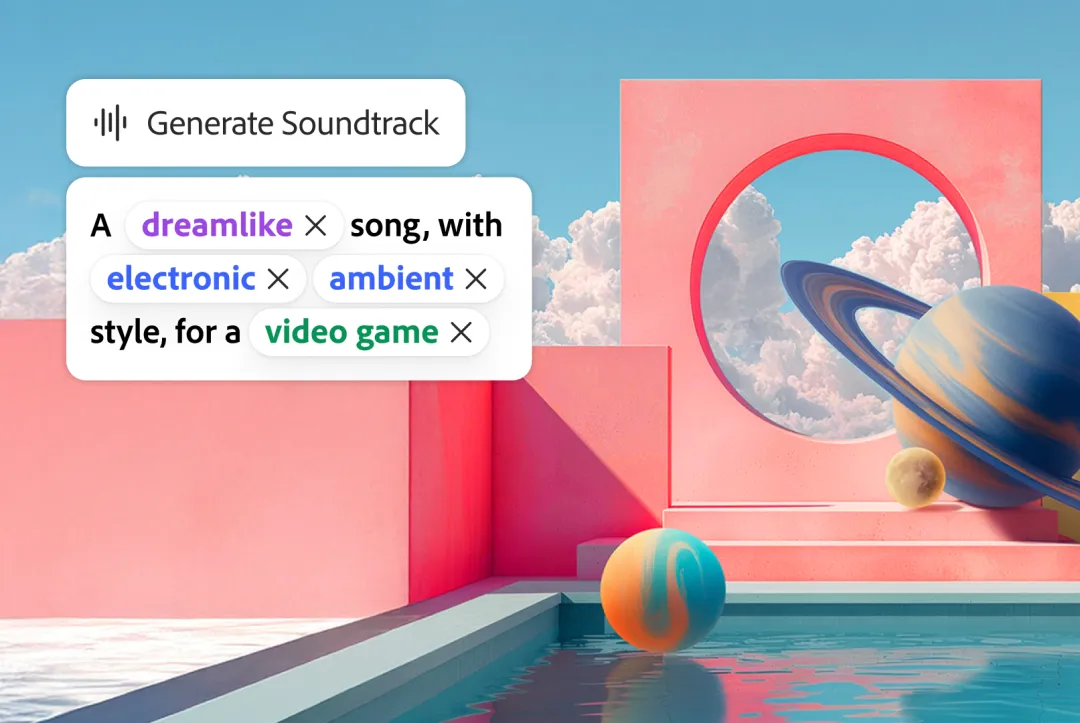
The latest update introduces custom model training, allowing users to create AI models based on their own styles, characters, or tones using just a handful of reference images. Firefly’s new Image Model 5 also supports layered editing, meaning you can move or replace objects within an image seamlessly, similar to how you’d edit layers in Photoshop.
Beyond visuals, Firefly now extends to audio and video with tools like Generate Soundtrack and Generate Speech, which can automatically add background music or voiceovers that sync with your footage. Adobe also previewed a web-based Firefly video editor, bringing together all these generative tools into a single, browser-based timeline for creating and editing videos directly online. -Louis
Photoshop and Premiere Pro get smarter editing tools
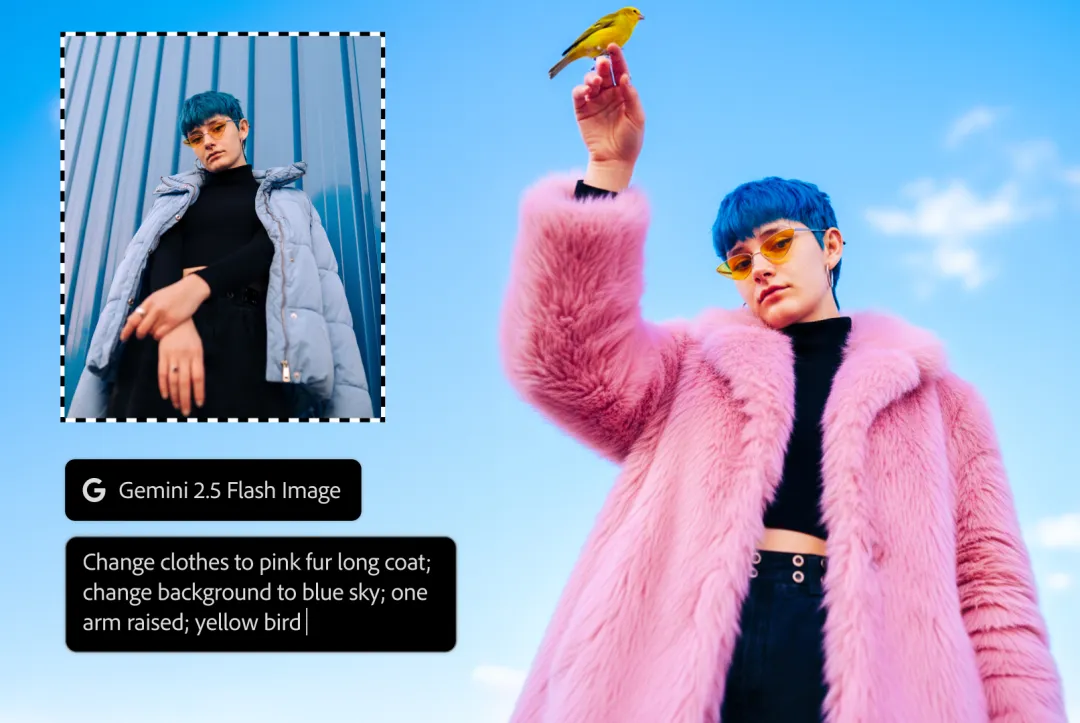
Adobe also rolled out updates to Photoshop and Premiere Pro that basically lower the skill barrier for editing. Before now, you needed some experience to pull off clean edits, but with the new generative fill and third-party AI model options, you can make complex adjustments almost instantly.
You can switch between models like Google’s Gemini 2.5 Flash, Black Forest’s Flux.1 Kontext, and Adobe’s own Firefly image model. Each gives slightly different results, so you can pick whichever fits the style you’re aiming for.
Photoshop on the web is also getting an AI Assistant. It works like a small chat box where you type simple prompts like “brighten the sky” or “add more warmth,” and it adjusts your image for you. No toggling through endless menus.
For video editors, Premiere Pro is getting AI Object Mask, which automatically detects people or objects in a video frame, so isolating subjects or applying selective effects is way faster. Lightroom is also getting Assisted Culling, which helps choose the best shots from a large batch so you don’t have to scroll through hundreds of similar photos.
A big part of these improvements is coming from Firefly Image 5, which now produces more realistic details and handles lighting and shadow adjustments more naturally. The idea is that generative edits should feel less like “AI pasted something in” and more like it blends into the scene. - David
Adobe wants to make editing YouTube shorts on Mobile easier

One thing Adobe rolled out before Max this year is Premiere Pro editing on the iPhone. The goal is to bring core desktop editing tools to your phone so you don’t have to wait until you’re back at your laptop to finish a cut. Android support is still in development, but it’s coming.
This ties into a new Create for YouTube Shorts hub that’ll live inside the Premiere mobile app and also directly inside YouTube. When it launches, you’ll get quick-access templates, transitions, and effects built specifically for Shorts, making it easier to edit and publish on the go. - David
Conclusion
It’s obvious that Adobe isn’t trying to replace creatives but is trying to speed up the parts of the process that slow people down. Will every feature land perfectly? Probably not. But the general direction is clear, and that is to make editing more enjoyable.
We’ll see how these tools feel once they hit everyone’s hands. From the previews so far, it looks like a step toward creativity with less friction.


