



Most people are not fans of watermarks on their content. These range from a little logo sitting in the corner of a perfect video. Or worse — the bouncing TikTok username floating around a downloaded video. For content creators, these marks can seem like stains on a new shirt. At times, unprofessional and hard to get rid of.
Testing the Vmake's Video watermark remover for this issue was worth a try. No fancy complicated layout or software. It is a simple tool that claims to clean your video with a single click. But does it really work?
The Vmake Watermark Remover
Vmake is an online platform packed with multiple AI tools. Users can remove video backgrounds and improve resolution. With a quick prompt, it can generate fashion models. And yes — erase watermarks like they were never there. If you want to recreate your TikTok videos, Vmake AI tool can be used to remove watermarks from TikTok videos instantly.
The best part of this tool is that everything happens in your browser. No downloads or installations are required. No "system requirements" issues either.
How Does the Vmake Watermark Actually Work?
Upload Video or Image
Here's the deal — you can upload videos or images without signing up. Most tools require users to complete pages of registration before uploading files. But not the Vmake. Visit the site, drop the video, and you are good to go.
Want to process multiple videos at once? The Vmake AI supports batch upload. And it handles prompts all in neat little cards.
Wait for the AI Processing
Vmake offers two modes, including;
Auto Mode: The AI automatically works on videos and watermarks, whether static or moving. Even the difficult ones that move around the screen. It works like a smart tool that finds only watermarks.
Manual Mode: Want to have control over your edits? You can draw boxes around what stays and what you want to remove. It allows you to protect the good part and erase the unwanted part. It is as simple as colouring inside the lines.
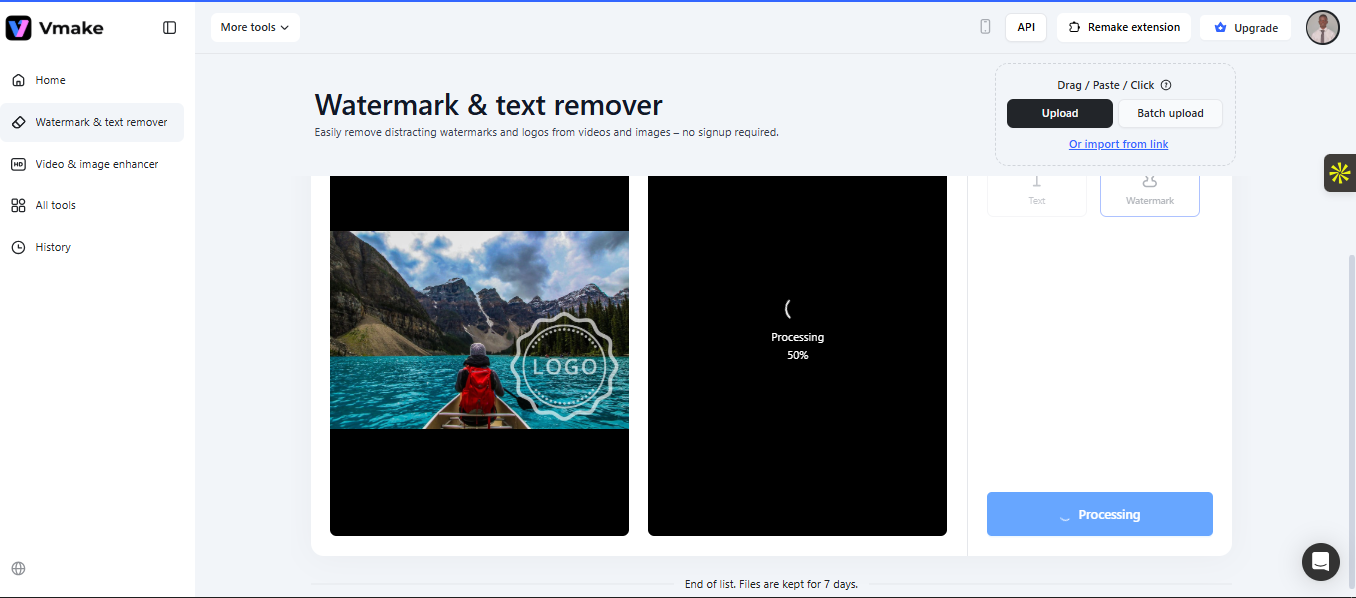
Download Your Clean Video
Preview the results after processing. If you are satisfied with the output, you can download it. The free version gives you a 5-second peek. Exporting the full video costs some credits.
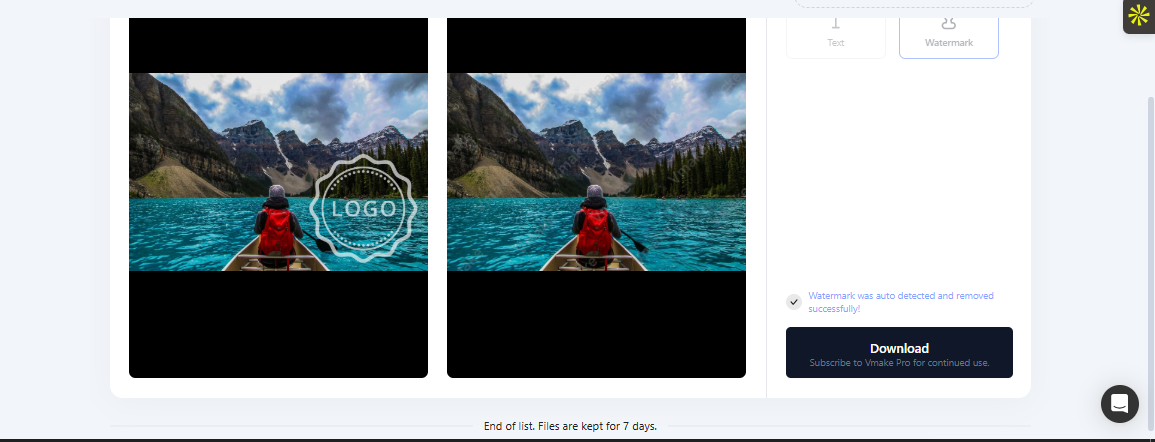
Real Results: The Good, the Bad, the Invisible
The Vmake Watermark Remover tool got tested with everything. From stock footage with copyright marks to AI-generated videos with platform logos. This also included TikTok downloads with a username tag. The output was simply quality results.
- Stock Watermarks: The AI filled in the background so smoothly that you would never know anything was there. It was gone after the edits.
- TikTok Logos: This is where VMake shines. Their dedicated Remove TikTok Watermark tool doesn't just blur things; it removes them. It understands TikTok's specific branding and targets the precise removal of the logo and username.
The Vmake AI Pricing
Using the full features of Vmake AI requires additional credits. The various pricing tiers include:
Free Version
Users can try Vmake AI for free. The free watermark remover mode lets you preview your video without the watermark to see if it works.
Paid Plan
$9 a month gets you the full tool package. You can access full HD downloads and unlimited watermark removal. Plus all the other Vmake tools—video upscaling, background removal, subtitle generation, and AI video creation.
Credits
Vmake runs on credits. That is, each processing task requires credits. If you are a heavy user, you can buy credit bundles: 1,000 credits on the Plus plan or 4,500 credits on the Pro plan.
Who can use the Watermark Remover Tool?
The Vmake is useful for almost anyone who has watermark issues in their videos.
Content Creators Going Cross-Platform
You made an amazing TikTok video and want to post it on other social media platforms. However, the hiccup is the bouncy TikTok watermark that makes it reused content. The watermark remover helps you make clean videos for every platform—no watermark drama; just pure content.
TikTok Downloads That Need Cleanup
Downloaded a TikTok for a presentation or portfolio? That watermark with the username may look unprofessional. Vmake handles both the logo and the username, even when they're bouncing around the screen.
AI-Generated Videos
AI video tools are incredible. But those watermarks? Not so much. Whether you're using Sora, Veo, Kling, or another generator, VMake strips away those pesky marks so your AI masterpiece looks professional.
Marketing Teams Refreshing Old Content
If you have a library of videos with outdated campaign watermarks, the Vmake AI offers a fix. This also extends to client logos that need updating and user-generated content that needs cleaning—no need to start from scratch.
Educators and Course Creators
Screen recordings can capture many extra details, such as dates, small icons, and pop-up messages. These things can distract people from the lesson. The Vmake watermark remover offers a great fix.
What Works Great with the Vmake AI?
The user interface does not get you stressed if you are new to it. You can easily drag and drop files to use this tool without tutorials. And the browser-based mode means no clogging up your computer with another program.
The Vmake AI comes at a high success rate. With batch processing, you can upload 30 videos, grab a coffee, and come back to clean footage. It works on them individually, as you would ordinarily expect for a single file.
Moving watermarks do not stand a chance. While other tools may process over-animated logos poorly, Vmake tracks like a bloodhound. Your videos get processed without sitting on the server forever.
Improvements with the Vmake AI
The 5-second free preview feels less, although it is enough for testing. Also, users cannot buy credits for a single tool, such as the watermark remover. You have to get the whole suite whether you want it or not. Plus, processing times vary for videos. Short videos take a few minutes. And long or complex ones may take longer.
Conclusion
Vmake delivers for most real-world situations. The free watermark remover saves hours of tedious work. And the Remove TikTok Watermark feature alone justifies bookmarking the site.
The no-signup policy shows confidence with a free preview and AI quality that makes the experience enjoyable. Typically, Vmake actually establishes a near-perfect workplace. Watermarks disappear, videos look professional, and creators get back to creating instead of editing.


