Lately, it feels like every piece of software we rely on has decided it needs a monthly payment. From our streaming services to our favourite coffee, everything is a subscription. That’s why the battle between the industry giant, Adobe Photoshop, and the suddenly revitalised competition, Affinity Photo, is such a critical one. What used to be a clear choice, 'Photoshop reigns supreme', is now a genuine toss-up, forcing creators to weigh years of dominance against a modern, budget-friendly challenger.
Choosing the right tool isn't just about the features; it's about what fits your wallet, your hardware, and your way of working. Do you stick with the proven, all-encompassing platform, or do you leap to the highly capable alternative that promises ownership, not debt?
We’ll unpack how these two giants match up in real-world use, so you can pick the one that actually fits your creative life.
/1. Pricing & Licensing
Right off the bat, this is arguably the biggest deciding factor for most people, and pretty much what brought about the whole debate in the first place.
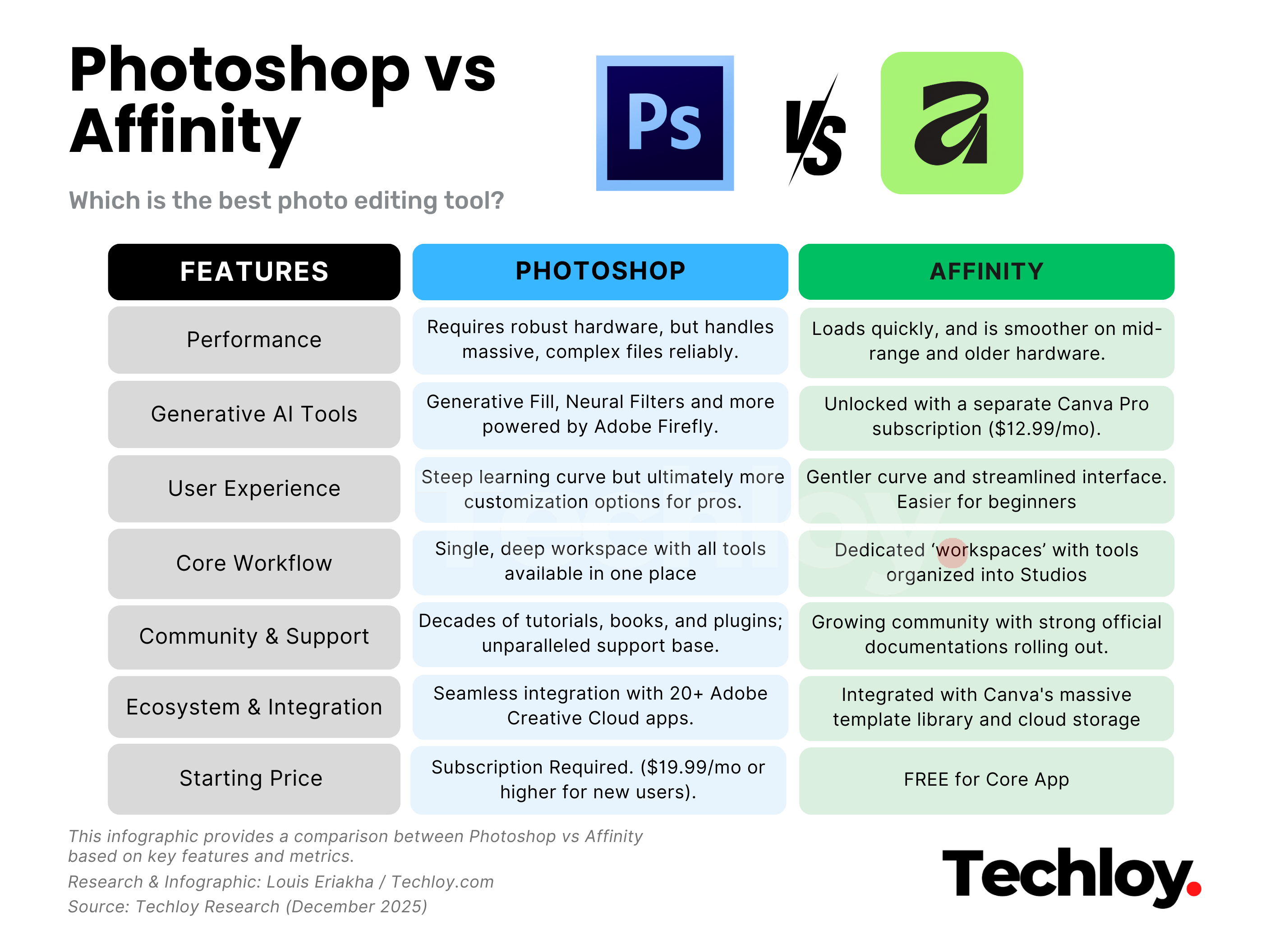
Photoshop is available only through the Adobe Creative Cloud subscription. The most popular option is the Photography Plan, which bundles Photoshop and Lightroom for around $19.99/month. It's affordable to start, but that cost is forever, adding up to over $200 a year. On the flip side, you get constant updates and cloud storage, keeping you on the cutting edge.
Affinity by Canva completely obliterated its old one-time purchase price. The core application, which now unifies the features of Affinity Photo, Designer, and Publisher into a single interface, is now completely free to download and use on Mac and Windows. There are no feature restrictions, no time limits, and no watermarks. This shift is a game-changer, making Affinity the ultimate entry point for students, hobbyists, and budget-conscious freelancers who refuse to join the subscription club.
/2. Performance & System Requirements
The cost savings from the first section don't matter if the software chugs along like an old steam engine. Thankfully, this is where the new contender really shines.
Affinity is renowned for its blistering speed and smooth performance. It's built from the ground up to be lean, fast, and highly optimised for modern hardware, including native support for Apple Silicon. It loads faster, handles huge layer documents smoothly, and generally feels more responsive than its competitor, even on mid-range machines.
Photoshop, weighed down by decades of added features and its constant cloud connection, is famously a bit of a resource hog. While it flies on high-end machines, it can feel sluggish on older devices. Complex projects with dozens of layers or heavy use of its newer AI features (like Generative Fill) require significant CPU and RAM power. However, that resource demand is the price of admission for its massive capability, which we’ll get to next.
/3. Core Features & Toolset
For decades, Photoshop’s tool chest was simply larger and deeper, especially in niche areas. Now, the feature gap is closing fast, largely thanks to a powerful acquisition.
Both applications have all the non-negotiables for professional editing: non-destructive layers, masking, adjustment curves, and high-end retouching tools (like Affinity’s excellent native Frequency Separation).
Photoshop retains its edge in raw depth and proprietary AI. Its Adobe Firefly and integrated Gemini AI models power revolutionary tools like Generative Fill (adding or removing content with a text prompt) and specialised Neural Filters for advanced retouching. These remain industry-leading, but there’s a catch: Adobe limits how many times you can use these premium AI features via Generative Credits.
Affinity’s core tools are free, but its new association with Canva is key. Users with a separate Canva Pro subscription ($12.99/month) can now unlock Canva AI features directly within Affinity, including Generative Fill and background removal. This means the powerful AI capabilities are now accessible, although they require paying into a separate ecosystem.
/4. Ecosystem & Compatibility
A photo editor is never used alone; it’s part of a larger creative world, and this is where the two diverge into distinct orbits.
Photoshop is the undisputed industry standard and the anchor of the massive Adobe Creative Cloud. If your job involves video (Premiere Pro), vector graphics (Illustrator), or layout (InDesign), the seamless file integration, shared cloud libraries, and team-based collaboration features are non-negotiable professional necessities. The .PSD file is the universal currency of the design world.
Affinity, on the other hand, is now fully integrated into the Canva ecosystem. While it can open and edit most .PSD files, crucial for compatibility, its real power now lies in linking to Canva’s massive library of templates, brand assets, and cloud storage. For designers who also manage social media, presentations, or quick marketing assets, this synergy is now incredibly powerful. For solo professionals, Affinity’s new free status means collaborators no longer need to buy the software just to open a native file.
/5. User Experience & Learning Curve
This section determines how much time you spend editing versus how much time you spend searching for the right menu.
If you’re a complete beginner, Affinity remains the more approachable choice. Its interface is cleaner, and the original Photo/Designer/Publisher separation has been replaced with customizable "Studios" (Pixel, Vector, Layout), which still manage to segment the vast toolset into less intimidating workspaces.
Photoshop, with its countless layers of features and options, has a much steeper learning curve. It demands time to master, but its depth rewards professionals with virtually limitless customisation and control. Users switching from Photoshop will find many shortcuts familiar in Affinity, but they'll need to adjust to the new Studio/Persona logic.
/6. Community & Support Resources
When the inevitable happens, and you get stuck mid-project, where do you turn for help?
Photoshop has an unmatched, decades-deep ocean of resources. You can find a tutorial for virtually any problem, feature, or version of the software on YouTube, blogs, and forums. The third-party plugin and brush market is also astronomical.
Affinity’s community is growing rapidly, boosted by the free access, and Canva has invested heavily in official documentation and video tutorials. However, the community is still smaller and newer. You might have to search a little longer for a highly niche solution, but the trade-off is a very engaged, supportive, and active official forum.
Conclusion
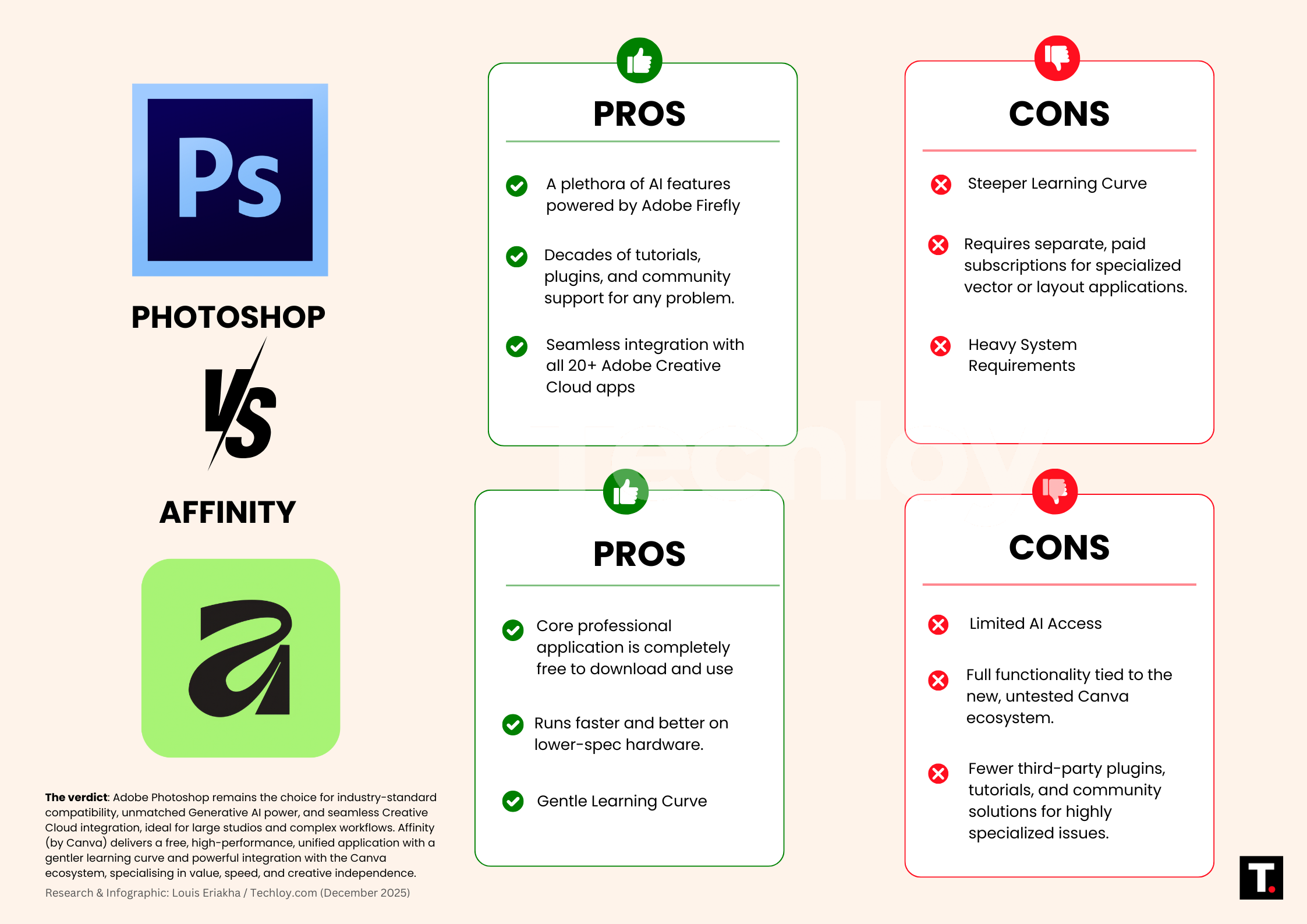
This isn’t really a question of which app is better, but which one fits how you work. Photoshop still makes sense for teams and professionals deeply embedded in Adobe’s ecosystem, where its AI tools and industry-standard workflows justify the subscription.
Affinity by Canva, however, has flipped the script. With fast performance, a free core app, and optional access to Canva’s AI and templates, it’s now a serious, no-compromise alternative for creators who want professional tools without a monthly bill. In a subscription-heavy world, that alone makes the choice clearer than it’s ever been.
 Kelechi Edeh