



When it comes to computer accessories, few tools are more personal than a mouse. It’s the thing your hand touches most during the day, your command centre, your creative wand, your workhorse.
Apple’s Magic Mouse and Logitech’s MX Master 3S are two of the most popular premium mice on the market, but they represent completely different philosophies. One is an exercise in minimalism, blending seamlessly into Apple’s design language.
The other is a feature-packed productivity machine designed for comfort and customisation. Choosing between them isn’t just about specs; It’s about how you work, what you value, and how long you’ll be at your desk.
So, let’s take a closer look at the design, features, battery life, connectivity, and pricing of each, and figure out which mouse might actually work best for you.
Design and Build Quality
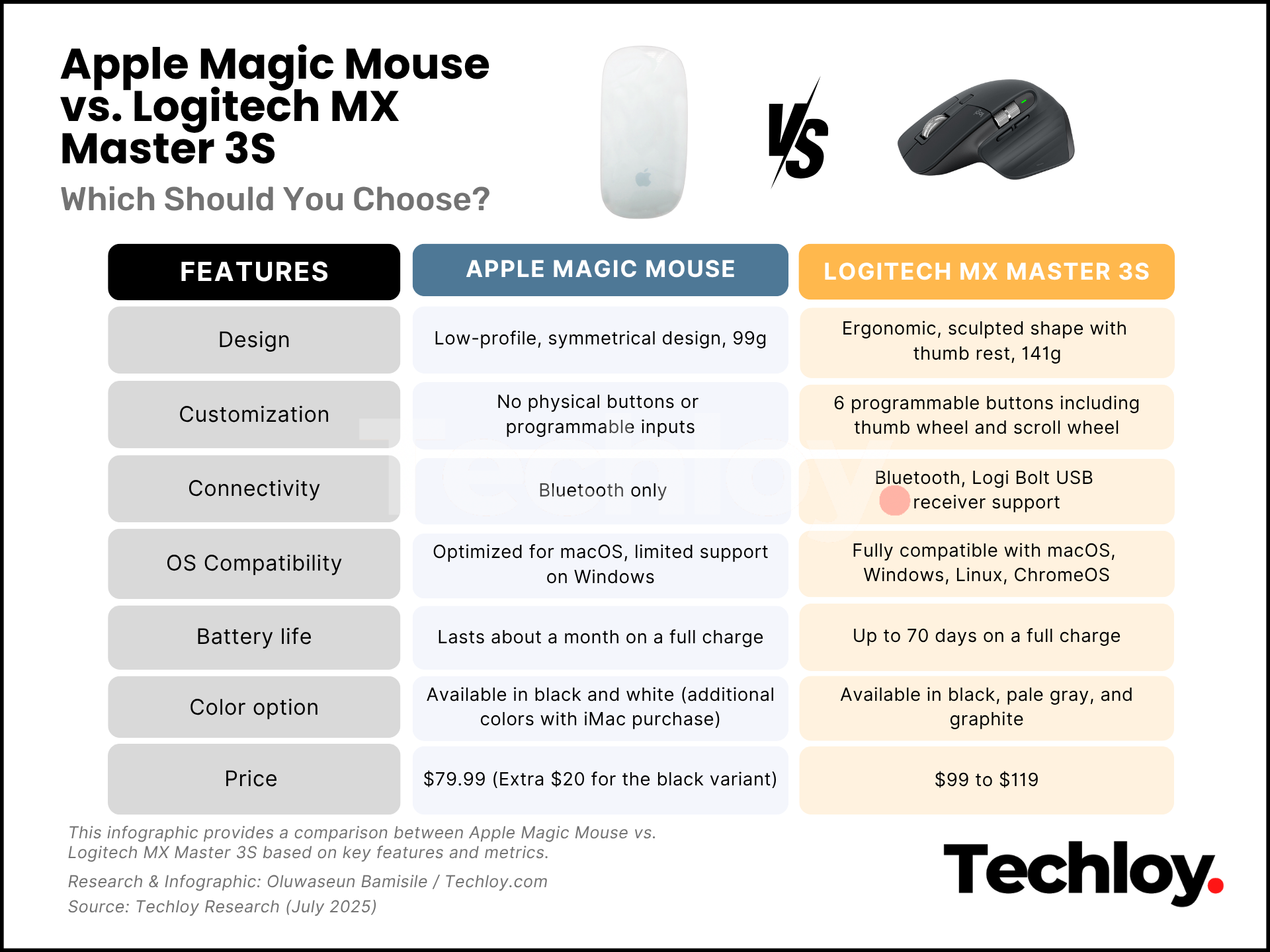
The first thing you notice when holding each mouse is how dramatically different they feel. The Apple Magic Mouse is slim, symmetrical, undeniably stylish, and weighs about 99 grams. Its hyper-glossy exterior reflects Apple’s obsession with clean, minimalist aesthetics.
But that same surface is also a magnet for fingerprints and smudges. Thankfully, they’re easy to wipe away with a microfiber cloth.
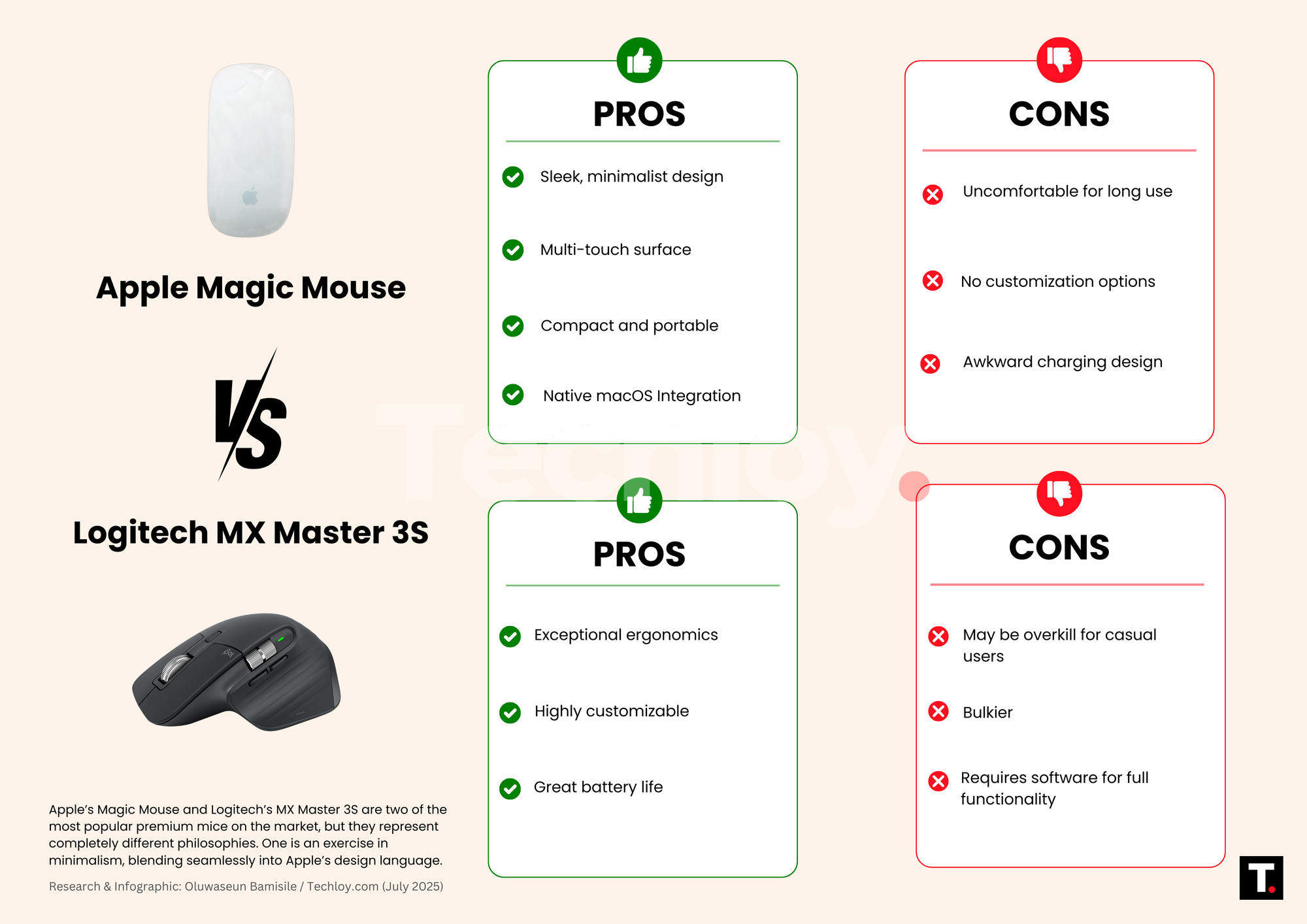
The low profile and lightweight body make it easy to toss in a laptop bag, but that same flatness can become a problem with extended use. It offers virtually no support for your palm or wrist, which can lead to strain after long hours at the desk. Design-wise, it’s a beautiful object, though arguably better suited for short bursts of use rather than full-day productivity.
In terms of colour, the standalone Magic Mouse comes in two standard finishes: black and white. However, if you purchase it with an iMac, Apple offers some playful extras, including green, orange, pink, purple, and yellow.
On the other side of the desk, the Logitech MX Master 3S looks and feels like a tool crafted for performance. A subtle wing on the left side supports your thumb like a built-in cushion, while the mouse’s contoured body guides your hand into a relaxed, neutral grip.
Soft ridges and a smooth, rubber-like exterior enhance the grip and provide tactile comfort without feeling cheap. This mouse also weighs around 141 grams, somewhat heavier than the Magic Mouse. It’s available in three subtle, professional colours: black, pale grey, and graphite, each adding a sleek, modern feel to the functional design.
Winner: Logitech MX Master 3S. While the Magic Mouse wins in aesthetic appeal, the MX Master 3S is built for comfort and long hours of work.
Features and Customisation
Here’s where the divide grows even wider. The Magic Mouse keeps things simple. Its top surface supports multi-touch gestures—swipe left to go back in a browser, scroll with a finger flick, tap to zoom. These gestures feel native in macOS and make navigating a breeze for basic tasks. But beyond that, it offers no programmable buttons, no app-specific settings, and no layers of customisation.
The MX Master 3S, by contrast, is a customisation playground. It features six programmable buttons, a horizontal thumb wheel, and a main scroll wheel that shifts between ratcheted and free-spin modes. With Logitech’s Options+ software, you can customise actions for individual apps—have different buttons do different things in Photoshop, Chrome, or Excel. There’s even gesture support if you hold one button and move the mouse in different directions.
It’s the kind of mouse that adapts to your workflow, not the other way around. Whether you’re editing video, coding, or flying through browser tabs, the 3S helps you move faster and smarter.
Winner: Logitech MX Master 3S. If you value control and want your mouse to match the way you work, the MX Master 3S runs circles around the Magic Mouse.
Battery Life and Wireless Connectivity
When it comes to battery life, both mice perform impressively, but with some frustrating differences. The Magic Mouse can go weeks on a single charge, and a few minutes plugged in gives you hours of use.
But there’s a catch: the charging port is located on the bottom of the mouse. That means when the battery dies, you can’t use the mouse at all until it’s charged. It’s a design decision that’s baffled users for years, and Apple still hasn’t fixed it.
The MX Master 3S also boasts an excellent battery life, up to 70 days on a full charge, and it charges via USB-C while in use. You can plug it in and keep working without missing a beat. It connects via Bluetooth or the Logi Bolt USB receiver, and can pair with up to three devices at once, switching between them with a tap.
Winner: Logitech MX Master 3S. The 3S offers longer battery life, more flexible charging, and seamless multi-device pairing.
Price
Both the Magic Mouse and the MX Master 3S are priced as premium accessories. The Magic Mouse typically retails around $79.99, and for that, you’re largely paying for Apple’s design and its tight integration with macOS. To add icing on the cake, Apple charges you an extra $20 if you want the black variant.
However, the MX Master 3S costs a bit more—around $99 to $119, depending on the retailer. But you’re getting significantly more functionality. Extra buttons, ergonomic design, device-switching, horizontal scrolling, and per-app customisation justify the slightly higher price tag, especially for power users or professionals.
Winner: Logitech MX Master 3S. For the same ballpark price, the MX Master 3S gives you more control, more features, and better value.
Final Verdict
If you’re a diehard Apple user who loves minimalism and works mostly with light productivity apps, the Magic Mouse will fit your workflow just fine. It’s gorgeous, reliable, and feels right at home next to a MacBook or iMac.
But if you’re spending serious time at your desk, multitasking across apps and devices, or simply want a more ergonomic and powerful tool, the Logitech MX Master 3S is hard to beat. It’s the kind of mouse that actually improves your workflow and lets you tailor your experience to your needs.
In this head-to-head, form meets function, but function takes the win.


