Cutting the cable cord no longer means losing access to live television. It just means choosing a streaming service that fits your needs. Today, the market is crowded with options, and the real challenge isn’t finding a cheaper alternative, but finding one that actually works for your viewing habits.
Two of the biggest names in this space are Hulu + Live TV and Sling TV. Hulu + Live TV, owned by Disney, combines traditional live channels with Hulu’s massive on-demand library. It’s pitched as an all-in-one solution for households that want both live programming and streaming originals. Meanwhile, Sling TV, operated by Dish Network, is designed to be a more flexible option, letting you pick packages based on your needs.
In this comparison, we’ll pit Hulu + Live TV and Sling TV against each other across key categories to help you decide which service is the better match for your household.
 Oluwaseun Bamisile
1./ Platform Support
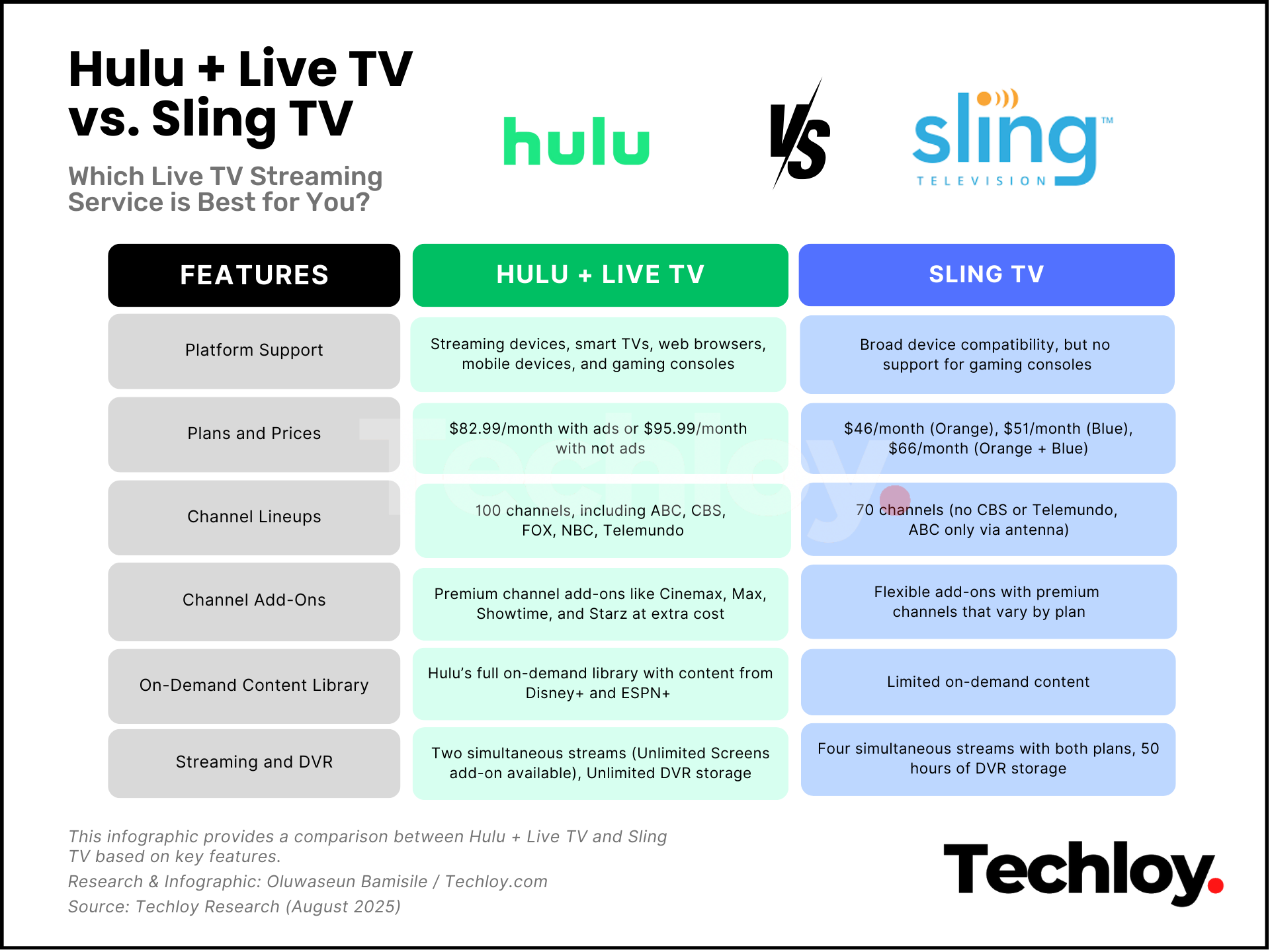
Both services make sure you can watch on the most popular devices, but they take slightly different approaches to their apps. Hulu + Live TV runs on pretty much everything: smart TVs from all major brands, Roku, Amazon Fire TV, Apple TV, Chromecast, game consoles like Xbox and PlayStation, iOS and Android devices, and any modern web browser.
The app is polished, unified, and lets you hop seamlessly between live TV, on-demand shows, and bundled services like Disney+.
Sling TV also covers all the core platforms, including streaming sticks, smart TVs, mobile devices, and browsers. But you can't find it on PlayStation and Nintendo Switch consoles.
Nonetheless, its strength lies in being lightweight. It runs smoothly even on slower devices or older TVs, which makes it appealing for setups that aren’t top-of-the-line.
The interface is also clean and uncluttered, though not as feature-packed as Hulu’s. Interestingly, Sling TV has a dedicated app for the Meta Quest headset line; meanwhile, Hulu doesn't support VR at all.
Winner: Tie. Both services are accessible on nearly every major platform, so there’s no clear advantage here.
2./ Plans and Prices
Hulu + Live TV runs $82.99/month and includes live channels, its full on-demand library, plus ad-supported Disney+ and ESPN+. You can skip most ads by upgrading to $95.99/month, though some partner content will still have commercials.
Sling TV is much cheaper and offers two plans, Orange and Blue. The Orange plan is geared towards sports fans and families, costing $46/month. Meanwhile, the Blue plan is tailored for pro football fans and news watchers, and costs $51/month.
Interestingly, you can get both plans for $66/month. Sling also sweetens the deal with frequent hardware promos, sometimes tossing in devices like the AirTV Mini if you prepay for a couple of months.
Winner: Sling TV. It’s not as feature-packed as Hulu, but Sling’s lower cost and hardware perks make it the better value.
3./ Channel Lineups
When it comes to variety, Hulu + Live TV takes the crown. It offers around 100 channels compared to Sling TV’s 70, and crucially, it carries all the major broadcast networks, including ABC, CBS, FOX, NBC, and Telemundo. Sling TV skips CBS and Telemundo entirely, and ABC is antenna-only, but it offers FOX and NBC affiliates in certain regions.
Hulu’s news coverage is broader, too, with ABC News Live, CBS News, CNBC, CNN International, and FOX Business, all missing from Sling TV. Sling TV counters with BBC America and Local Now, but overall has fewer options.
Sports fans will notice a major difference. Hulu packs in CBS Sports Network, multiple ESPN channels, FS1, FS2, Golf Channel, and NFL Network. Sling’s lineup is lighter, with just ESPN, ESPN2, and FS1.
For entertainment and lifestyle, both share many big names, but Hulu adds channels like Pop, Cozi, PBS Kids, and Smithsonian Channel, giving it a stronger edge for families.
Winner: Hulu + Live TV. More channels, better local coverage, and stronger sports make Hulu the clear choice here.
4./ Channel Add-Ons
Hulu + Live TV keeps things straightforward with premium add-ons like Cinemax, Max, Showtime, and Starz, plus two bundles: Entertainment ($7.99/month) with extra lifestyle and niche channels, and Español ($4.99/month) with sports and entertainment in Spanish.
Sling TV takes a more à la carte approach. Depending on your base plan (Orange, Blue, or both), you can add extras like Sports, Comedy, Kids, News, Lifestyle, Hollywood, and Heartland, most for $6/month (Sports is $11).
It also offers a wide range of premium channels, like Starz, BET+, MGM+, Shudder, and more, and a stronger lineup of foreign-language packages, especially for Latino audiences.
Winner: Sling TV. Hulu’s add-ons are solid, but Sling’s flexibility and variety give it the advantage.
5./ On-Demand Content Library
If on-demand viewing is a big part of your streaming life, Hulu + Live TV is tough to beat. You get Hulu’s full streaming library, packed with originals like Only Murders in the Building and The Bear, plus current-season TV from major networks, and a huge backlog of movies and shows.
The bundle also includes Disney+ and ESPN+, giving you an even bigger pool of content without juggling separate subscriptions.
Sling TV does have on-demand content from its partner networks, but it’s not unified in the same way Hulu’s library is. You’ll find shows and movies, but it’s more like a collection of channel-specific extras than a cohesive library.
Winner: Hulu + Live TV. For sheer volume, variety, and integration, Hulu’s on-demand offering is in a different league.
6./ Streaming and DVR
Both Hulu + Live TV and Sling TV stream in 1080p at 60fps, with some content reaching 4K on compatible devices. Audio support is similar, too. Both support stereo audio with live TV streams, with select on-demand shows in 5.1 Surround Sound.
Where they differ is in flexibility. Hulu allows two simultaneous streams unless you pay $9.99/month for unlimited screens at home (plus three on the go). Sling TV's Orange plan allows one stream at a time, while the Blue plan allows up to 3 simultaneous streams. If you subscribe to both the Orange and Blue plans together, you get 4 simultaneous streams.
On the DVR (digital video recorder) front, Hulu wins hands down. It includes unlimited recording at no extra cost, while Sling’s default is 50 hours, upgradeable to unlimited for $5/month.
Winner: Hulu + Live TV. Generous DVR storage and the option for unlimited screens make Hulu the stronger choice for heavy streamers.
My Final Take
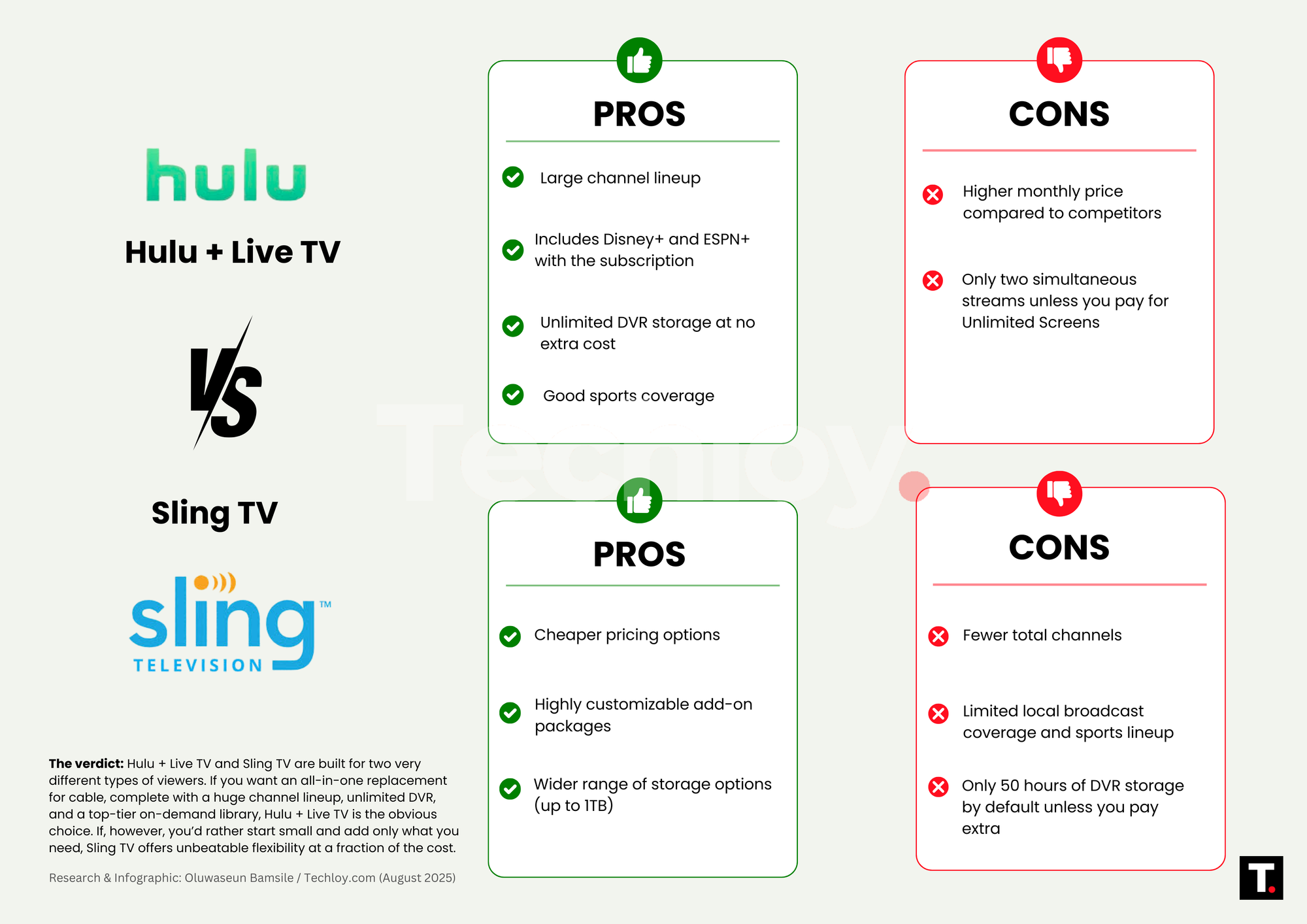
Hulu + Live TV and Sling TV are built for two very different types of viewers. If you want an all-in-one replacement for cable, complete with a huge channel lineup, unlimited DVR, and a top-tier on-demand library, Hulu + Live TV is the obvious choice.
It’s the premium option, and you’ll pay a premium price. If, however, you’d rather start small and add only what you need, Sling TV offers unbeatable flexibility at a fraction of the cost.
You won’t get the same breadth of content or local coverage, but you’ll keep your bill lean and your lineup curated.
 Fishon Amos