



Apple wants you to believe the future of professional laptops is a touchscreen MacBook with a PROLED XDR display so good it makes everything else look ordinary. Dell, meanwhile, has spent 2026 rebuilding the reputation of its XPS brand with a thinner, lighter laptop that packs serious performance into a premium design.
Both machines want a place on the desks of developers, designers, video editors, and other professionals who need more than a basic laptop. Both also demand a premium price.
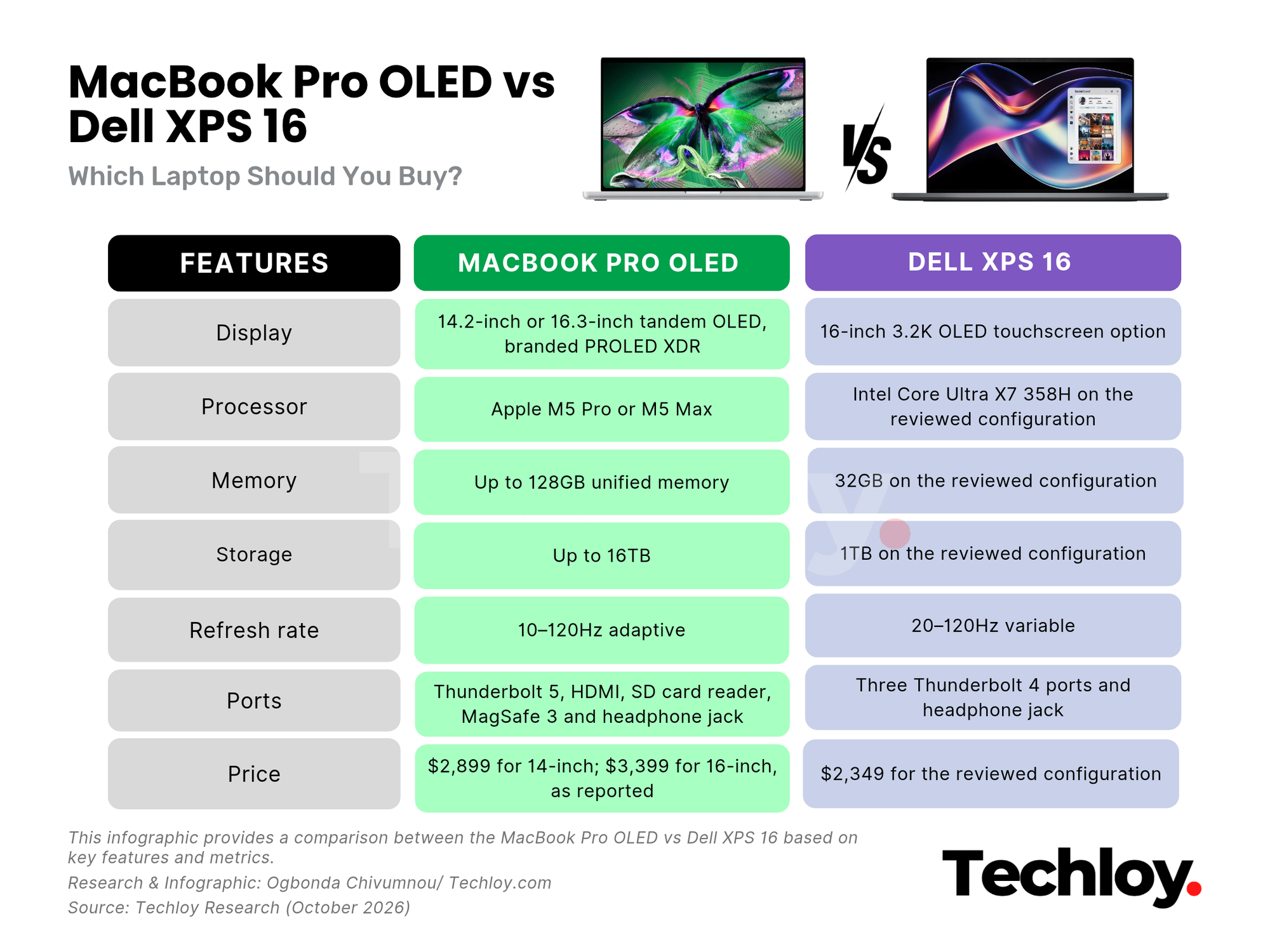
But there's a catch. Apple's new MacBook Pro OLED starts at $2,899 for the 14-inch model, while Dell's XPS 16 costs around $2,349. That's a $550 difference before you even consider upgrades. Preorders opened October 28, with deliveries and retail availability starting November 6.
So, does Apple's long-awaited touchscreen MacBook justify the extra money, or has Dell built the smarter buy? The answer depends on what you need your laptop to do and which compromises you're willing to accept.
 Oluwajeminipe Fasheun-Motesho
/1. Design and portability
Dell's XPS 16 looks like a laptop designed for people who want a big screen without the usual bulk that comes with it.
The 2026 model weighs around 3.65 pounds and measures approximately 14.6mm thick. Its CNC-machined aluminium chassis gives it a solid, premium feel, while the Graphite finish adds a bit of understated character. It can pick up fingerprints, but that is a minor complaint on an otherwise well-built machine.
Dell has also made some welcome changes to the keyboard. The capacitive function row from previous models is gone, replaced by physical keys. The trackpad now has subtle visual markings around its edges, making it easier to locate without sacrificing the clean design.
There are trade-offs, though. The keyboard has relatively shallow travel, and early XPS 16 units reportedly suffered from key-registration problems. Dell said it had addressed the issue in newer units and planned a software fix for affected devices.
Apple has made meaningful changes to the MacBook Pro's design, too. Its tandem OLED display has allowed for a thinner and lighter chassis, slimmer bezels, and slightly larger screen sizes. The 14-inch model weighs around three pounds, while the 16-inch version comes in at approximately four pounds, depending on the configuration.
Apple has also brought back its illuminated logo on the lid, giving the laptop a nostalgic flourish.
The redesigned hinge is particularly important. Touchscreens are awkward on traditional laptops when the display moves every time you tap it, so a firmer hinge could make a genuine difference. Apple has also replaced the familiar notch with a Dynamic Island-style cutout.
/2. Display
The MacBook Pro OLED's display is the biggest reason to consider spending the extra money.
Apple's tandem OLED panel uses two layers of light-emitting pixels to improve brightness while maintaining consistent colour and grayscale performance. Unlike a traditional backlit display, OLED can switch individual pixels off completely, producing deep blacks without the glow or blooming that can appear around bright objects on darker backgrounds.
Apple claims a 10,000,000:1 contrast ratio and peak brightness of 2,000 nits. The panel can also reach 1,000 nits across the full screen, according to the company, and drop to just one nit in dark environments.
Those numbers matter if you work with HDR video, photographs or other content where the difference between a deep shadow and a bright highlight needs to remain visible. A glassblowing scene, for instance, can show the intense glow of molten glass alongside the darkness of the surrounding room without the two bleeding into each other.
Colour reproduction is another advantage. The display supports Adobe RGB as well as P3 and covers more than 80% of the Rec. 2020 colour space, according to Apple. That wider gamut could be especially useful for photographers, video editors, and designers who need more control over colour.
The Dell XPS 16 is no slouch. Its optional 3.2K OLED touchscreen delivers sharp details, vibrant colours, and excellent viewing quality. Its thin bezels also make the screen feel more immersive, while the 20–120Hz variable refresh rate allows it to adapt to the content on screen.
But its reported 400-nit nominal brightness is far from Apple's claimed figures. Brightness specs don't tell the whole story, and the two screens would need to be tested under the same conditions for a definitive comparison. Even so, Apple's higher brightness ceiling, per-pixel lighting and stated contrast ratio give it a clear advantage on paper.
For people who spend their working day editing footage, grading images, or reviewing colour-sensitive projects, this difference could be worth paying for. For general office work, web browsing and watching videos, the XPS 16's OLED display should still be more than capable.
/3. Performance
The MacBook Pro OLED uses Apple's M5 Pro and M5 Max chips, while the Dell XPS 16 configuration uses Intel's Core Ultra X7 358H processor with integrated Intel Arc graphics.
These are different hardware platforms, so simply comparing processor names won't tell you which machine is faster in every situation.
The XPS 16 performed well in everyday use during testing. It handled productivity tasks, coding, photo work, and video editing without trouble. It also managed to run Cyberpunk 2077 at 62 frames per second at 1080p with Ultra settings and Intel XeSS set to Quality. That's a respectable result for a thin laptop relying on integrated graphics, although it won't replace a dedicated gaming machine.
The MacBook Pro has a different advantage: the M5 Pro and M5 Max configurations are designed for demanding professional workloads, with options for more powerful graphics and substantially more memory and storage.
The available configurations go up to 128GB of unified memory and 16TB of storage. For someone working with large video projects, complex audio sessions or enormous creative files, that headroom can be more important than a small difference in a processor benchmark.
Subscribe for free to continue reading this article
Subscribe SubscribeAlready have an account? Log in


