Microsoft has officially rolled out Xbox Mode for Windows 11 PCs, marking a major step in its effort to unify the Xbox ecosystem across consoles, handhelds, and desktop gaming.
Initially introduced through the ROG Xbox Ally, Xbox Mode is now expanding to standard Windows 11 PCs in select markets, with a broader rollout expected in the coming weeks. The new feature is designed to give PC users a more streamlined, console-inspired gaming experience that emphasizes controller accessibility, simplified navigation, and direct game access.
What is Xbox Mode?
Xbox Mode is a full-screen gaming interface for Windows 11 that shifts focus away from the traditional desktop environment and places gaming front and center. Inspired by the Xbox console dashboard, this mode offers players quicker access to their game library, recently played titles, PC Game Pass content, and even titles from other storefronts if manually added.
The primary goal is to reduce distractions from standard Windows processes while creating a controller-friendly interface that feels far more natural for gaming sessions. Rather than navigating menus built around keyboard and mouse inputs, users can interact with a cleaner system tailored to gamepads and living-room-style gaming setups.
 Emmanuel Umahi
For years, Windows has remained one of the most powerful gaming platforms, but its interface has often been criticized for not being built specifically for gaming, particularly on handheld PCs and controller-first setups.
With Xbox Mode, Microsoft is directly addressing long-standing complaints about Windows being clunky, resource-heavy, and inconvenient for users who simply want to jump into games quickly. By reducing background distractions and introducing a dedicated gaming interface, Xbox Mode offers a more focused experience that could appeal strongly to players who use gaming PCs as console replacements.
This is especially relevant for handheld gaming devices, couch-based PC gaming, and players seeking a smoother, more accessible gaming environment without switching ecosystems.
Xbox mode is optional, not mandatory
Microsoft is positioning Xbox Mode as an additional option rather than a replacement for the standard Windows experience. Users are not required to boot directly into Xbox Mode, nor does it remove traditional desktop functionality.
Instead, Xbox Mode exists as a flexible feature players can enter whenever they want a more console-like session. This approach gives gamers the best of both worlds: a simplified gaming dashboard when desired, alongside full access to Windows for productivity, customization, or advanced settings.
That flexibility could make Xbox Mode appealing to a broad audience without alienating traditional PC users.
How to access Xbox Mode
As the rollout continues, Xbox Mode will become available through Windows Update for supported Windows 11 systems in participating regions.
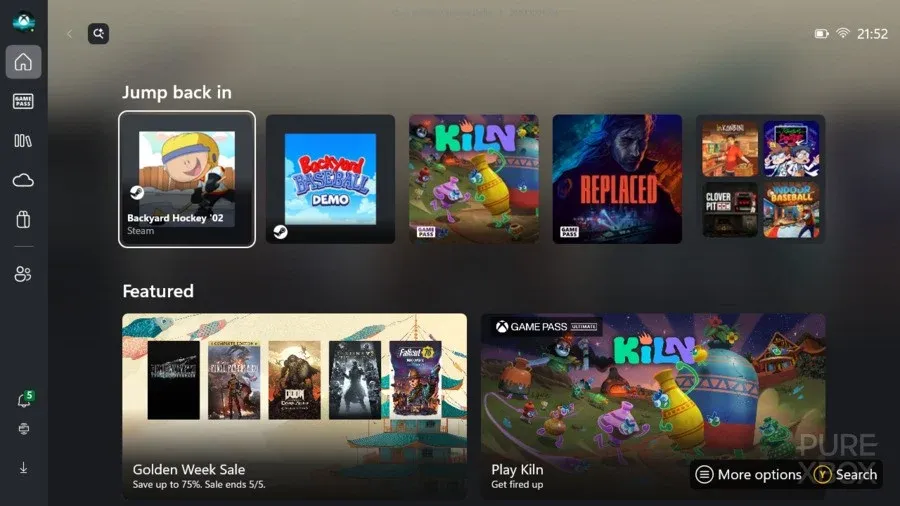
Once installed, players can access the feature directly through the Xbox Game Bar by pressing the Windows key and G on their keyboard. From there, they can launch into the full-screen Xbox interface and transition into a gaming-first environment.
This relatively simple activation process ensures users can easily test the feature without permanently altering their existing PC workflow.
Microsoft’s bigger strategy
Xbox Mode represents more than just a new interface; it's part of Microsoft’s broader strategy to create a unified Xbox experience across all devices.
By bringing Xbox’s console-inspired design philosophy to Windows PCs, Microsoft is further integrating Game Pass, Xbox services, and Windows gaming into one cohesive ecosystem. This could strengthen Xbox’s competitive position against platforms like SteamOS while also improving user retention across Xbox hardware and software services.
It also reflects Microsoft’s larger push toward giving players greater freedom in how they access games, whether on console, PC, handhelds, or cloud.
Emmanuel Umahi