



YouTube Shorts has taken the internet by storm, offering quick, engaging videos that are perfect for on-the-go entertainment. But when you find that one video you would love to keep, a quick cooking tip, a guitar riff, or a life hack, you quickly realize there is no easy “save” button.
Unlike regular YouTube videos, Shorts don’t offer a direct way to download them for offline viewing. That is frustrating when your connection drops or you just want to rewatch a favorite clip.
The goal of this article is to solve that exact pain point.
This article will explore the best extensions and tools available in 2025 to save YouTube Shorts for offline viewing.
Is there a way to download YouTube Shorts to watch later?
Yes, you can easily save YouTube Shorts to your device for viewing later, which is important because YouTube itself doesn't offer a direct download to your local storage. To achieve this, you need a third-party application or website. These tools work by taking the specific Short's URL, extracting the video file, and providing it to you in a standard format like MP4.
List of Extensions/Tools to Save YouTube Shorts for Offline Viewing in 2025
- Tubly Downloader
- SaveFrom
- Foreplay
- ShortsNoob
- 4K Video Downloader
1. Tubly Downloader
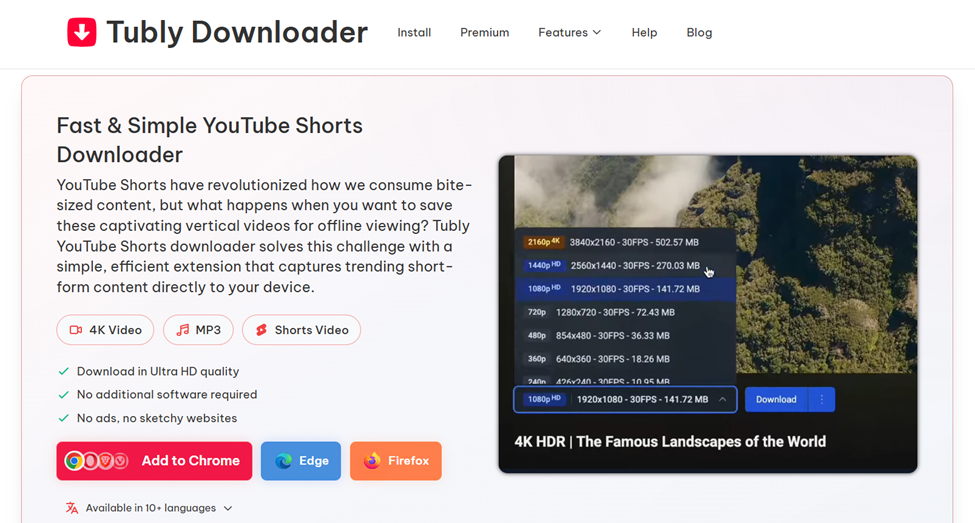
Tubly Downloader is a browser extension designed to make saving YouTube Shorts effortless. It adds a small Download button right under the video, allowing you to save Shorts in MP4 or MP3 format. It is fast, ad-free, and works smoothly across major browsers and devices, giving you a quick and reliable way to keep your favorite clips offline anytime you want.
Key Features
- One-click download button for easy download
- Supports YouTube Shorts while preserving vertical format and resolution
- Allows downloads up to 4K or 8K resolution and MP3 conversion up to 320 kbps
- Enables downloading of private or unlisted videos you have viewing access to
- Works directly as a Chrome extension without extra software
- Save videos as MP4 or convert them to MP3 for audio-only playback
- Compatible with Windows, macOS, Linux, and ChromeOS
- Available for Chrome, Edge, Firefox, Opera, and other Chromium-based browsers
Pros of Tubly Downloader
- No redirects or third-party pop-ups
- Secure local processing helps protect user data
- High-quality MP4 download and fast processing
- Ad-free interface makes the process smooth
- Reliable for both YouTube Shorts and long-form videos
Cons of Tubly Downloader
- Requires manual installation for Chrome users (due to YouTube’s policy on downloaders).
2. SaveFrom
SaveFrom is an online tool that allows users to download YouTube Shorts by simply pasting the video link into its website. It doesn’t require any installation or signup, making it a quick to save a clip fast without using extensions or apps.
Key Features
- Web-based downloader, no software or extension needed
- Supports YouTube Shorts, regular videos, and playlists
- Allows downloads in MP4, WEBM, and other common formats
- Option to choose between multiple resolutions
- Works across browsers and devices, including mobile
Pros of SaveFrom.net
- Very easy to use
- No installation or setup required
Cons of SaveFrom.net
- Displays ads and pop-ups that can interrupt the process
- Video quality options depend on what YouTube provides
3. Foreplay
Foreplay is a Chrome extension that injects a “Save to Foreplay” button right on YouTube Shorts pages. After saving, you can download the Short as an MP4 from your Foreplay dashboard, making it ideal for content creators or anyone who frequently collects Shorts for later use.
Key Features
- Extension adds a save button directly on Shorts pages
- Saves the Short to your Foreplay dashboard (even if the original video is deleted)
- Download YouTube Shorts in MP4
- Quality is preserved as much as YouTube allows
Pros of Foreplay
- Very convenient and easy to use
- Cleaner workflow for users who save multiple Shorts over time
Cons of Foreplay
- Dependent on the extension’s compatibility and YouTube layout updates
- Doesn’t support direct audio extraction (MP3)
4. ShortsNoob
ShortsNoob is a free online service that lets you download YouTube Shorts by simply pasting the link. It supports high-quality video downloads. Its straightforward design makes it ideal for users who want a quick and hassle-free way to save Shorts.
Key Features
- Download Shorts in HD / original quality when available
- Option to download audio only (MP3) from Shorts
- Works across all devices
- No fees, unlimited free use
- “Paste-link → download” simplicity
- Doesn’t store or track your downloads
Pros of ShortsNoob
- Very easy to use
- Completely free
Cons of ShortsNoob
- No batch downloading or playlist support
- Quality depends entirely on what YouTube gives
5. 4K Video Downloader
4K Video Downloader is a desktop application that you can install on your computer. It supports downloading YouTube Shorts, entire playlists, and individual videos in multiple formats. It is designed for users who frequently download large quantities of videos.
Key Features
- Download YouTube Shorts as MP4
- Batch download: multiple Shorts or playlists at once
- Cross-platform: works on Windows, macOS, and Linux
- Supports extracting audio (MP3) from videos
- No watermark or registration needed for basic functionality
Pros of 4K Video Downloader
- Works offline after installation
- Regular updates to stay compatible with YouTube
Cons of 4K Video Downloader
- Must be installed on your device (not browser-embedded)
- Steeper learning curve
Key Takeaways
Saving YouTube Shorts for offline viewing doesn’t have to be complicated. Whether you prefer browser extensions, web tools, or desktop apps, each option offers a different balance between speed, convenience, and control. Extensions, in particular, offer the flexibility of downloading directly from YouTube without switching tabs or using separate software.
If you want a simple, ad-free experience right inside YouTube, Tubly Downloader is the most practical choice. For quick, occasional downloads, SaveFrom.net and ShortsNoob do the job well.
These options let you keep your favorite YouTube Shorts ready, even offline.


