



Capture cards are devices that enable you to stream or capture video from external devices like game consoles, cameras, or a different computer. They improve video quality, reduce system loading, and are essential to creators who need high-definition, low-latency streams.
Streaming and video content creation have come a long way in recent years. Whether it's live game action or high-quality tutorials, viewers expect clear video, smooth motion, and synchronized audio.
Built-in screen recorders or webcams can only go so far before limitations become obvious. This is where hardware-based video capture becomes essential.
Capture cards are playing a bigger role in helping gamers and professionals hit those higher standards. They allow for better performance, more flexibility, and significantly higher visual fidelity, especially when dealing with external sources.
In this article, we’ll look at how capture cards work, what types exist, which models stand out, and why more creators are using them than ever before.
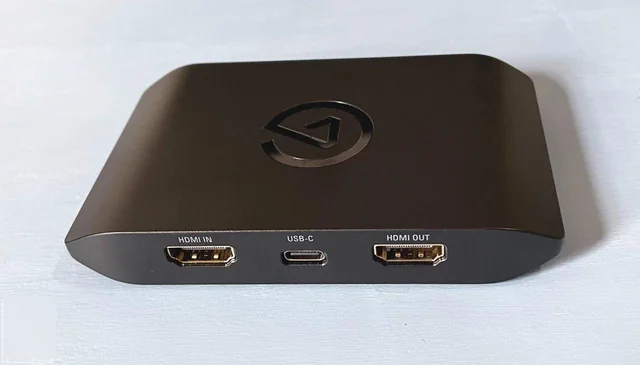
What Is a Capture Card & How Does It Work
A capture card is a device that transfers video and audio from an external source, like a PlayStation, Xbox, camera, or a second computer, into your main PC for recording or streaming. It converts the signal into digital data that software like OBS Studio or XSplit can use to broadcast or store.
The video source is plugged into the capture card, which is typically done through HDMI. The capture card is plugged into your computer via USB or PCIe. As the signal is routed through, the card picks up the data and outputs it to your software while often also routing the original feed out to a monitor or television for live viewing.
It's a really important passthrough, as it permits viewers to play or watch with no lag while the computer streams and encodes in the background.
A few high-end cards even feature their hardware encoders, which relieve the workload from your computer's CPU or GPU. This can be useful with dual-machine configurations or with 4K video productions.
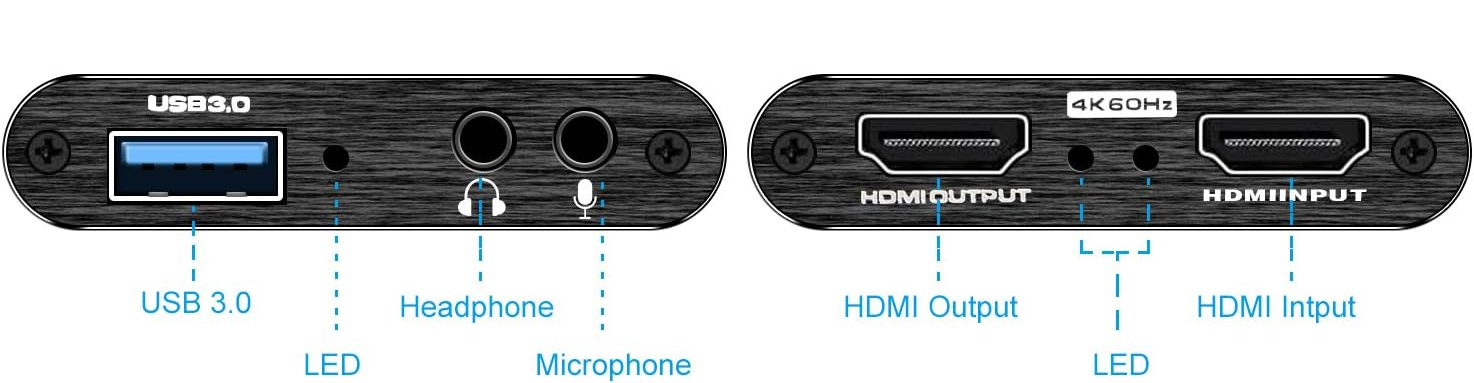
Types of Capture Cards
External capture cards
External capture cards are the most common choice for streamers, general users, and content creators. These are small devices that connect to your PC via USB, making them easy to use and portable. They’re compatible with laptops and desktops alike, and many support 1080p or 4K resolution with passthrough, allowing users to record or stream without interfering with gameplay or camera feeds.
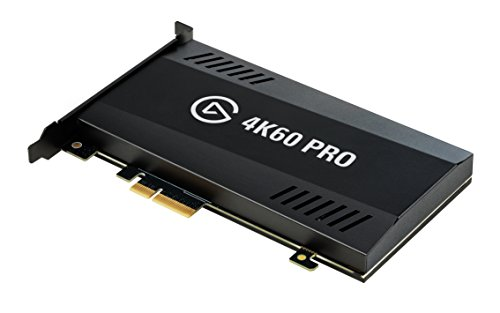
Internal (PCIe) capture cards
Internal capture cards work with desktop PCs and can be fitted into a motherboard's PCIe slot. These provide quick data transfer and reduced lag compared to USB versions, making them a better fit for high-frame-rate recording or competitive gameplay.
Specialised capture cards
Specialised capture cards serve more specific purposes. Some are built to work with DSLR and mirrorless cameras, providing clean HDMI feeds that can be used as webcams or studio inputs. Others support analogue inputs like RCA or S-Video, which are useful for digitising VHS tapes or older camcorder footage. Multi-input models also exist for capturing multiple camera angles or devices simultaneously.
Popular Capture Card Models in 2025
- AVerMedia Live Gamer Ultra S (GC553Pro): Supports true 4K 60 fps, HDR/VRR passthrough and capture, dual HDMI inputs, and reliable long‑session stability.
- AVerMedia Live Gamer Ultra 2.1: External card with HDMI 2.1 support for 4K 144 Hz passthrough while capturing at 60 fps.
- Elgato Game Capture Neo: Best budget pick for 1080p 60 fps plug‑and‑play capture.
- Elgato Game Capture 4K S: Portable USB‑C device capturing 4K 60 HDR, with near‑zero latency passthrough, built‑in analog audio input, and easy compatibility with OBS, Discord, Zoom.
- Elgato Game Capture HD60 Pro: One of the most trusted internal capture cards still in use today, offering 1080p at 60 fps with H.264 hardware encoding.
- AVerMedia Live Gamer HD 2: A budget-friendly internal card that supports 1080p recording at 30 fps with an external button for quick recording.
- Razer Ripsaw HD: Optimised for Xbox, but fully compatible with PlayStation, PCs, and Macs, it supports 4K passthrough at 60 fps, allowing you to play in high resolution while streaming in 1080p.
Benefits of Using a Capture Card
- Superior quality & low latency: External capture cards usually maintain full video quality while reducing lag, which is crucial for live gaming or high‑end production.
- Offload work from your main PC: Dual-PC configurations have become the norm for streamers, with one used to play games while the other records and encodes gameplay. Capture cards offload the CPU/GPU workload and will not overheat long streams.
- High‑resolution support: Modern cards support 1080p60 and now 4K60 HDR/VRR captures, even at affordable prices, ideal for pro‑level content.
- Multi‑source capture: Models like AVerMedia Live Gamer Duo handle two simultaneous HD sources, which is great for multi‑camera livestreams or dual‑console setups.
Factors to Consider When Choosing a Capture Card
- Cost: A capture card can cost anything from $50 upwards to more than $300, depending on the resolution support, encoding platform, and other features. Entry-level users may only need a basic 1080p card, while professionals working with 4K or dual inputs will pay more for advanced functionality.
- Compatibility: Ensure that the card is compatible with your devices, whether a game console, DSLR camera, PC, or Mac. Some cards are platform-optimised (for example, Xbox or Windows), while others are plug-and-play compatible with various platforms.
- Video Quality: Consider the resolution at which content will be captured (e.g., 1080p or 4K) and frame rate (30 or 60 fps). If you want smooth gameplay footage or high-quality live video, aim for at least 1080p at 60 fps. Cards with HDR and VRR support are now common for 4K content.
- Software Support: Most capture cards work with OBS Studio and other popular broadcasting tools, but some come with their software for added features like multi-streaming, overlays, or editing. Check for easy setup and long-term software support.
- Features: Consider extras like hardware encoding (which reduces CPU load), passthrough for real-time play, analog input for older devices, or multi-source capture for dual-camera or console-plus-camera setups. These can improve workflow and performance.
- Connection Type: External cards connect via USB (ideal for portability), while internal cards use PCIe slots and typically offer lower latency. Choose based on whether you need flexibility or speed and stability in a fixed setup.
Conclusion
Capture cards are now an integral part of the workflow for today's content creators, streamers, and professionals who need more from their video production. And with so many options available on the market, anywhere from budget 1080p USB cards to powerful 4K PCIe cards, it's easier than ever to find one that meets your requirements and budget.
The key lies in knowing what to look for. As the popularity of high-quality video increases on platforms like Twitch, YouTube, and Zoom, capture cards will remain a valuable resource in the creator's toolkit. Whether you're brand new to streaming or want to upgrade, spending money on the right capture card can have your content looking tighter, performing better, and attracting a larger following.


