On March 17, Anthropic introduced Claude Dispatch, a new feature that connects your phone to your computer, allowing you to send instructions to Claude remotely and have it execute tasks on your desktop. It’s a clear step toward making AI assistants more embedded in everyday workflows.
The timing is notable. In recent months, OpenClaw has gained traction as a popular open-source alternative for users who want similar “agent” capabilities without being tied to a single company’s ecosystem. It offers flexibility, control, and a level of transparency that proprietary tools often lack. With Dispatch, Anthropic is now offering a comparable idea — but within its own controlled environment and as part of its paid offering.
That raises a more important question than just how the feature works: is Dispatch actually replacing what OpenClaw does, or are these tools solving fundamentally different problems?
/1. Privacy & Security
With Dispatch, Claude runs on your desktop, but the interaction itself is routed through Anthropic’s infrastructure. You send a command from your phone, it passes through Anthropic’s servers, and is then executed locally by Claude on your machine. Anthropic says this process is contained within a sandboxed environment with strict boundaries, but it also makes clear that instructions sent remotely can trigger real actions on your computer.
OpenClaw takes a very different approach. It runs locally, meaning your messages, files, and workflows can stay entirely on your device. You can choose to connect to external APIs, but you also have the option to operate fully offline using local models. That level of control comes with trade-offs. OpenClaw does not include strong default safeguards, and security depends heavily on how it is configured.
That has raised concerns. Security researchers have flagged vulnerabilities, including a zero-click exploit that could allow attackers to take control of an instance. Cisco has described the system as a “security nightmare,” and Chinese authorities have reportedly warned government bodies about its risks.
/2. Cost
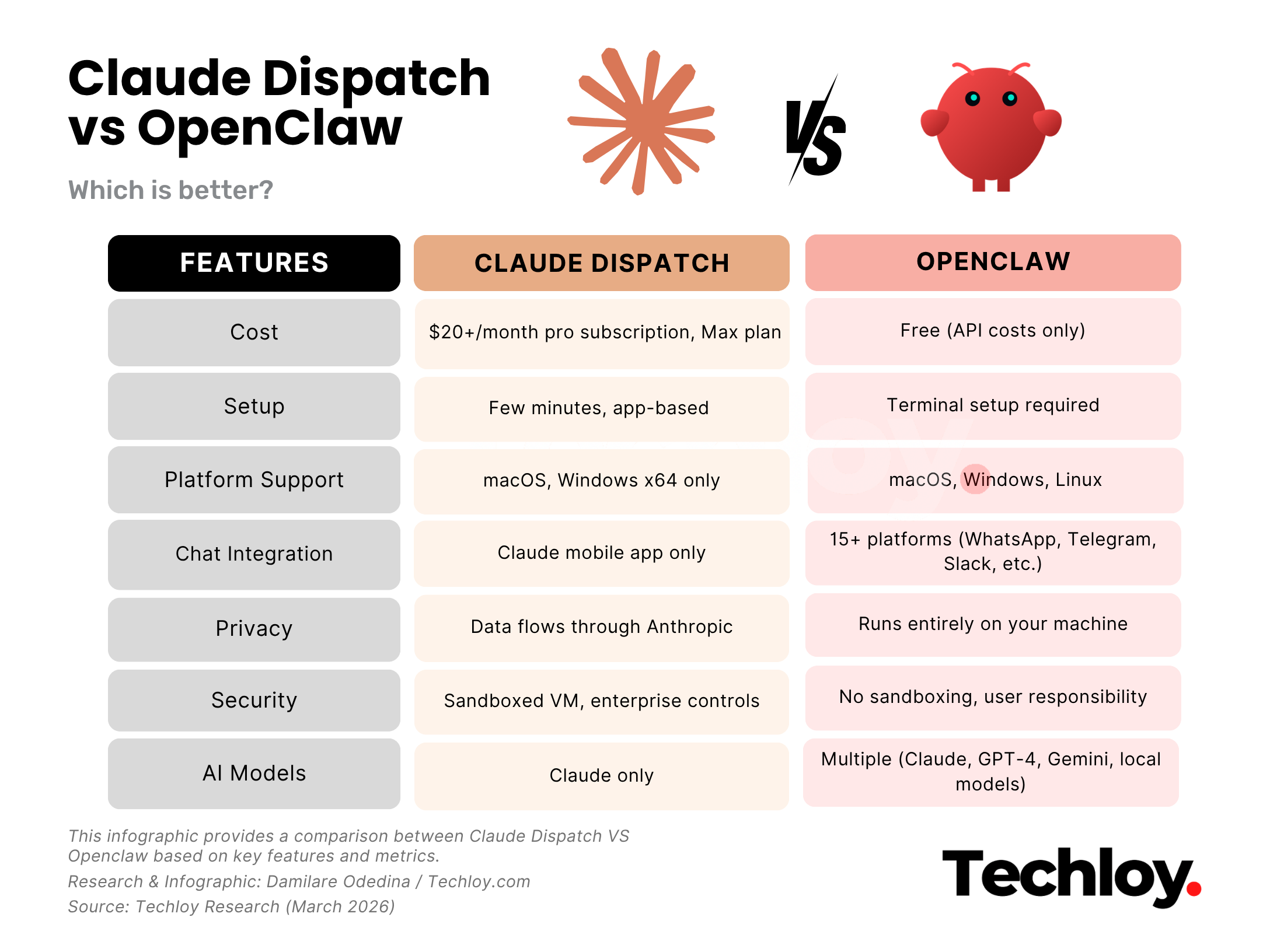
Dispatch is tied to Anthropic’s subscription plans. To access it, you need a Claude Pro plan at $20 per month or a higher-tier Max plan. The cost is fixed, whether you use it occasionally or rely on it heavily throughout the day. For users already paying for Claude, Dispatch effectively comes as an added feature. But for new users, the subscription is a required entry point.
OpenClaw, by contrast, is free and open source under an MIT licence. There is no upfront cost to use it. Instead, expenses depend on how you choose to run it. If you connect it to cloud models like Claude or GPT-4, you pay per API call, meaning costs scale with usage. Light users might spend around $5 per month, while heavier usage can push that closer to $15–$20. There is also the option to run local models using tools like Ollama or LM Studio, which eliminates API costs entirely, aside from electricity and hardware.
/3. Setup
Getting started with Dispatch is relatively straightforward. You install Claude Desktop on your computer, update the Claude mobile app, and enable Dispatch within the Cowork feature. Once file access is turned on and setup is complete, you can begin sending instructions from your phone, with Claude executing tasks directly on your desktop.
OpenClaw is more involved. Installation typically requires running scripts, configuring messaging platforms like WhatsApp or Telegram, and setting up API keys for the AI models you want to use. While the one-line install script simplifies dependencies like Node.js, the process still takes place in a terminal and may involve additional steps such as managing webhooks or authentication.
For developers or technically inclined users, this level of control is manageable and even desirable. For non-technical users, however, it can present a meaningful barrier to entry.
/4. Accessibility
Dispatch works across macOS and Windows (x64) for its desktop component, with mobile support on iOS and Android. However, it requires both your phone and computer to be online at the same time, with Claude Desktop actively running. If your computer goes to sleep or the app closes, Dispatch stops working. Interaction is also limited to Anthropic’s own mobile app, meaning there are no integrations with other messaging platforms or tools you may already use.
OpenClaw takes a more flexible approach. It runs across macOS, Windows, and Linux, but its key advantage is how you interact with it. Instead of relying on a dedicated app, OpenClaw integrates directly into existing messaging platforms such as WhatsApp, Telegram, Discord, Slack, Signal, iMessage, Microsoft Teams, and others. This allows users to access it within tools they already use daily, without changing their workflow.
/5. Features
Dispatch is built around extending Claude’s capabilities across devices. It allows you to send instructions from your phone and have Claude carry them out on your desktop. Depending on the connectors enabled in Cowork, this can include pulling data from spreadsheets, searching Slack or email history, drafting documents, organising local files, or building presentations. The experience is continuous, with conversations synced between mobile and desktop.
OpenClaw takes a much more expansive approach. It supports a wide range of integrations across productivity tools, developer platforms, and even hardware. This includes services like Notion, GitHub, and Gmail, as well as features like browser control, scheduled tasks, webhooks, and system-level access such as screen capture. Users can chain workflows across multiple services, switch between AI models within the same session, and build custom automations tailored to specific tasks. However, these capabilities typically require manual setup and configuration.
/6. Control
Dispatch operates entirely within Anthropic’s ecosystem. It runs Claude on Anthropic’s terms, with a single continuous conversation and limited flexibility in how the system behaves. Users cannot switch between models or significantly customise behaviour beyond what is available within Cowork. The upside is a consistent, predictable experience, with Anthropic managing the underlying complexity.
OpenClaw takes the opposite approach. It functions more as infrastructure than a product, giving users full control over how it is set up and used. You can choose which AI models to run, whether that’s Claude, GPT-4, Gemini, or local models, and configure how they behave through custom prompts and workflows. Access to tools and services can be tightly controlled, and the system itself can be modified, audited, or even run in isolated environments.
/7. Limitations
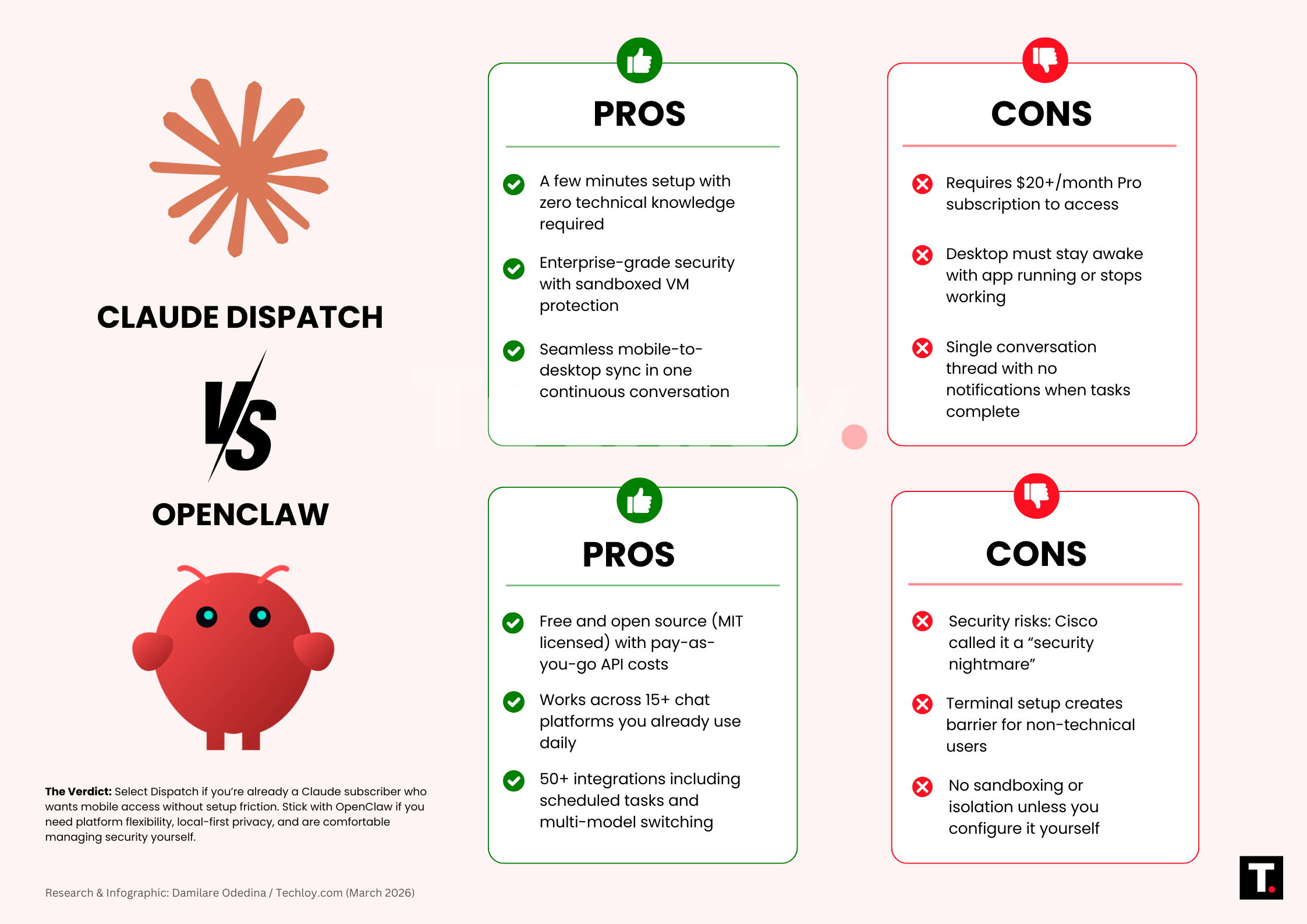
Dispatch is still in a research preview phase, and that shows in its current constraints. There are no notifications when tasks are completed, so users need to check manually. The experience is limited to a single continuous conversation, with no support for multiple threads. It also lacks built-in scheduling, and the system depends on your desktop remaining active with Claude Desktop running. These limitations reflect a product that is still evolving, with features likely to expand over time.
OpenClaw, by contrast, is more mature as an open-source project but comes with a different set of challenges. Some integrations, particularly widely used ones like WhatsApp, Telegram, and Slack, are relatively stable. Others, especially community-contributed features, can be less reliable. While documentation is generally solid, it may not match the consistency of commercial products. When issues arise, users often need to troubleshoot themselves or wait for fixes from the community.
Conclusion
Dispatch isn’t replacing OpenClaw because they serve different users. Dispatch is for people already in Claude’s ecosystem who want mobile access without technical setup. OpenClaw is for people who need control over their data, costs, platform choices, and integrations.
If you want it only for work and you’re already paying for Claude, use Dispatch. If you need it to work your way and you’re comfortable with technical configuration, use OpenClaw.
The choice comes down to convenience versus control. Pick based on what matters more for your workflow.
 Damilare Odedina