There was a time when browsers were just windows to the internet. You typed, you searched, you clicked, and that was it. But in 2025, the browser itself had started thinking back. It remembers what you read, suggests what to do next, and sometimes even acts before you ask.
That’s exactly what AI companies are betting on, with browsers themselves now becoming the product. Two contenders are leading the charge: ChatGPT Atlas from OpenAI and Comet from Perplexity AI. Atlas turns your browser into a doer; it acts, books, and executes tasks for you. Comet turns it into a thinker; it reads, cites, and connects information for deep understanding. Both mark a major change: Companies are now building products like browsers around AI.
So which AI browser leads the way? Let’s break it down.
 Oyinebiladou Omemu
/1. Vision and Purpose
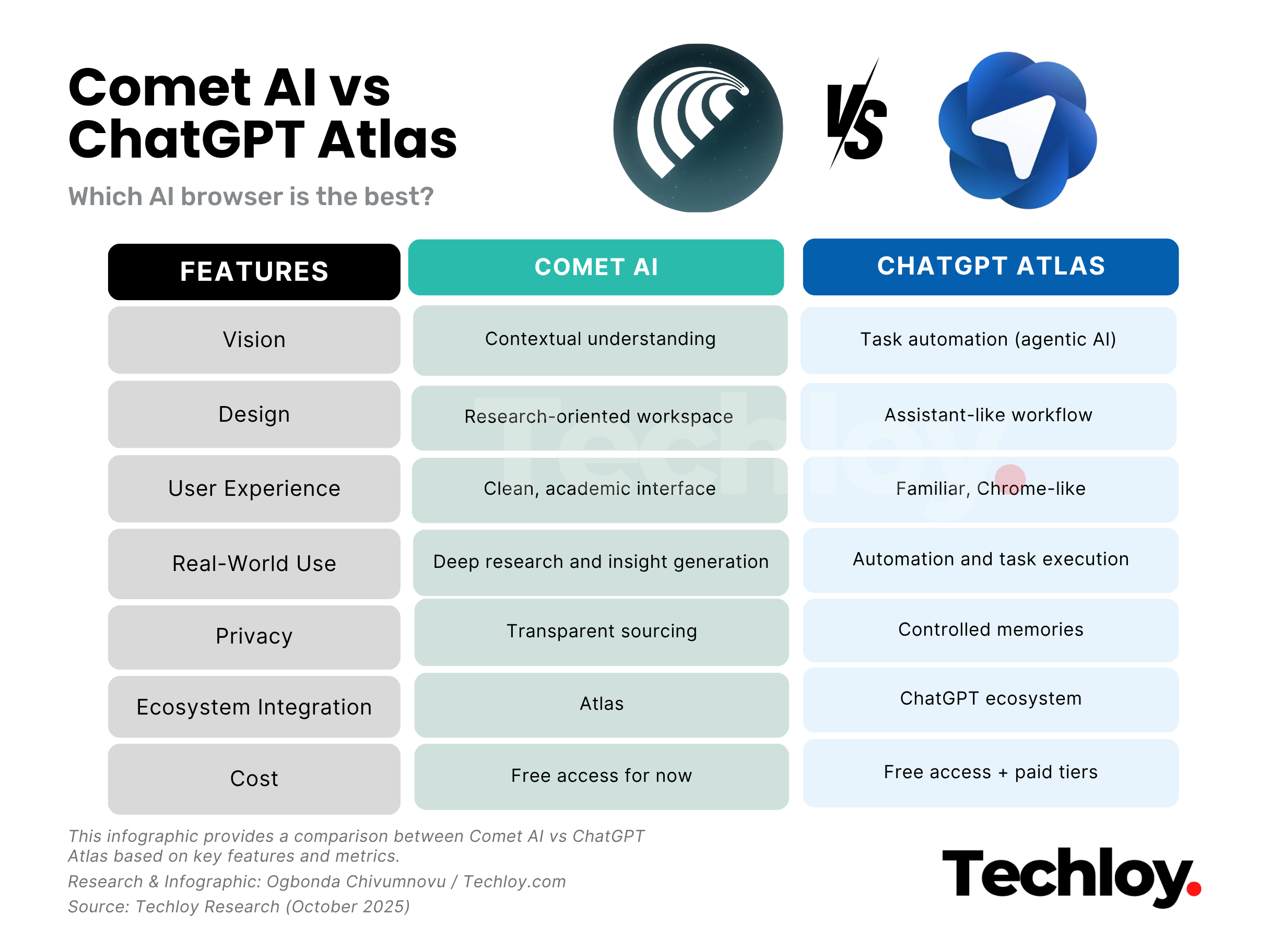
Atlas aims to turn browsing into a workflow assistant. It interprets natural language and executes actions, booking flights, drafting emails, or comparing products. According to OpenAI, it “places ChatGPT at the centre of the experience,” so each click becomes a potential action, not just a page load.
Comet, however, brands itself as a research hub. Perplexity says the goal is to shift “from consumption to curiosity,” letting you highlight any text and ask deeper questions about it. It thrives on contextual reasoning, surfacing citations and nuanced explanations. Perplexity’s CEO, Aravind Srinivas, calls Comet a “knowledge interface,” positioning it as a tool for deep exploration rather than task automation.
/2. Design and Navigation
Atlas sticks close to home, resembling a Chromium browser but adding a persistent ChatGPT sidebar, memory, and agent tools. It’s built for smooth transition; you still get tabs and toolbars, but with added intelligence running quietly in the background.
Comet, on the other hand, tries to reimagine what a browser looks like. It introduces “workspaces” that group tabs, notes, and sources under a single project. Each workspace becomes a mini research lab, keeping context between pages. It’s a more structured way to browse, less about layout familiarity, more about workflow depth.
/3. User Experience
Atlas feels like an upgrade of what you already know. It feels intuitive: type or speak a request, and it handles the rest. The learning curve is almost non-existent because everything feels like Chrome with a brain. It’s perfect for people who want intelligence without a redesign.
Comet, by contrast, feels like a clean-slate experience. Its distraction-free interface prioritises focus and discovery. Instead of juggling tabs, you move between “Goals,” “Sources,” and “Findings.” It’s less about automation and more about immersion, ideal for researchers, writers, and analysts who live in long-form reading.
/4. Real-World Use
Atlas shines when you’re doing something. It includes Agent Mode (for Plus/Pro users) that automates tasks like “Find three conferences, sign me up,” etc.
Comet excels when you’re learning something. It provides verified insights and inline citations while you read, making it perfect for research-heavy tasks. For instance, summarising a set of tabs, offering counterpoints, tracking context across sessions, etc.
/5. Privacy and Data Control
Both browsers claim transparency and user control, but their philosophies differ. Atlas lets you delete or turn off browser memory entirely, ensuring ChatGPT doesn’t retain your browsing history without consent.
Comet also emphasises transparency but faces a unique security concern, prompt injection, according to the rival Brave browser. This occurs when malicious websites insert hidden instructions into a page that trick the AI into revealing or performing something unintended, such as leaking private data or executing harmful commands. While Comet’s design promotes openness and citation clarity, this risk highlights the delicate balance between accessibility and AI safety.
/6. Integration and Ecosystem
Atlas benefits from being inside the ChatGPT ecosystem, meaning it integrates directly with GPT-5, DALL·E, and plug-ins. You can write, code, generate, and browse seamlessly without switching platforms.
Comet connects to Perplexity’s research graph and search API, but its ecosystem is narrower. It’s a standalone product, great for focus, but less connected to creative or coding tools.
/7. Cost and Accessibility
Atlas runs directly inside ChatGPT, no separate install. Basic features are free, but advanced automation and model access scale with your plan (Pro or Team tiers).
Comet recently became free for all users (previously $200/month for Max users), democratising access to AI browsing. Paid tiers may return for premium AI models later, but for now, it’s fully open.
Conclusion
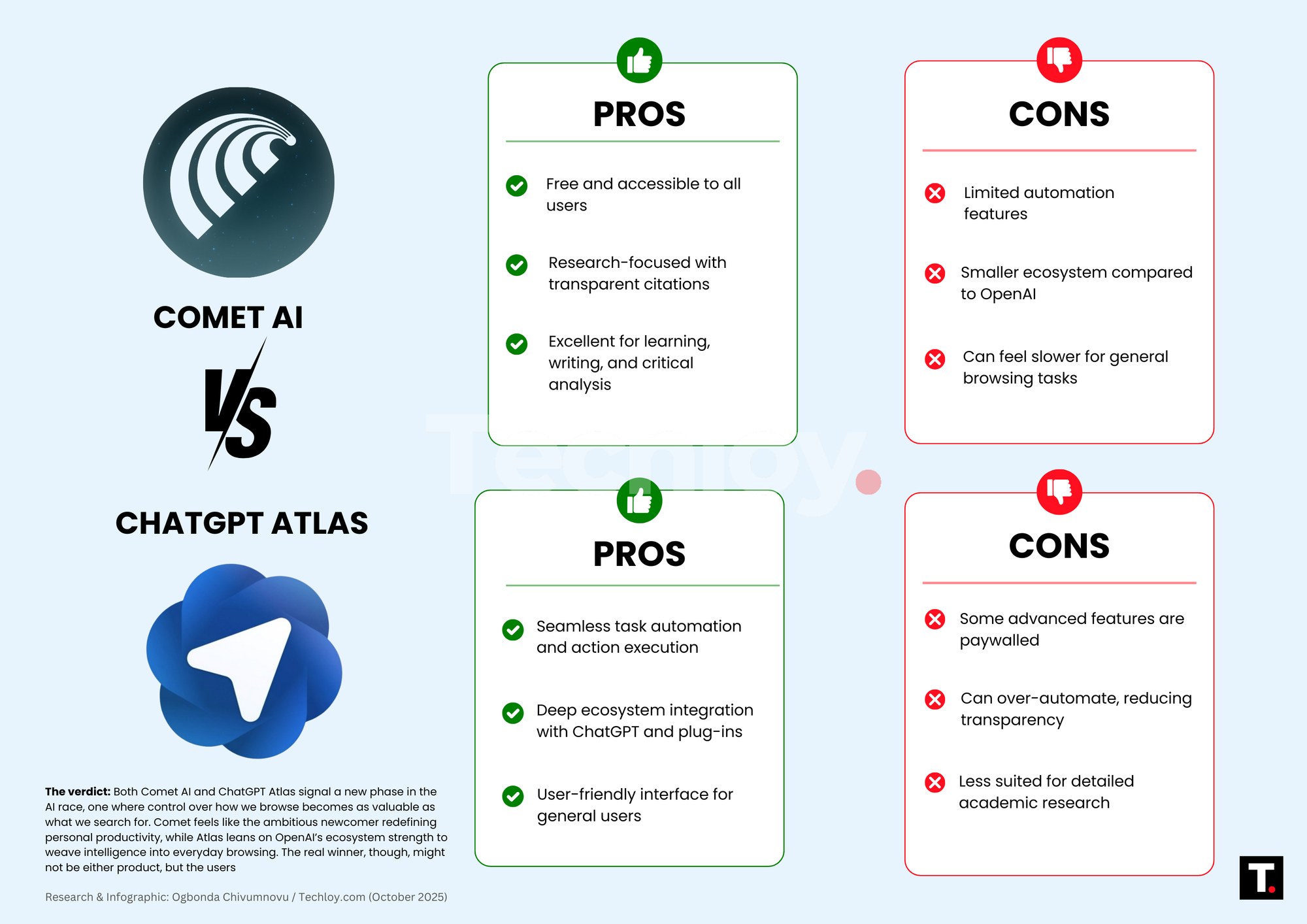
We’re witnessing a shift: AI companies are redrawing the boundaries of the web. The browser is no longer just a tool for surfing information; it’s becoming the platform where AI lives, thinks, and makes decisions on your behalf. In this new landscape, the browser isn’t just how you reach information; it’s starting to determine what information reaches you.
If your day is filled with tasks, bookings, and multitabs, and you lean on AI to do things, ChatGPT Atlas is the pick. If your focus is research, citations, and deep work, and you value clarity and context, Perplexity Comet leads.
Neither is perfect yet. Both carry risks. The true test will be how each evolves, addresses security, and whether users and developers build real workflows around them. The browser war has changed. It’s less about speed or extensions now, and more about intelligence, agency, and trust. Choose your side wisely.
 Louis Eriakha