Discord says more than 90% of users will be placed into an age group automatically using signals from their account. Only some users will be asked to confirm their age, particularly when they try to access age-restricted content, spaces, or settings.
That makes Discord’s new system a little different from the traditional idea of age verification. You are not simply being asked to upload an ID the moment you open the app. Instead, Discord first tries to work out whether your account belongs to a teen (13–17), adult (18+), or unconfirmed age group.
Here’s what you need to know.
 Ogbonda Chivumnovu
When does Discord age verification start?
Discord began rolling out its new age assurance system on September 22, 2026, with the rollout continuing across the week. Not every account will see the changes at the same time.
The company introduced the system after previously facing criticism over plans that would have relied more heavily on facial age estimation and ID checks.
This new approach puts more emphasis on account-level signals first, meaning many people will never be asked to submit additional information.
Do you have to verify your age on Discord?
No, not simply to keep using Discord.
Discord says its age estimation system will automatically place most accounts into an age group. If your account is correctly identified as an adult, there may be nothing else you need to do.
You can continue messaging friends, joining voice calls, and accessing servers that aren't age-restricted without manually confirming your age.
You are more likely to see a verification prompt if Discord cannot confidently determine your age or if you try to access an age-restricted feature while your account is not classified as an adult.
How does Discord determine your age?
This is the part that makes the new system different.
Discord says it uses signals such as how long your account has existed, device information, activity patterns and other account-level behaviour to estimate whether you are a teenager or an adult.
The company says its age-estimation system does not read your messages, listen to your voice calls or analyse the content of your conversations to determine your age.
If there isn't enough information to make a confident determination, your account can remain in an unconfirmed state.
What happens if Discord classifies you as a teen?
If Discord determines that you're 13–17, your account gets additional safety protections.
That can include restrictions around age-restricted servers, channels and sensitive content, while core Discord features remain available.
The important distinction is that being classified as a teen doesn't mean your Discord account suddenly becomes unusable. The system is primarily designed to apply different protections depending on your age group.
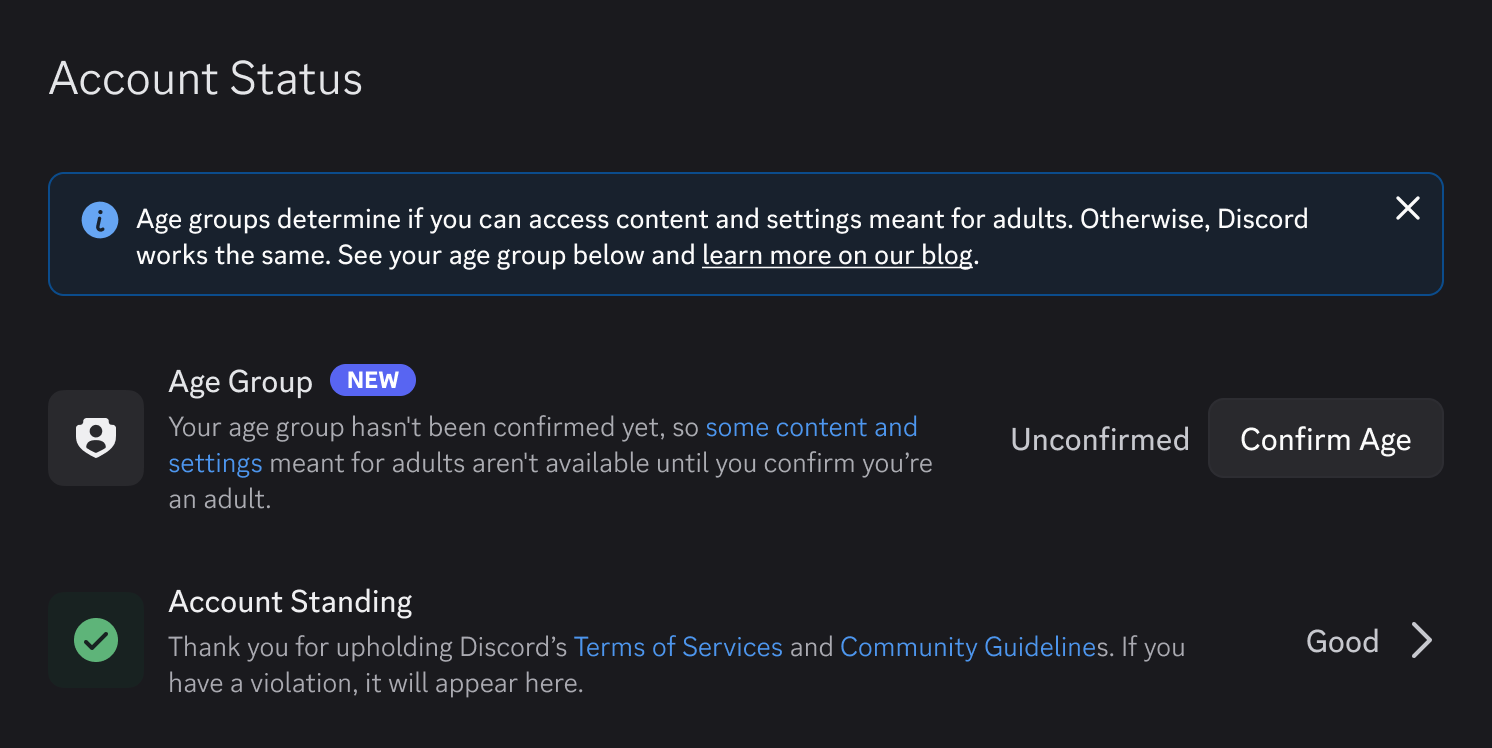
How to check your Discord age verification status
If you're wondering what Discord currently thinks your age group is, you can check it directly inside the app.
- Open Discord.
- Go to User Settings.
- Select Account Status.
- Look for your current age group status.
If Discord needs you to confirm your age, you'll see a Confirm Age option there. You may also receive the option when attempting to access age-restricted content or settings.
Your age group is saved to your account once confirmed and isn't displayed on your public profile or to other members of a server.
How to confirm your age on Discord
If Discord asks you to confirm your age, go to User Settings > Account Status > Confirm Age.
Subscribe for free to continue reading this article
Subscribe SubscribeAlready have an account? Log in