Google rolled out the Fitbit Air, and it seems like the epitome of the trend of screenless devices. In this age, where many people are fatigued with screens or don't like the constant distraction they provide, screenless devices have been the solution that lots of consumer tech companies have come up with. Most screenless devices include things like fitness wristbands, rings, or even writing pads.
The Fitbit Air, which launched earlier this month, raised eyebrows. One reason was that it looked a lot like the Whoop, one of the foremost screenless fitness bands, leading to speculation that Google is taking direct aim at Whoop and trying to compete.
In this article, we put the Fitbit Air head-to-head with the Whoop in various categories to see which comes out on top, or which fits your needs better.
/1. Design
The Fitbit Air uses a small pod that snaps into interchangeable straps, just like the Whoop. But the pod is much smaller than Whoop's. The strap is 18 millimeters wide. Google designed it so you can easily pop out the pod and put it into a new strap. The straps come in three styles: the Performance Loop, a micro-adjustable woven yarn blend (polyester, nylon, elastane) with a Velcro closure; the Active Band, a sweatproof, wetproof silicone band for workouts; and the Elevated Modern Band, a dressier polyurethane option with a solid stainless-steel clasp.
The Whoop has a bulkier design and a tighter grip than the Fitbit Air. The band is 23 millimeters wide. The pod is bigger, but it still feels comfortable overall to wear. Where the Whoop has a huge advantage is the variety of accessories you can attach the pod to. This is mostly down to the fact that the Whoop has been around much longer than the Fitbit Air. It has a ton of accessories, from wristbands to bicep bands to even clothes.
/2. Sensors
Both devices are packed with similar sensors. Both use photoplethysmography (PPG), which detects volumetric changes in blood circulation. But it works differently on each device. The Fitbit Air samples once every two seconds, which is great for sleep and resting, but can sometimes smooth over fast spikes during high-intensity intervals. The Whoop samples 26 times per second, offering highly granular data for athletes.
Both devices also feature a 3-axis accelerometer. However, the Fitbit Air also includes a gyroscope, which the Whoop 5.0 lacks. This helps the Air better track complex movements during swimming or specific strength exercises.
Both monitor SpO2 (via red and infrared sensors) and skin temperature. Fitbit makes these sensors available to all users, whereas Whoop locks them behind its more expensive subscription tiers — Peak or Life.
The standard Whoop 5.0 does not have a medical-grade ECG. You must upgrade to the Whoop MG (Life) band to get clinical-accuracy ECG scans and AFib confirmations. The Fitbit Air does not offer ECG, but you can find this feature on other Fitbit models like the Charge 6.
/3. Pricing
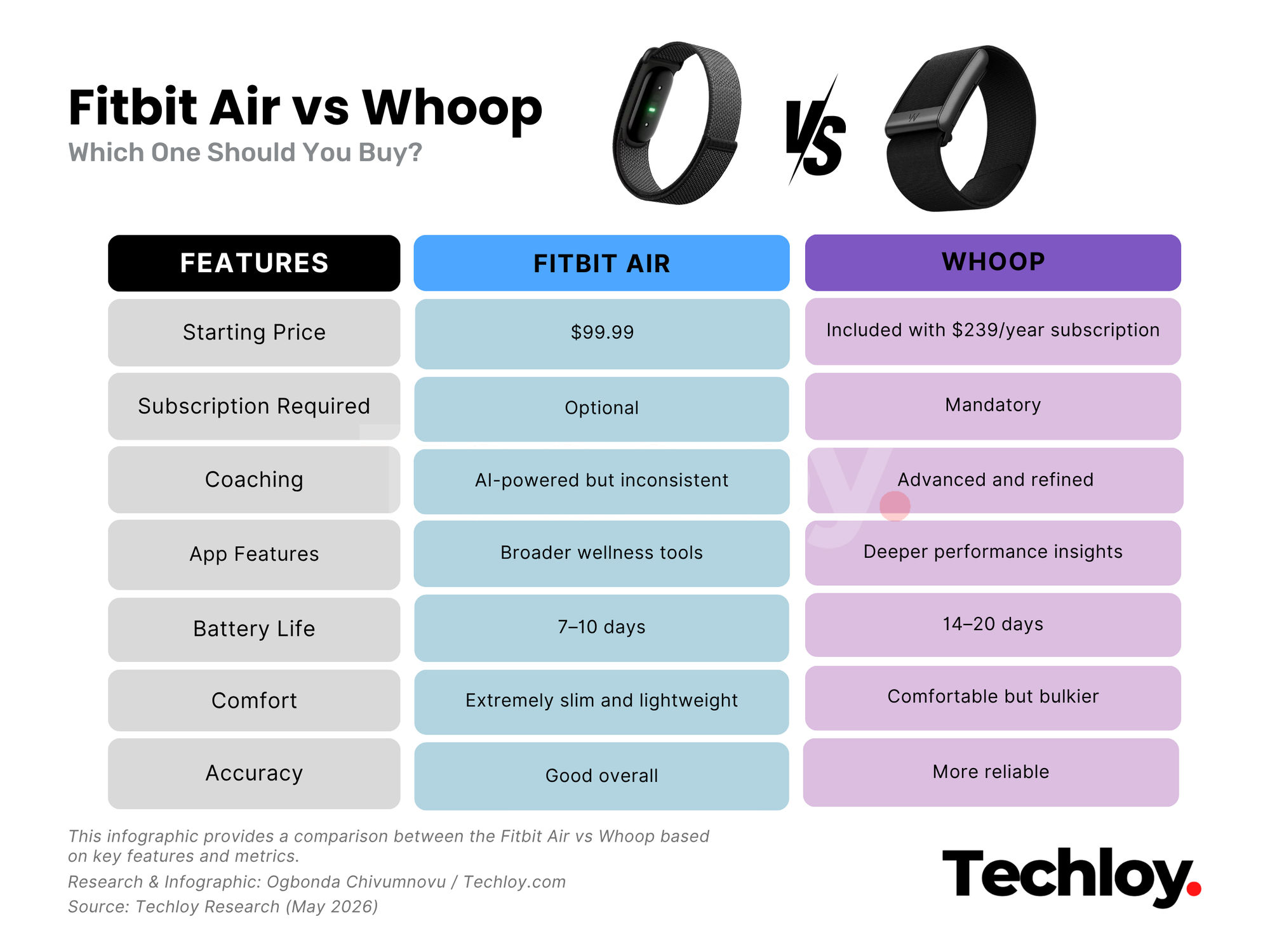
Pricing is where the difference becomes most obvious. The Fitbit Air costs $99 to purchase and does not require a subscription for core functionality.
On the free tier, users still get activity tracking, sleep analysis, resting heart rate, HRV, skin temperature tracking, cardio load estimates, and calorie tracking through the Google Health app.
The optional Google Health Premium subscription costs $99.99 per year after a three-month free trial. This unlocks the Google Health Coach, AI-generated workout plans, deeper health insights, meal analysis via photos, and personalised recommendations.
Whoop works differently. The hardware is tied entirely to a membership model, meaning the device cannot be used without a subscription. The recommended Peak tier costs $239 per year and includes the device.
Over time, costs add up significantly. By year three, a Whoop user would have spent more than $700, compared to roughly $400 for a Fitbit Air user with Premium. Whoop accessories are also more expensive, with straps ranging from $39 to over $100, and charging accessories costing more than Fitbit equivalents.
For serious athletes, the subscription model may feel justified. For casual users, Fitbit’s optional approach is more flexible.
/4. App Features
The Fitbit (Google Health) app is cleaner and easier to navigate. It presents information in a simplified way, making it more approachable for general users. The Whoop app, on the other hand, feels denser, with more advanced data presented upfront.
On the free tier, Google Health allows barcode scanning for food tracking and calorie logging. With Premium, it adds AI-generated workout plans, guided sessions, exercise demonstrations, and built-in timers, allowing users to follow structured workouts.
Whoop takes a different approach, focusing on recovery and performance optimisation. Its strength training analysis is more advanced, as it accounts for muscular strain in workload calculations. It also includes habit tracking, showing how behaviours like alcohol consumption, supplements, hydration, and sleep consistency affect recovery.
Fitbit feels more like a wellness and lifestyle platform for general users. Whoop feels more like a performance-focused tool designed for athletes.
/5. Battery and Charging
The Fitbit Air lasts around seven to ten days, depending on usage, and charges fully in under an hour.
Whoop lasts significantly longer, often exceeding two weeks on a single charge. It also uses a wireless charging pack that allows users to recharge the device while wearing it, meaning it rarely needs to be removed.
/6. Coaching
This is the most important category for screenless fitness devices. Whoop’s coaching system is structured, calm, and data-driven. It connects sleep, recovery, heart rate variability, and strain in a way that is easy to understand and actionable.
It adjusts recommendations intelligently based on recovery and avoids overly simplistic or reactive advice.
Google Health Coach, however, takes a more aggressive AI-driven approach. It can generate workout plans, summarise health trends, analyse meals, and respond conversationally.
The issue is consistency. The system may sometimes misinterpret workouts, provide inaccurate recommendations, repeat incorrect assumptions, or offer overly cautious advice. In some cases, it has even been suggested to avoid training before events despite adequate recovery indicators. It may also reference features that do not exist in the app.
The result is an experience that sometimes feels like an AI assistant trying to be helpful rather than an accurate fitness coach.
Conclusion
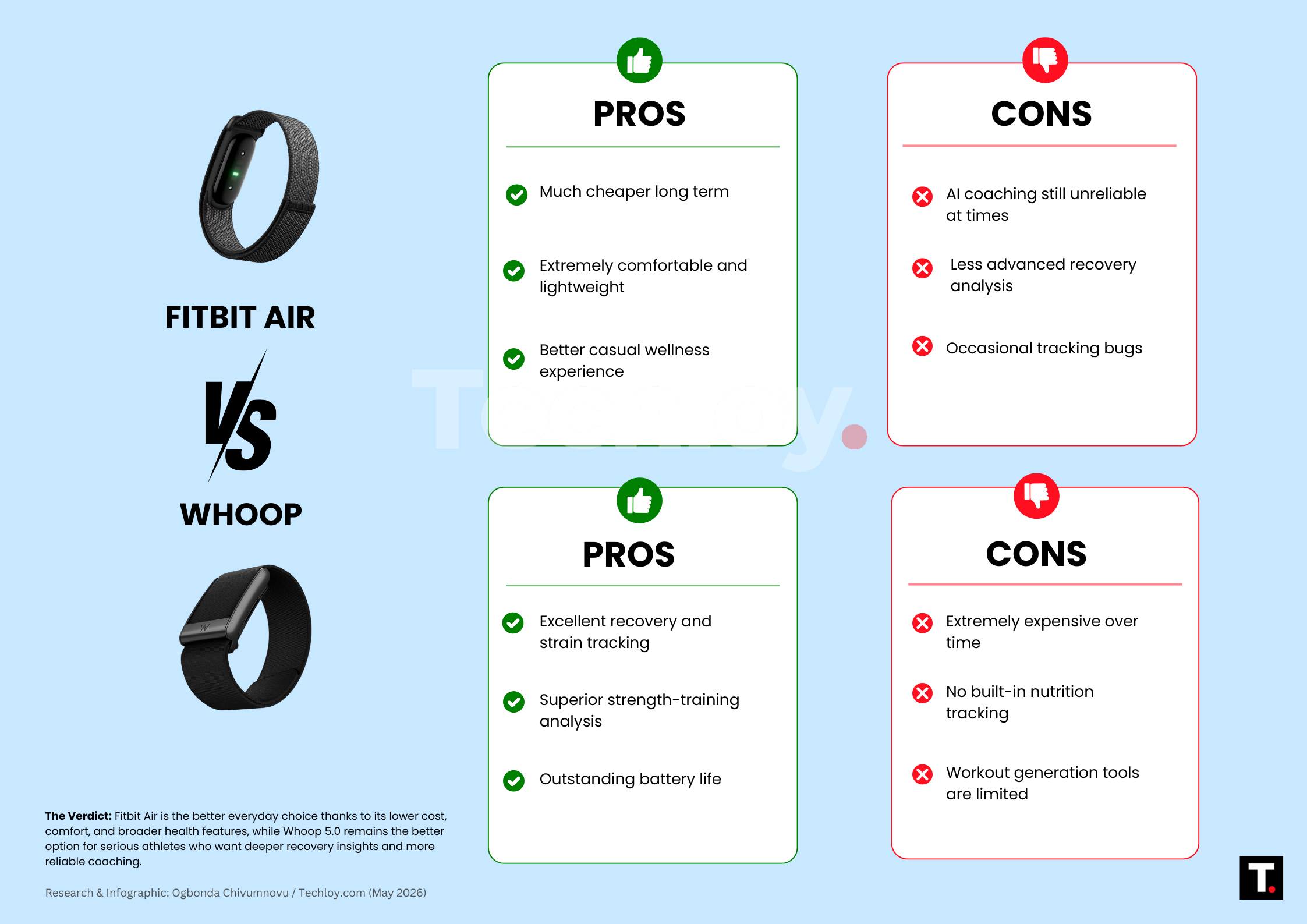
The Fitbit Air is not a full replacement for Whoop. Whoop still leads in recovery insights, coaching quality, sensor accuracy, and performance tracking. It is clearly built for users who train seriously and want deeper physiological feedback.
However, the Fitbit Air wins on accessibility, comfort, price, and overall usability. It delivers enough features for most users at a significantly lower cost, with the flexibility of no mandatory subscription.
Whoop is the better performance tool, while Fitbit Air is the better everyday fitness tracker.
 Ogbonda Chivumnovu