



Watching a video in full screen on X and having it loop and then automatically scroll to the next video is a very frustrating experience.
You may just want to have full control of the videos you see and play to save data or just be in charge, and this feature (or a long overdue bug as some people call it) keeps preventing you from doing that.
The good thing is that you can now disable the video Autoscroll and autoplay on X for a better video-watching experience. The option to disable AutoScroll is now available on the X mobile app for both iOS and Android.
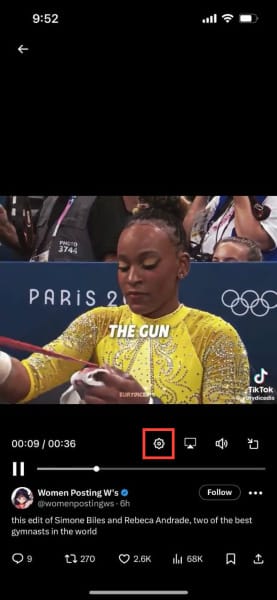
Quick answer: Whether you're on iOS or Android, play any video on X, tap the gear icon on the video, then tap "Auto-advance" to switch it off.
How to disable Video Autoscroll and Autoplay on X
- Play any video on X.
- Tap the gear icon.
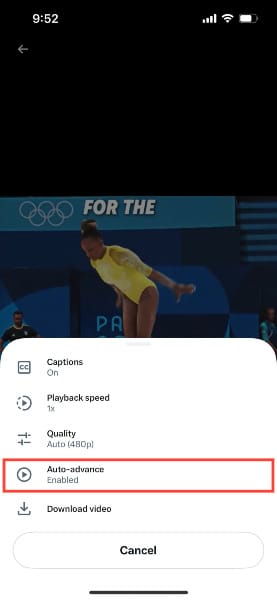
- The Auto-advance is enabled by default. Tap on it to disable it.
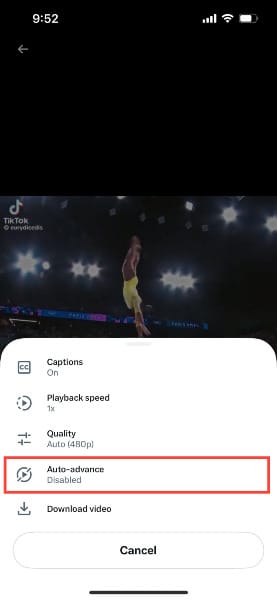
- Once you tap on it, that should disable it.
Conclusion
Disabling the AutoScroll and autoplay features on X can significantly improve your video-watching experience, giving you more control over what you see and play.
This is especially beneficial for managing data usage and avoiding unwanted video loops. Both iOS and Android users can now easily toggle off the AutoScroll feature with the steps above.
Image credit: Oyinebiladou Omeu/techloy.com


