If you use an Xbox controller with your Windows 11 PC, there’s a small but meaningful change coming your way. Microsoft says it's testing a new feature that lets you long-press the Xbox button to open Task View (Windows’ built-in app switcher) instead of only powering off the controller.
A single tap will still launch the Game Bar, and holding the button down will continue to turn the controller off—so nothing you’re used to is going away, you’re just getting more flexibility. Right now, the update is available to testers in the Windows Insider Dev Channel, with a broader rollout expected in the coming months. On the surface, it may feel like a minor tweak, but it fits into a much bigger shift.
Handheld gaming PCs have gone from a curiosity to a serious market in just a few years, with nearly 6 million units shipped between 2022 and 2024 (via VG Chartz). Valve’s Steam Deck leads the pack with over 3.7 million sold, while rivals like the ROG Ally and Lenovo Legion Go are carving out their own niches. Microsoft likely wants a piece of that action with its upcoming “Xbox Ally” device, and controller-first navigation is at the heart of its strategy.
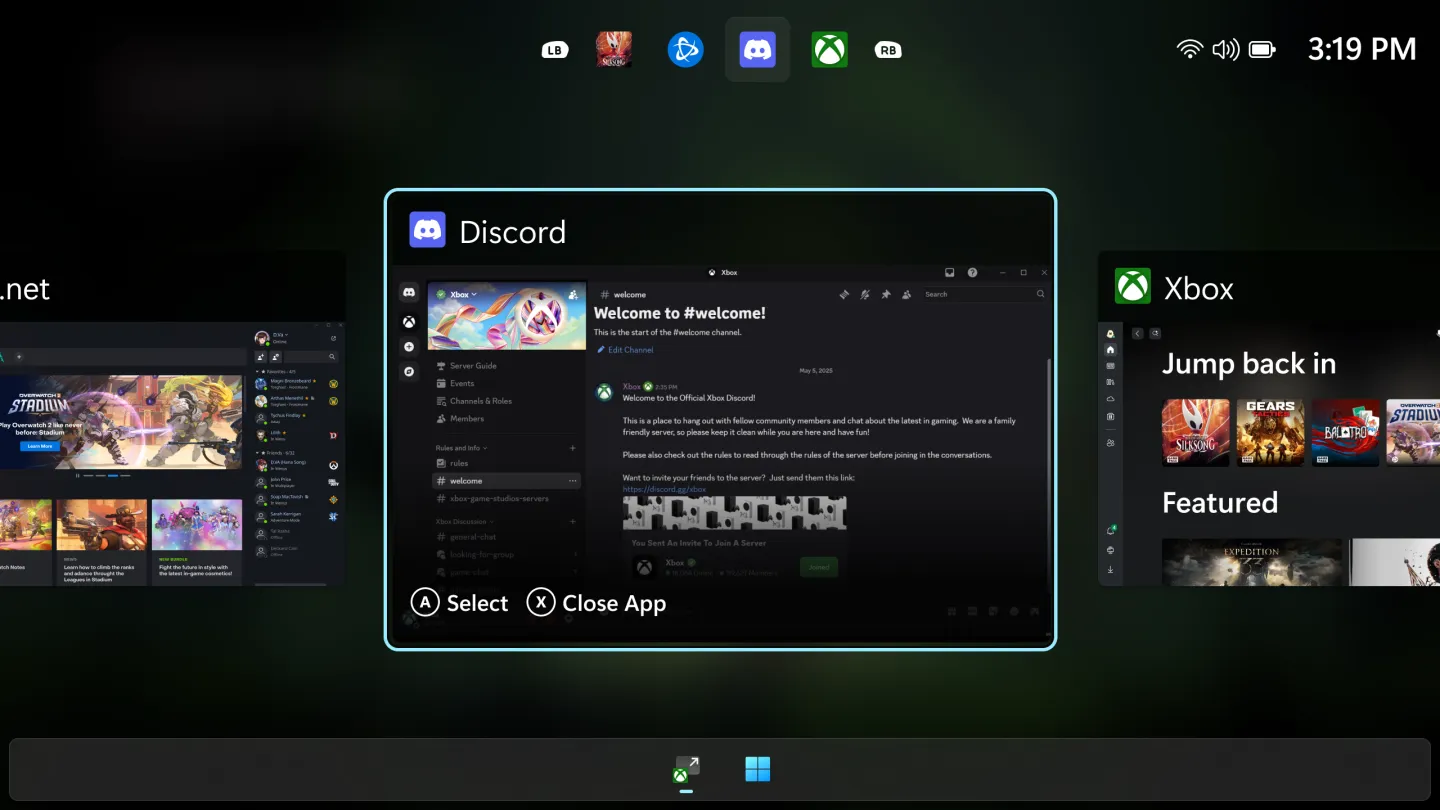
On those Xbox Ally handhelds, Microsoft has already introduced smoother animations and UI tweaks, allowing players to jump between games and apps without needing to reach for a keyboard. Bringing the same Xbox button shortcut to regular Windows PCs is a signal that the company sees controllers not just as gaming accessories, but as primary navigation tools.
And that’s the real story here. Gaming on Windows has always been powerful but not always seamless—switching between games, apps, or overlays can break immersion. By lowering that friction, Microsoft is making Windows feel more console-like and more ready for the handheld era.
 Oluwaseun Bamisile
If you ask me, what Microsoft is doing here is subtle but smart. This kind of UX polishing often doesn’t grab headlines, but it contributes to what I’d call streaming readiness for Windows gaming. The devices are there, the hardware is getting better, and competition is pushing everyone forward. What holds platforms back is often small friction: having to pick up a keyboard, dig into menus, lose immersion. Lowering that friction adds up.
Over the next year, I expect more controller-first features to follow, like quicker switching, smarter overlays, maybe even voice-assisted navigation. Microsoft needs that style of iteration if it wants Windows handhelds to compete not only with Steam Deck, but also with whatever Apple, Sony, or Nintendo might bring in their ecosystems.
 Emmanuel Umahi