



If you’ve ever tried to translate a PDF manually, you already know how frustrating it can be. Copying text line by line, pasting it into a translator, then trying to rebuild the formatting—it’s time-consuming and error-prone.
That’s where AI PDF Translator come in. Instead of breaking your document apart, modern AI-powered solutions can translate entire PDFs while preserving layout, structure, and meaning.
In this guide, you’ll learn why AI is the best way to translate PDF and 3 AI PDF translators to translate PDFs efficiently.
Part 1. Why Should You Translate PDF Using AI?
1. Translate entire documents instantly
Instead of translating text manually, AI tools can process complete PDFs in one go, saving hours of work.
2. Preserve formatting and layout
AI-powered tools maintain original layout, fonts and spacing. This is especially important for professional documents like invoices, contracts, or reports.
3. Improve translation accuracy
AI understands context, not just words. This leads to more natural translations and better handling of technical or industry-specific terms
4. Reduce manual errors
Manual workflows often introduce mistakes. AI minimizes this by automating the process end-to-end.
5. Handle multiple languages efficiently
Modern AI tools support dozens of languages, making them ideal for global communication.
Part 2. 3 Best AI PDF Translators
1. Wondershare PDFelement
PDFelement stands out as a full-stack PDF solution with deeply integrated AI translation capabilities. Unlike lightweight web tools, it operates as a professional document environment where translation is just one component of a broader workflow.
Its AI translator supports multiple languages and handles both native and scanned PDFs using built-in OCR. Users can translate entire documents or selected sections, which is especially useful for legal or technical documents.
- Full PDF translation: Translate entire documents at once, including multi-page PDFs.
- Side-by-side translation view: View the original document on one side and see the translated version on the other.
- Batch translation for multiple PDFs: Process several PDFs at once—perfect for business or academic use.
- AI-powered context understanding: Supporting more accurate terminology
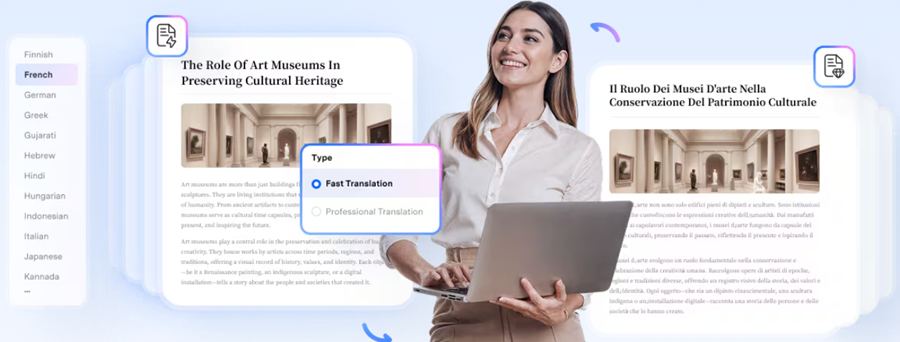
Why choose it:
If you need an enterprise-grade tool that combines editing, annotation, and translation in one ecosystem, PDFelement is a strong candidate. It’s particularly suited for professionals who regularly handle complex PDFs.
2. NoteGPT PDF Translator
NoteGPT takes a different approach by focusing on AI comprehension rather than just literal translation. It leverages large language models to interpret meaning, summarize, and translate PDFs simultaneously.
This makes it particularly effective for dense or conceptual content, such as research papers or reports. Instead of translating word-for-word, NoteGPT can restructure sentences for clarity in the target language. It also supports quick uploads and browser-based usage, making it highly accessible.
Why choose it:
If your priority is understanding rather than strict formatting fidelity, NoteGPT is a strong option. It’s especially valuable for students, analysts, and knowledge workers.
3. HiPDF AI PDF Translator
HiPDF combines AI translation with a broader suite of cloud-based PDF tools. It offers multilingual support, OCR for scanned files, and relatively strong layout retention for an online platform.
Its cloud-first design makes it accessible from any device, and it integrates well with other PDF operations like compression, editing, and conversion. HiPDF’s AI translation engine is optimized for clarity, making outputs readable and natural.
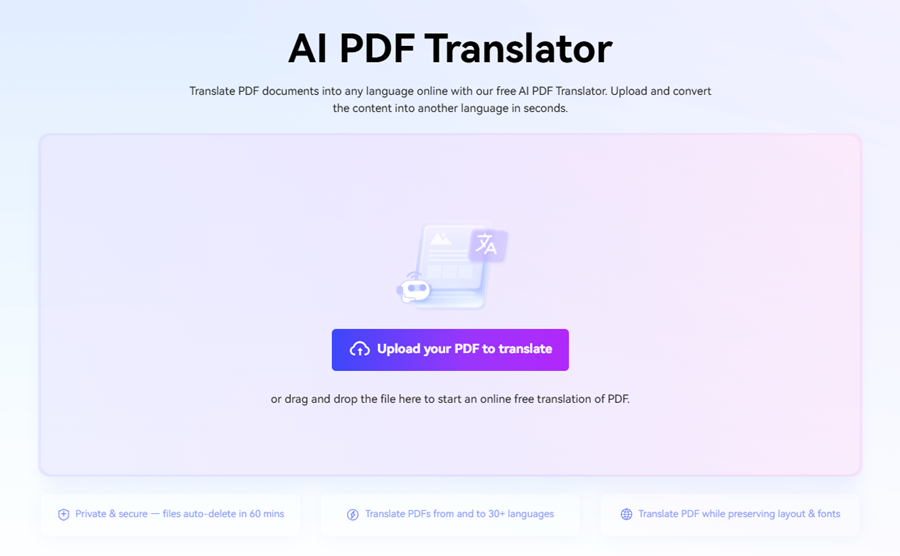
Why choose it:
HiPDF is a balanced option for users who want more capability than basic tools but don’t need full enterprise software.
Part 3. Comparison Chart of AI PDF Translators
|
Tool |
Best
For |
OCR
Support |
Layout
Preservation |
AI
Intelligence Level |
Platform
Type |
|
PDFelement |
Professional workflows |
Yes |
High |
High |
Desktop + Cloud |
|
NoteGPT |
Understanding & summarization |
Limited |
Medium |
Very High |
Web-based |
|
HiPDF |
Balanced cloud solution |
Yes |
Medium–High |
Medium–High |
Web-based |
Part 4. How to Select the Best AI PDF Translator
Choosing the right AI PDF translator depends on your use case rather than just features. Here are the key decision criteria:
1. Document Complexity
If you’re working with structured documents (contracts, technical manuals), prioritize tools like PDFelement that preserve layout integrity.
2. Contextual Understanding
If your documents are conceptual (research, essays), tools like NoteGPT provide better semantic translation rather than literal output.
3. OCR Capability
Ensure the tool supports OCR if you deal with scanned PDFs. Without it, translation accuracy drops significantly.
4. Budget and Accessibility
Web-based tools are often free or freemium, while advanced desktop tools require licensing but offer significantly more control.
Part 5. Conclusion
AI PDF translators have evolved from simple text converters into intelligent document processors. The best tools today combine OCR, contextual AI, and layout preservation to deliver usable, accurate translations.
- PDFelement dominates in professional and enterprise environments.
- NoteGPT excels in understanding and summarization.
- HiPDF provides flexible, accessible solutions for everyday use.
Selecting strategically ensures you don’t just translate documents—you retain their meaning, structure, and value.


