Streaming sticks are the easiest way to upgrade any TV, but with so many choices, it comes down to which one fits your habits best. The Amazon Fire TV Stick 4K and Roku Streaming Stick Plus are top contenders, each offering sharp 4K video, voice remotes, and wide app support.
But beneath the surface, they take very different approaches to how you watch, browse, and interact with your TV. Whether you want tight integration with your smart home or just a no-nonsense way to binge your favorite shows, this guide breaks down the battle across essential categories while helping you decide which is best for your needs.
 Henry Chikwem
Design & Ease of Use
Design might seem secondary for a device that hides behind your TV, but when it comes to setup and everyday navigation, it plays a bigger role than you'd think.
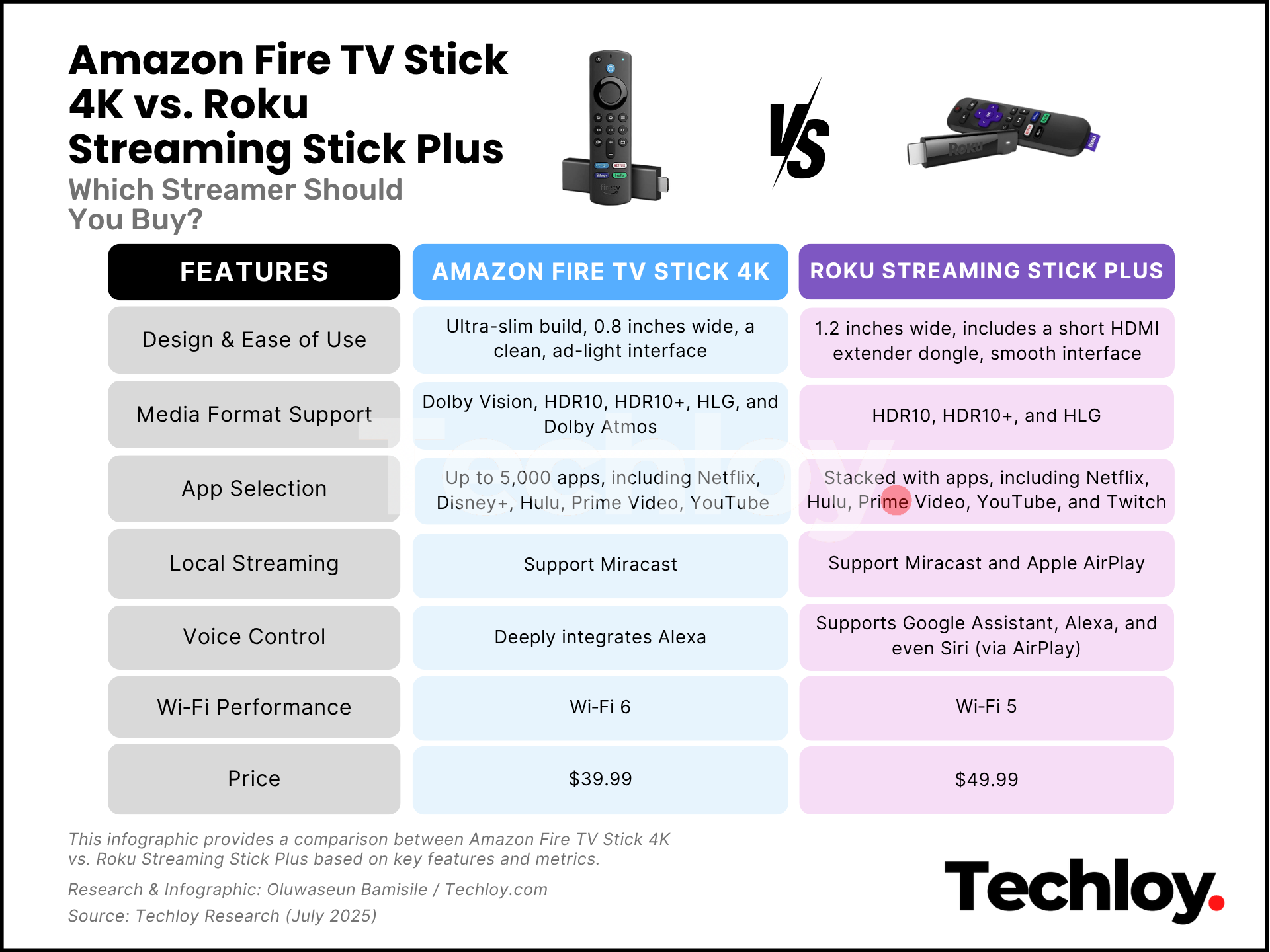
The Roku Streaming Stick Plus stands out for its ultra-slim build, about 0.8 inches wide, making it one of the most compact streamers you can plug into your TV. It tucks neatly into even the tightest HDMI slots without needing extra help.
By comparison, the Fire TV Stick 4K is bulkier at 1.2 inches wide. And while it often requires more space, Amazon includes a short HDMI extender dongle to help it fit comfortably when port space is tight. It’s a thoughtful inclusion, but one that underscores Roku’s more streamlined physical design.
As for user experience, Roku nails it with a clean, ad-light interface that keeps navigation simple and neutral. You get straight to your content without being nudged toward any specific platform.
Fire TV, on the other hand, is fast and smooth but tends to feel like an extension of Amazon’s storefront. Prime Video is front and center, and recommendations are heavily skewed toward Amazon’s own content and services.
Winner: Roku Streaming Stick Plus. Its slimmer design and clean, fuss-free interface make setup and daily use a breeze.
Media Format Support
When it comes to visual fidelity and audio quality, both sticks punch above their weight, but only one pushes further into premium territory. The Fire TV Stick 4K supports Dolby Vision, HDR10, HDR10+, HLG, and Dolby Atmos.
It even includes AV1 decoding for more efficient 4K video compression. These formats provide deeper contrast, more accurate color, and immersive spatial audio when paired with compatible TVs and sound systems.
The Roku Streaming Stick Plus, on the other hand, supports HDR10, HDR10+, and HLG but stops short of Dolby Vision and Atmos support. For users with basic 4K TVs, this might not matter, but if you’ve invested in a home theater setup, Fire TV’s format range gives it an edge.
Winner: Fire TV Stick 4K. More advanced video and audio support make it the top pick for cinephiles and AV enthusiasts.
 Gabriel Ojeh
App Selection
When it comes to streaming options, both platforms deliver the heavy hitters. You’ll find Netflix, Disney+, Hulu, Max, Prime Video, YouTube, and most other mainstream apps on both the Fire TV Stick 4K and the Roku Streaming Stick Plus.
Roku organizes its apps as “channels” and offers more than 5,000 of them, including plenty of niche and regional options. Its standout feature is platform-neutral search. You type in a title, and Roku tells you where to find it, even if it’s not on its own service. That transparency makes finding content faster and cheaper.
Amazon’s Fire TV OS is also stacked with apps, though its interface and search tend to prioritize Amazon-owned content. Still, there’s one area where Fire TV pulls ahead: gaming. Gamers should lean toward the Fire TV Stick 4K because it supports Twitch, a major streaming platform Roku doesn’t offer.
Roku’s app store includes a few unofficial third-party Twitch clients, but they’re notoriously unreliable or flat-out broken, offering a frustrating experience at best.
Winner: Roku Streaming Stick Plus. Roku offers broader, more neutral app support and a more transparent content search, though Fire TV gets extra points for Twitch fans.
Local Streaming
If you’ve got a personal library of movies, photos, or home videos, or you want to beam content from another device to your TV, local streaming support becomes essential.
Both Roku and Fire TV support Miracast (also called WiDi) for screen mirroring from Windows PCs and many non-Pixel Android phones. But neither supports Google Cast, so if you're using a Pixel phone, you’re out of luck unless you spring for the pricier Chromecast with Google TV.
Here's where Roku pulls ahead: it includes support for Apple AirPlay, allowing users to stream content directly from iPhones, iPads, and Macs. That’s a big win for Apple users.
Roku also plays nicer with local streaming apps like Plex and supports DLNA servers more consistently than Fire TV, offering smoother and more intuitive playback from your network.
Fire TV can stream locally, but it's more limited and less polished. It lacks AirPlay support entirely and is often clunkier when using third-party apps or navigating personal libraries.
Winner: Roku Streaming Stick Plus. More flexible with personal content, better support for Apple devices, and easier DLNA streaming make Roku the go-to for local media lovers.
Voice Control
Voice control is where these two devices start to feel like they’re in entirely different categories. The Fire TV Stick 4K deeply integrates Alexa, and not just for streaming.
You can search titles, open apps, control smart home devices, ask for the weather, or order a pizza, all through the remote. If you own an Echo speaker, you can even use Alexa hands-free to control playback.
The Roku Streaming Stick Plus features a voice remote, too, but its commands are more limited. You can search for content, launch apps, and perform basic navigation, but it doesn't have the same deep smart home integration. Roku supports Google Assistant, Alexa, and even Siri (via AirPlay), but only through external devices, unlike Fire TV, which supports these services natively.
Winner: Fire TV Stick 4K. Alexa integration adds serious functionality and convenience, especially for smart home users.
Wi‑Fi Performance
Wi-Fi stability plays a crucial role in ensuring smooth streaming. In this arena, both devices are strong, but one is slightly more future-ready. The Fire TV Stick 4K supports Wi‑Fi 6, the newer wireless standard.
It’s faster, handles congestion better, and is ideal for busy homes with many devices. You’ll need a compatible Wi-Fi 6 router to take advantage, but it's a nice bit of future-proofing.
The Roku Streaming Stick Plus uses 802.11ac dual-band Wi-Fi (Wi‑Fi 5). It’s reliable and quick for 4K content and works well in most home setups, but it lacks the cutting-edge speed and interference resistance of Wi-Fi 6.
Winner: Fire TV Stick 4K. Wi‑Fi 6 gives Fire TV the edge in streaming speed and stability, especially for heavy internet households.
Price
Both streaming sticks are extremely affordable, especially considering how much tech is packed into such tiny hardware. The Roku Streaming Stick Plus typically sells for around $39.99. Its price remains consistent and competitive, especially given how ad-light the experience is and how many features are included out of the box.
Meanwhile, the Fire TV Stick 4K is usually $49.99, with regular discounts around Prime Day and major holidays. The value is high, especially for Alexa and Dolby Vision support, but you’ll get a slightly more ad-heavy interface in exchange.
Winner: Roku Streaming Stick Plus. Slightly cheaper and with fewer upsells, it edges out Fire TV for pure dollar-to-feature value.
Final Verdict
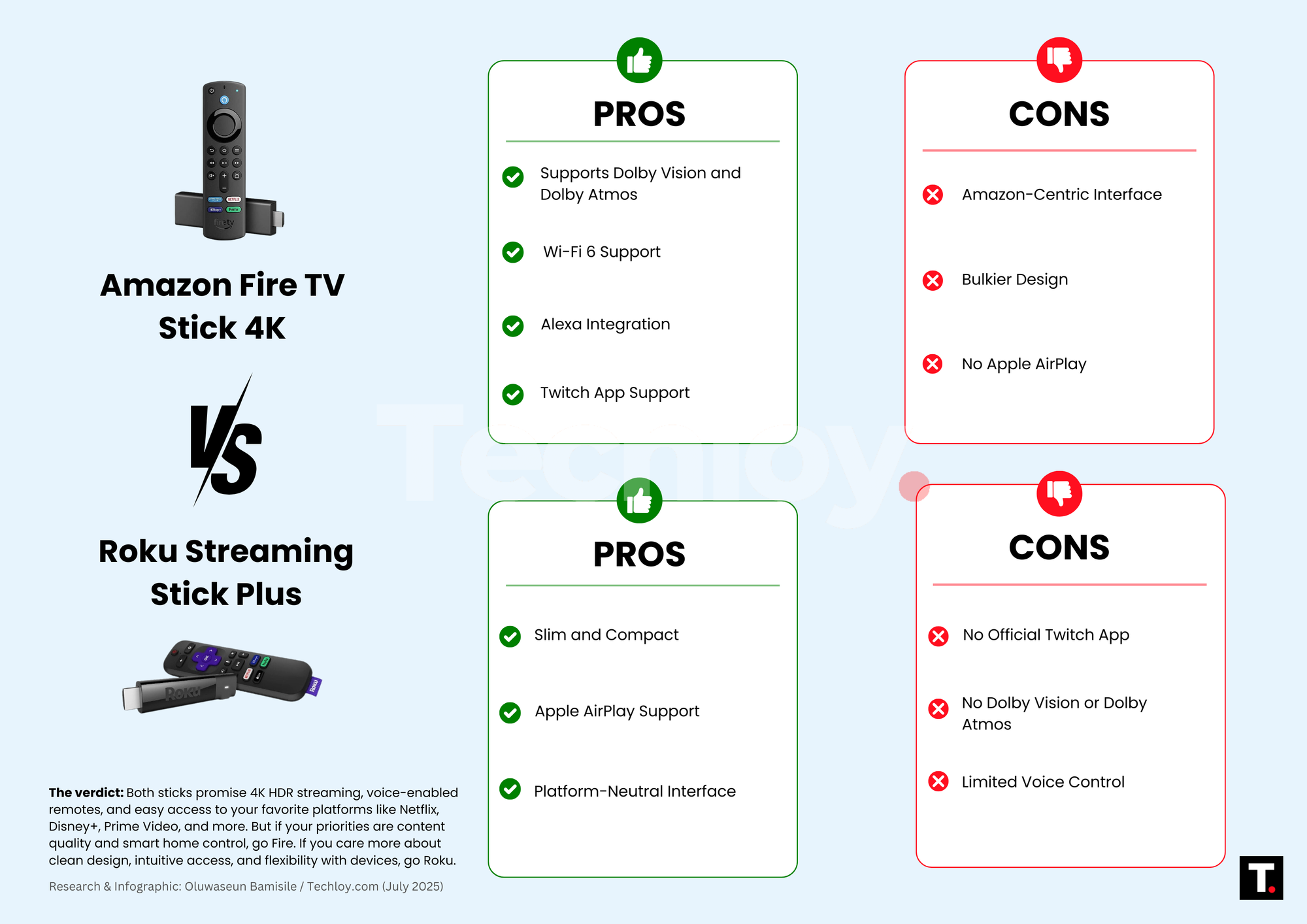
So, which streaming stick wins overall? If you want the most powerful feature set, future-proof Wi-Fi, premium format support (like Dolby Vision and Atmos), and deep Alexa voice integration, the Amazon Fire TV Stick 4K is the stronger technical performer.
But if you prefer simplicity, neutrality, broader local streaming compatibility, and a cleaner interface with fewer distractions, the Roku Streaming Stick Plus offers a smoother and more user-friendly experience, especially for casual streamers or Apple users.
Both are excellent, and you really can’t go wrong. But if your priorities are content quality and smart home control, go Fire. If you care more about clean design, intuitive access, and flexibility with devices, go Roku.
 Techloy