



A novel has just reached the good part, but you have had enough of looking at your phone. Or there is a long article open on your laptop that you keep meaning to finish. A text-to-speech app offers a straightforward alternative: listen to the words instead. Speechify and ElevenReader are familiar options, but CastReader belongs on the shortlist if you want to keep subscription costs down.
You do not need to study every feature before choosing. Start with what you read, whether you use a phone or computer, and which voice you enjoy hearing. Then consider the annual cost. CastReader focuses on everyday listening, with natural voices, adjustable speed, text highlighting, and Kindle support. Its Pro plan costs $4.99 a month or $35.99 a year.
The three options at a glance
Prices are official USD list prices checked on October 9, 2026. Annual plans are billed upfront, and features and allowances differ. CastReader costs $103.01 less annually than Speechify and $63.01 less than ElevenReader.
Natural narration and your own voice with CastReader
A voice that works for a short announcement is not necessarily the one you want for an entire chapter. Long-form listening needs a natural, steady delivery. CastReader lets you choose a voice and adjust the pace, so novels can breathe while familiar articles move faster.
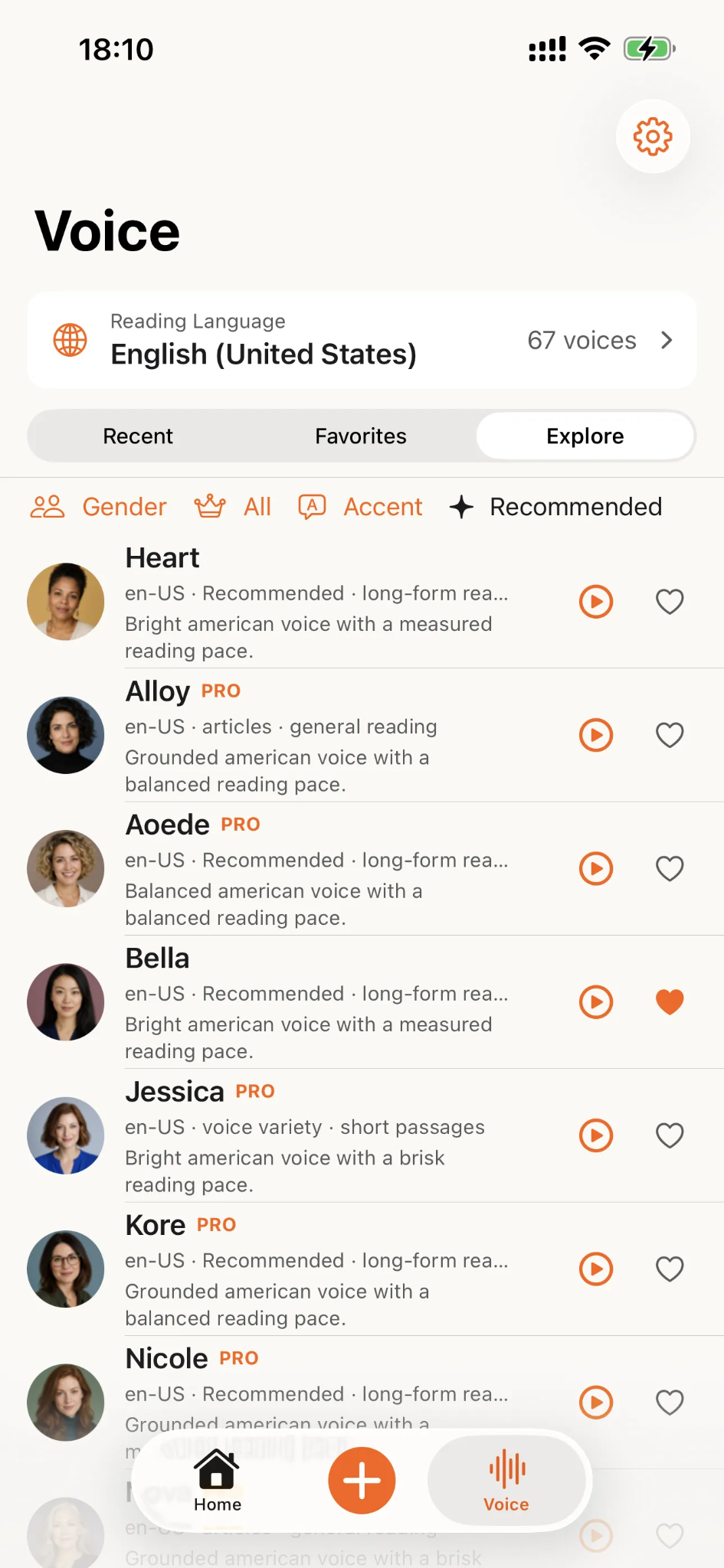
Highlighting makes it easy to combine listening with reading. If you want to check a character's name or confirm a figure in a report, the current text is marked for you. Follow along on screen, look away, and return to the words when you want a closer look.
Another feature worth trying is CastReader's voice cloning. Read a prompted sentence to create a clone of your own voice without recording the entire article or book. The resulting voice retains your familiar tone, offering a personal way to hear a story or essay alongside standard voice choices.
The text stays the same, but the voice is yours. Standard narration keeps listening simple, while cloning adds a more individual experience.
Books on your phone and articles on your computer
For mobile reading, start with the app. If you read blogs, newsletters, and reports on a computer, the browser extension offers a direct route. On supported pages, CastReader extracts article text and reads it aloud, without requiring you to copy the entire piece into another tool.
You can listen to Kindle books in a browser on your computer or through the app on an iPhone, iPad, or Android device. Visit the CastReader apps and browser extensions page to find the download for your device.
This matters if you already have a Kindle library. You can listen to supported books while following the highlighted text. CastReader also supports books on Kobo and Google Play Books, so its usefulness is not limited to one bookstore.
Monthly billing costs $4.99, while the $35.99 annual plan works out to about $3 a month, charged upfront. The free plan includes 20 minutes of standard read-aloud use each day, giving you a chance to try it before subscribing.
Speechify for more than reading aloud
Speechify reads web pages and documents, with voice selection, highlighting, and speed controls. If you already use it for work, moving to essays, reports, or fiction does not require learning another product. It suits readers who handle varied content and want to explore its wider voice features.
Those additional capabilities matter if you regularly use them. However, if your main activity is listening to books and articles, a broader feature set does not automatically justify a higher subscription. It makes sense to pay for the features you actually use.
A useful Speechify alternative does not have to duplicate every feature. It needs to work with your reading material, offer a voice you like, and fit your budget. CastReader combines affordable listening with Kindle support and personal voice cloning.
ElevenReader for a library of books and articles
ElevenReader imports articles, PDFs, and EPUBs and offers voice choices, bookmarks, and a sleep timer. It suits people who prefer preparing their listening material before choosing something from a reader. Bookmarks help revisit passages, while a timer fits naturally into an evening listening routine.
If its voices and reader interface appeal to you, include it in your comparison. Try both fiction and an article: dialogue needs a comfortable rhythm, while explanations need to be easy to follow.
CastReader is worth trying with the same material. Voice preference is subjective, but subscription prices are easier to compare. Kindle support and the option of your own voice may matter more to you than a larger catalog.
CastReader also includes Read & Explain. Read-aloud mode follows the original text, while Explain talks you through the content. Choose narration for the complete wording of a novel or article, and explanation when you first want to understand what a piece is about.
Choose the app you will actually keep using
Speechify is worth considering for its broader voice tools. ElevenReader suits a library-style approach to imported books and articles. If you want affordable listening for novels, long web articles, and Kindle books, CastReader deserves a place near the top of your shortlist.
The best fit is the one you enjoy opening: a chapter on your phone, a report on your computer, a voice you like, and a price you are comfortable paying. CastReader combines those everyday essentials with the possibility of hearing the words in your own voice.


