



With Solana (SOL) cashouts, you can convert Solana crypto into real currencies like the euro, US dollar, or British pound, and have those sent straight to your bank card or bank account. If you hold SOL tokens in your own wallets like Phantom or other Web3 wallets, you will require an easy-to-use off-ramp that allows you to send SOL from your wallet to the platform’s deposit address.
Make the process simple: buy SOL on Paybis with fast on- and off-ramp services in more than 180 countries and 48 US states. Paybis offers high liquidity, reasonable limits, and low fees.
SOL Card vs SEPA Payouts: Fees, Limits and Timing
Looking at a side-by-side chart of payout options allows you to determine the most suitable way to withdraw your SOLs based on your financial requirements and schedule.
|
Criterion |
Card payout |
SEPA payout |
|
Fiat currency |
EUR, USD, GBP and other enabled currencies |
EUR only |
|
Destination |
Eligible Visa/Mastercard |
Personal SEPA bank account |
|
Total cost |
SOL sale quote; check card and FX charges |
SOL sale quote; check bank charges |
|
Minimum/maximum |
SOL-specific checkout limits |
SOL-specific checkout limits |
|
Account checks |
KYC; country and issuer eligibility |
KYC; SEPA residence; own-name IBAN |
|
Timing |
1–3 business days |
Business-day processing; verify bank settlement |
|
Restrictions |
Card must support incoming payouts |
Payouts must be sent to a personal bank account in your own name |
Please keep in mind that while transaction quotes show the actual network and service fees that will be incurred, you should always ask your card issuer or receiving bank for any other intermediary or foreign exchange fees.
How to Sell SOL From An External Wallet
Performing the cash-out from an independent crypto wallet is a walk in the park. To make it really easy for you, we are offering some easy steps below to cash out:
- Select asset and wallet: Select Solana (SOL) as your asset on your platform and note the off-platform wallet you are using.
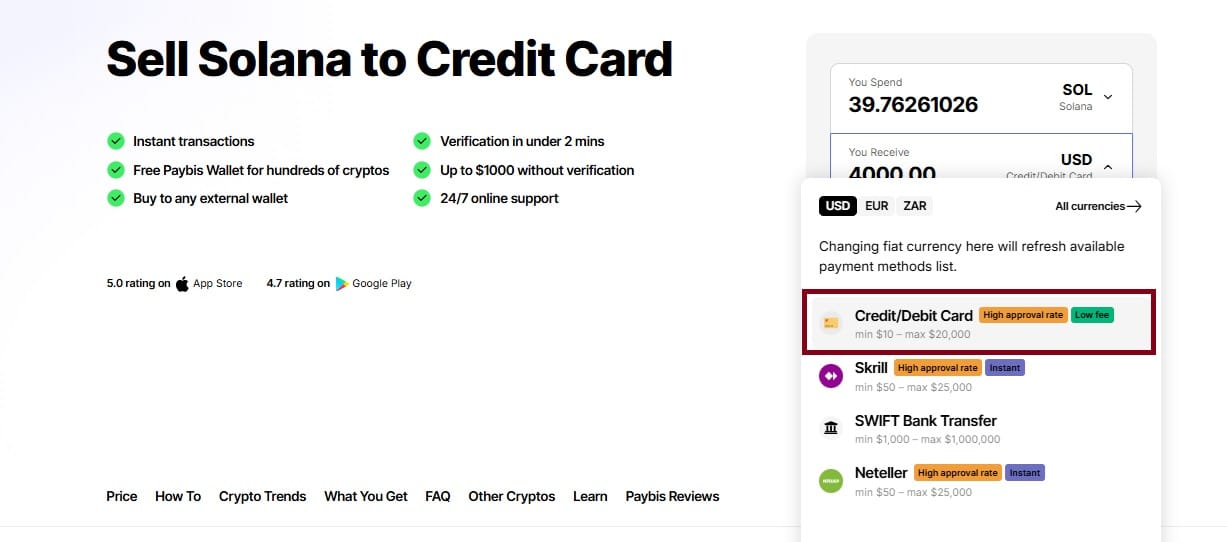
- Choose a payout method: Determine how you want your fiat payout made: to a debit or credit card, or via a SEPA bank transfer.
- Verify the quote: Get the live quote to see the exact conversion rate, service fee, and fiat value of the fiat that you will be receiving.
- Complete verification: Complete the standard identity verification (KYC) process if requested. The platform may allow some lower-level card transactions to automatically be accepted up to thresholds.
- Enter payout details: Add your valid card details or SEPA bank account details using your real bank account name (set upon registration), the same name as on your verified identity document.
- Send native SOL: Send the precise amount of native SOL asked for to the personalized, order-specific deposit address given to you by the platform. Remember to leave a remaining amount of SOL in your wallet to pay for network fees.
- Track transfer and payout: Follow the complete process of the blockchain transaction confirmation through to your fiat settlement.
Why SOL Cash-Outs Fail or Arrive Late
Although the off-ramp process is a lot easier, transactions can sometimes get delayed or fail. Knowing why something happens can help you avoid the usual suspects, like:
- Not enough SOL for network fee: when you try to send the full amount of SOL with no small amount of SOL left for the blockchain fee, the transaction doesn't go through.
- Wrong deposit amounts: Sending a different amount than the exact order of services can delay automation.
- Cards or banks that do not support incoming merchant payouts: Not every payment card will allow incoming merchant payouts, and some provider banks might be blocked from SEPA routing.
- KYC verification incomplete: Withdrawals will be halted until necessary KYC checks are carried out where account names don't match or verification is incomplete.
- Weekend and holiday bank delays: While blockchain confirmations happen 24/7, traditional banking rails like the standard SEPA operate strictly on business days, which can introduce weekend lag times.
- Locked or staked funds: When staked natively, SOL can't be transferred directly from a stake account. You will need to unlock your staked SOL, wait until the SOL is fully available, then withdraw it into your liquid wallet balance before your transfer.
SOL Card and SEPA Cash-Out FAQs
Can I cash out SOL from Phantom?
Yes. You can transfer SOL from your Phantom wallet or any other self-custody Web3 wallet directly to the order deposit address that is provided during checkout.
Can I sell natively staked SOL?
No. SOL that is staked directly with the network is in a stake account and needs to be unstaked and transferred to your available balance before you're able to open up a cash-out order.
Are SOL card payouts instant?
The card payment method is one of the fastest on the site, but your card processing time will vary based on the processing speed of your card provider, ranging from a matter of minutes to 1–3 business days.
What is the minimum SOL cash-out?
The minimum amounts for transactions differ by payment method. For example, most card transactions start at $4, while bank transfers generally have a minimum of $200.
Choose Your SOL Cash-Out Method
When choosing a cash-out option, you will have to make a choice based on the right balance between speed, wanted cash-out currency and destination. Card payout options are flexible, with support for multiple worldwide currencies (USD, EUR, or GBP) and hassle-free deposits directly to a debit or credit card. SEPA offers a regular bank-to-bank route, in particular for EUR currency users with personal IBANs.