



A blue bicycle outside a café could open a weekend travel video. It could also be the bike you’re selling. The first clip gives viewers a feel for a place. In the second, someone might pause to look at the frame, the basket or a scratch in the paint. Those two jobs call for different starting points, even if the opening shot looks much the same.
For an imagined scene, a few written lines can give the tool enough to work with. For a subject people need to recognize, start with a photo. And if a buyer needs to see how something actually works, go straight to footage of the real thing. Here’s how those choices play out with the same bike.
Start with words when the details are yours to invent
Suppose you’re making a short introduction to an illustrated story set on a quiet street. In a tool that supports text and image to video, you can start by typing the scene you have in mind. Try a description like this:
“A blue city bike leans against a café wall on a sunny morning. The edge of the striped awning lifts in the breeze. The camera stays still.”
That gives the shot a subject, a setting and one visible movement. You’ve left the tool to choose the handlebars, the style of the café and the pattern on the pavement. For this story, those are reasonable decisions to hand over.
If you picture a particular place, though, a longer prompt is an awkward way to recreate it. One photo can show where the doorway sits in relation to the bike without making you describe the whole street.
Use a photo when viewers should recognize the subject
Now imagine the café owner has asked for a clip of the blue delivery bike customers see outside every morning. Take a picture from the side that shows its distinctive wicker basket and low frame. Move back far enough to fit both wheels in your intended crop.
If you’re making a vertical video, check that crop on your phone before you upload. A landscape photo can look roomy until a vertical frame takes the front wheel out of the shot.
Once you supply the photo, the words have a different job. With the bike already in the picture, you could write: “Keep the camera still. The awning moves gently in the breeze.” That leaves you with just one change to check.
Think twice before asking the camera to circle the bicycle. The photo shows one side. An orbit asks the tool to invent the other side, including anything hidden behind the basket. If that reverse angle matters, walk around the bike and photograph it. You can cut between the two pictures in an editor.
Check the part that matters before another try
Watch the clip once at normal speed, then pause near the beginning, middle and end. For the delivery bike, compare the basket attachment and the slope of the frame with the original photo. If the awning moves nicely but the basket slowly melts into the handlebars, the clip has lost the feature that made the bike recognizable.
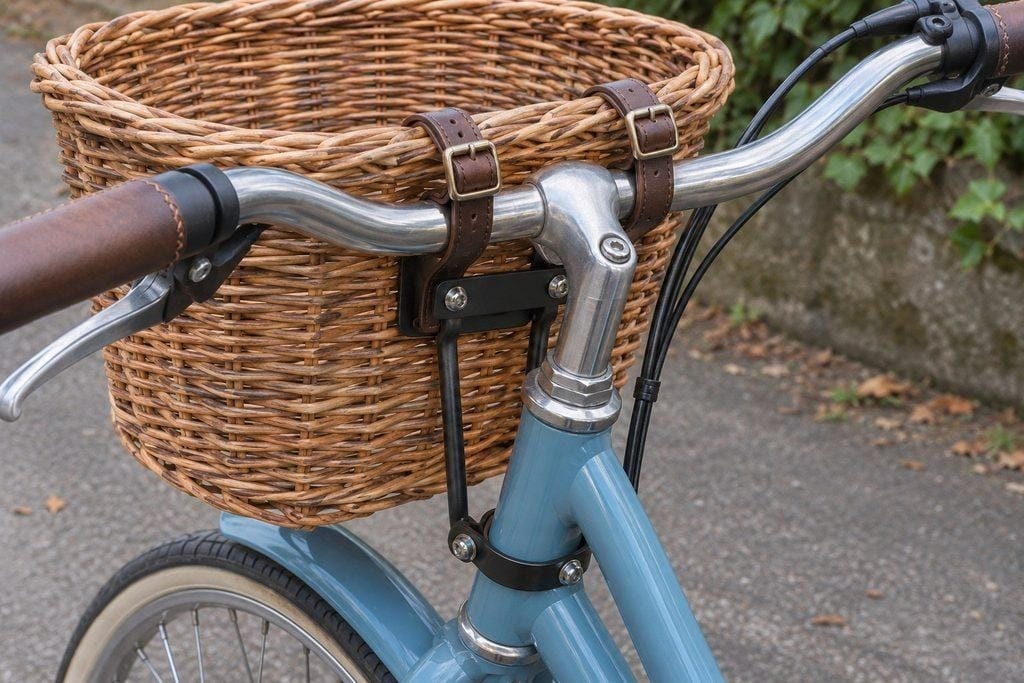
An attachment point gives you a specific detail to compare with the original photo.
Let the problem guide the next attempt. A missing wheel in the very first frame calls for a wider crop. A basket that changes shape halfway through a sweeping camera move calls for a simpler shot.
When all you want is a gradual close-up, you can zoom into the original photo in an ordinary editor. You control where the movement ends, and the photo keeps its details.
Short trials can also save credits. Before doubling the length of a shot you’re still figuring out, check the cost shown for your selected model.
Know when to pick up your phone
If a tool keeps changing the bike after you simplify the motion, save the original image and prompt before trying another service. Give each tool the same photo, prompt and clip length where available. Count all the credits you spent getting one clip you would use, including the attempts you discarded.
For the bike you’re selling, the buyer may care less about a beautiful café scene than whether the basket wobbles on a ride. A generated clip can’t answer that. Take a phone video showing how the basket is attached and what happens when you move it gently. That shot may take less time than the next generation, and it gives the buyer something the model never saw.